Our Short List of 3
All 4 Picks at a Glance
| Product | Specs | Action |
|---|---|---|
 Beelink SER8 Mini PC | Check price on Amazon | |
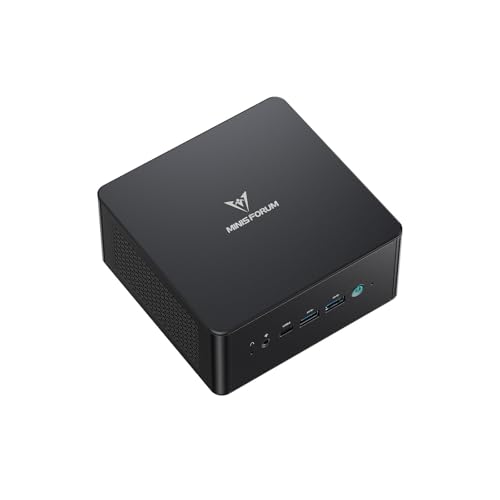 MINISFORUM UM890 Pro Mini PC | Check price on Amazon | |
 MINISFORUM AI X1 Pro Mini PC | Check price on Amazon | |
 GEEKOM A8 Max Mini PC | Check price on Amazon |
Key takeaways
- Five verified Ryzen mini PCs for creative workflows, compared by processor, graphics, memory, storage and display support for photo and video work.
Disclosure: As an Amazon Associate, we earn from qualifying purchases.
Our top pick: Beelink SER9 Pro AI Mini PC. Runner-up: Beelink SER8 Mini PC.
A mini PC for creative work has to do two jobs at once: drive demanding applications such as photo editors, illustration tools and video timelines, and stay small enough to sit on or under a desk without crowding out monitors, tablets and drives. The five models in this guide are all compact desktop computers built around AMD Ryzen processors, each checked against a real Amazon US listing with a verified ASIN. This guide covers only those five verified models, and it keeps the focus on the details that matter for creative workflows: core counts for rendering and exporting, integrated graphics for previews and effects, memory for large layered files, fast storage for project libraries, and display support for multi-monitor setups.
The range here runs from eight-core Ryzen 7 and Ryzen 9 machines with Radeon 780M graphics to newer Ryzen AI 9 models with Radeon 890M graphics and a dedicated neural processing unit for AI-assisted features in creative software. Read the sections below in order if you want the strongest all-round machine first, or use the Quick Picks to match each model to a particular kind of desk and workload.
Quick Picks
- Beelink SER9 Pro AI Mini PC — Best overall: Ryzen AI 9 HX 370 with Radeon 890M graphics, 32GB of LPDDR5X memory and dual M.2 slots.
- Beelink SER8 Mini PC — Best balanced desk setup: Ryzen 7 8745HS with Radeon 780M graphics, 32GB of DDR5 memory and triple-display support.
- MINISFORUM UM890 Pro Mini PC — Best for multi-monitor workstations: Ryzen 9 8945HS, 32GB of DDR5 memory and quad-display support with dual 2.5G LAN.
- MINISFORUM AI X1 Pro Mini PC — Best for heavy projects: Ryzen AI 9 HX 370 with 64GB of DDR5 memory, WiFi 7 and an OCuLink port.
- GEEKOM A8 Max Mini PC — Best for storage-hungry libraries: Ryzen 9 8945HS, 32GB of expandable memory and a 2TB NVMe drive with a UHS-II SD slot.
Beelink SER9 Pro AI Mini PC
OUR TOP PICK
The Beelink SER9 Pro is the strongest all-round creative machine in this guide, and the one to start with when the workload mixes photo editing, illustration and video timelines. As stated on the Amazon listing, it runs an AMD Ryzen AI 9 HX 370 processor with 12 cores and 24 threads, reaching up to 5.1 GHz, built on the Zen 5 architecture. Graphics come from the integrated AMD Radeon 890M, the most capable integrated graphics here, and the listing also states an NPU rated at 50 AI TOPS, with 80 TOPS of total AI performance, the hardware that AI-assisted features in creative applications draw on for tasks such as subject selection and noise reduction.
Memory and storage are sized for serious project work. The listing states 32GB of LPDDR5X RAM and a 1TB PCIe 4.0 x4 SSD, with dual M.2 PCIe 4.0 x4 slots and storage support up to 8TB as listed, so a second drive can be added for a dedicated project or scratch library. Connectivity includes USB4, WiFi 6, Bluetooth 5.2 and a 2.5G LAN port, and the listing also notes a built-in microphone and speakers. The SER9 Pro arrives with Windows 11 Pro as listed, and the listing copy explicitly names Photoshop, Premiere Pro and Illustrator among its uses, placing this model squarely on the intent of this guide.
Specs
– Model: Beelink SER9 Pro AI Mini PC
– Processor: AMD Ryzen AI 9 HX 370, 12 cores / 24 threads, up to 5.1 GHz, Zen 5
– Graphics: AMD Radeon 890M integrated graphics
– AI hardware: NPU 50 AI TOPS, 80 TOPS total AI performance, as stated on the listing
– Memory: 32GB LPDDR5X RAM
– Storage: 1TB PCIe 4.0 x4 SSD, dual M.2 PCIe 4.0 x4 slots, up to 8TB as listed
– Connectivity: USB4, WiFi 6, Bluetooth 5.2, 2.5G LAN
– Operating system: Windows 11 Pro, as listed
Pros
– Strongest processor and integrated graphics combination in this guide
– Dedicated NPU for AI-assisted features in creative applications
– Dual M.2 slots allow a second drive for project or scratch storage
– USB4 and 2.5G LAN cover fast external storage and wired networking
Cons
– LPDDR5X memory is not a socketed, user-swappable format, so plan memory needs around the fitted 32GB
– More capability than a light photo-editing workload requires
Beelink SER8 Mini PC
The Beelink SER8 is the runner-up, and the sensible choice when the workload is steady photo editing, design work and moderate video timelines rather than the heaviest projects. As stated on the listing, it runs an AMD Ryzen 7 8745HS processor with 8 cores and 16 threads, reaching up to 4.9 GHz, with AMD Radeon 780M integrated graphics, a capable step below the 890M in the SER9 Pro that handles previews, filters and timeline playback well.
The configuration checked for this guide carries 32GB of DDR5 RAM at 5600 MHz and a 1TB M.2 2280 PCIe 4.0 SSD, a balanced pairing for layered photo files and active video projects. Display support is a strength: the listing states triple-display support with 4K at 144Hz, over HDMI, DisplayPort and USB4, so a main editing monitor can sit alongside a reference screen and a tools panel. WiFi 6 and Bluetooth 5.2 cover wireless networking and peripherals. One point to hold carefully: SER8 listings exist in several configurations under different ASINs, and the ASIN here belongs to the 32GB DDR5 and 1TB configuration described, so check those figures on the product page before ordering.
Specs
– Model: Beelink SER8 Mini PC
– Processor: AMD Ryzen 7 8745HS, 8 cores / 16 threads, up to 4.9 GHz
– Graphics: AMD Radeon 780M integrated graphics
– Memory: 32GB DDR5 RAM, 5600 MHz as listed
– Storage: 1TB M.2 2280 PCIe 4.0 SSD
– Display support: triple display, 4K at 144Hz as listed, via HDMI, DisplayPort and USB4
– Connectivity: WiFi 6, Bluetooth 5.2
Pros
– Balanced eight-core processor and Radeon 780M graphics for photo and video work
– Triple-display support with a high refresh rate ceiling as listed
– 32GB of DDR5 memory and a 1TB PCIe 4.0 drive in the configuration checked
Cons
– No dedicated NPU of the kind fitted to the Ryzen AI models in this guide
– Several configurations exist under different listings, so the exact configuration needs confirming on the product page
MINISFORUM UM890 Pro Mini PC
The MINISFORUM UM890 Pro is the pick for a workstation built around several monitors and a wired network. As stated on the listing, it runs an AMD Ryzen 9 8945HS processor with 8 cores and 16 threads, reaching up to 5.2 GHz, paired with AMD Radeon 780M integrated graphics. That clock speed is the highest boost figure among the eight-core models here, suiting applications that lean on single-thread speed for interface work while still offering eight cores for exports.
Memory is 32GB of DDR5 at 5600 MHz, and storage is a 1TB PCIe 4.0 SSD. Where the UM890 Pro separates itself is connection density. The listing states quad-display support via HDMI, DisplayPort 1.4 and USB-C, with two USB4 ports in the listing family, plus dual 2.5G LAN ports. Four screens make room for a timeline, a preview, a reference display and a tools panel without stacking windows, and dual wired networking suits desks that move footage to and from network storage. The listing gives an item weight of 3.56 pounds and package dimensions of 7.2 x 6.3 x 5 inches. Note that a barebone UM890 Pro listing also exists, sold without memory, storage or an operating system; the ASIN here is the ready-to-run 32GB and 1TB configuration.
Specs
– Model: MINISFORUM UM890 Pro Mini PC
– Processor: AMD Ryzen 9 8945HS, 8 cores / 16 threads, up to 5.2 GHz
– Graphics: AMD Radeon 780M integrated graphics
– Memory: 32GB DDR5 5600 MHz RAM
– Storage: 1TB PCIe 4.0 SSD
– Display support: quad display via HDMI, DisplayPort 1.4 and USB-C, 2x USB4 as listed
– Networking: dual 2.5G LAN
– Weight: 3.56 pounds, as stated on the listing
Pros
– Quad-display support for a spread-out editing workstation
– Dual 2.5G LAN ports for fast movement of large project files
– Highest boost clock among the eight-core models in this guide
Cons
– Radeon 780M graphics rather than the newer 890M in the Ryzen AI models
– A barebone version exists under a separate listing, so confirm the ready-to-run configuration before ordering
MINISFORUM AI X1 Pro Mini PC
The MINISFORUM AI X1 Pro is the heavy-project pick in this guide, built for creators whose files strain a 32GB machine. As stated on the listing, it runs the same AMD Ryzen AI 9 HX 370 processor as the SER9 Pro, with 12 cores and 24 threads reaching up to 5.1 GHz, and the same AMD Radeon 890M integrated graphics. That pairing gives it the strongest preview and effects performance available from integrated graphics here, together with the AI acceleration hardware of the Ryzen AI platform.
What sets the AI X1 Pro apart is memory: the listing states 64GB of DDR5 RAM, double the memory of the other models here, alongside a 1TB PCIe 4.0 SSD. Large layered documents, effect-heavy timelines, and several applications open at once all draw on memory first, and 64GB leaves headroom for that way of working. Display support reaches 8K quad display as listed, and networking is the most current in this guide, with dual 2.5G LAN, WiFi 7 and Bluetooth 5.4. The listing also includes an OCuLink port, the connection used for an external graphics dock, an upgrade path the others do not state. The item model number on the listing, AI X1 Pro-370-64GB/1TB, is a useful cross-check for the configuration described here.
Specs
– Model: MINISFORUM AI X1 Pro Mini PC, item model number AI X1 Pro-370-64GB/1TB
– Processor: AMD Ryzen AI 9 HX 370, 12 cores / 24 threads, up to 5.1 GHz
– Graphics: AMD Radeon 890M integrated graphics
– Memory: 64GB DDR5 RAM
– Storage: 1TB PCIe 4.0 SSD
– Display support: 8K quad display, as listed
– Connectivity: dual 2.5G LAN, WiFi 7, Bluetooth 5.4, OCuLink port
Pros
– 64GB of memory, double the other models in this guide, for heavy layered projects
– Ryzen AI 9 processor with Radeon 890M graphics and AI acceleration hardware
– OCuLink port provides an external graphics upgrade path
– WiFi 7 and dual 2.5G LAN are the most current networking set in this guide
Cons
– Internal storage starts at 1TB despite the larger memory, so big libraries still need external or network drives
– More machine than a single-application, light-editing desk will use
GEEKOM A8 Max Mini PC
The GEEKOM A8 Max closes the guide with the largest internal drive in the group, making it the natural pick for creators who keep a deep local library of footage, photographs and assets. As stated on the listing, it runs an AMD Ryzen 9 8945HS processor with 8 cores and 16 threads, reaching up to 5.2 GHz, with AMD Radeon 780M integrated graphics. The listing copy explicitly cites 4K video editing in Premiere Pro and DaVinci Resolve among its uses, directly on the intent of this guide.
Storage is the headline: the listing states a 2TB M.2 2280 NVMe Gen4 x4 SSD, described as expandable, roughly double the active project space of the 1TB models above. Memory is 32GB of DDR5, described on the listing as expandable dual-channel DDR5 5600 SODIMM, so memory can grow with the workload. Connectivity includes dual 2.5G LAN and USB4, display support reaches 8K as listed, and the machine adds a UHS-II SD slot, practical for photographers and videographers ingesting card media at the desk. A VESA mount is supported, Windows 11 Pro comes pre-installed as listed, and the item weight is 3.63 pounds. Keep the name precise: the plain GEEKOM A8, without Max, is a different listing, and the specifications here belong to the A8 Max only.
Specs
– Model: GEEKOM A8 Max Mini PC
– Processor: AMD Ryzen 9 8945HS, 8 cores / 16 threads, up to 5.2 GHz
– Graphics: AMD Radeon 780M integrated graphics
– Memory: 32GB DDR5 RAM, expandable dual-channel DDR5 5600 SODIMM as listed
– Storage: 2TB M.2 2280 NVMe Gen4 x4 SSD, expandable as listed
– Display support: 8K support, as listed
– Connectivity: dual 2.5G LAN, USB4, UHS-II SD slot, VESA support
– Operating system: Windows 11 Pro pre-installed, as listed
– Weight: 3.63 pounds, as stated on the listing
Pros
– Largest internal drive in this guide at 2TB, for deep local project libraries
– Expandable memory and storage extend the useful life of the machine
– UHS-II SD slot suits fast card ingest at the desk
– Dual 2.5G LAN and USB4 cover wired networking and fast external drives
Cons
– Radeon 780M graphics rather than the 890M in the Ryzen AI models
– The similarly named GEEKOM A8 is a separate listing, so the Max name needs checking on the product page
How to Choose
Start with the processor and graphics pairing, because those two parts decide how a timeline scrubs, how filters preview and how exports run. The Ryzen AI 9 HX 370 models here, the SER9 Pro and the AI X1 Pro, combine 12 cores with Radeon 890M graphics and dedicated AI hardware, the strongest choices for mixed photo and video work with AI-assisted features. The eight-core models with Radeon 780M graphics remain capable creative machines, particularly for photo-led workflows and moderate timelines.
Next, size the memory to the files. A 32GB configuration covers most photo editing and video work comfortably. Step up to the AI X1 Pro and its 64GB when layered documents are large, timelines carry many effects, or several applications stay open together. Where memory is expandable, as on the A8 Max, a smaller start is less of a commitment; where memory is fixed, choose for the workload expected over the life of the machine.
Then look at storage in two parts: the drive fitted and the room to grow. The A8 Max starts at 2TB, the rest at 1TB, and project libraries grow quickly. The SER9 Pro adds a second M.2 slot, the A8 Max lists expandable storage, and USB4 lets an external drive act as working space. A 2.5G LAN port, fitted across this guide and doubled on three models, speeds up movement to network storage.
Finally, count the screens and cards the desk actually uses. Triple-display support on the SER8 is enough for many editors; quad-display support on the UM890 Pro and AI X1 Pro suits a wider spread. If card ingest is a daily task, the A8 Max and its UHS-II SD slot remove a separate reader from the desk. Before ordering, confirm the exact configuration on the product page, since several of these names are sold in more than one configuration.
FAQs
How much memory does a mini PC need for creative workflows?
For most photo editing and moderate video work, 32GB is a sound working figure, and four of the five models here carry exactly that. Move to 64GB, as fitted to the MINISFORUM AI X1 Pro, when layered files are large, timelines are effect-heavy, or several applications run at once. Expandable memory, as listed for the GEEKOM A8 Max, lets a 32GB machine grow later instead of being replaced.
Can integrated Radeon graphics handle video editing in a mini PC?
Yes, within the class of work these machines are built for. The Radeon 890M in the SER9 Pro and AI X1 Pro is the stronger integrated option here, and the Radeon 780M in the other three is a capable step below it; the GEEKOM listing itself cites 4K video editing in Premiere Pro and DaVinci Resolve. For an external graphics dock later, the AI X1 Pro lists an OCuLink port.
What should be checked on the product page before ordering?
The exact configuration. The Beelink SER8 is sold in several configurations under different ASINs, the UM890 Pro also exists as a barebone listing without memory, storage or an operating system, and the A8 Max should not be confused with the plain GEEKOM A8. Match the processor, memory and drive figures in the relevant section above against the product page for the ASIN linked there.
Conclusion
For most creative desks covered here, the Beelink SER9 Pro is the top pick, pairing the Ryzen AI 9 HX 370 and Radeon 890M graphics with 32GB of memory and a second M.2 slot. The SER8 is the runner-up for a balanced, triple-display setup. The UM890 Pro suits multi-monitor workstations, the AI X1 Pro is the heavy-project choice with 64GB of memory and an OCuLink path, and the A8 Max fits storage-led workflows with its 2TB drive and SD slot. Before buying, confirm the exact configuration on the product page.