Key takeaways
- Find the best TV safety straps to anchor flat-screen TVs and furniture to the wall, with no-drill, adhesive, steel-cable, and screw-mounted options.
The best TV safety straps are the ones that match your TV, your wall, and the way your household actually lives around the screen. For most homes, that means a strap kit that bolts to the back of the television through its upper mounting holes, fixes firmly to a wall stud or to the stand beneath it, and stays tight enough that a climbing child, a leaning pet, or a bump from a vacuum cleaner cannot pull the set forward. A good kit is simple, strong, and easy to check at a glance, and it works quietly in the background once it is installed.

As an Amazon Associate, we earn from qualifying purchases.
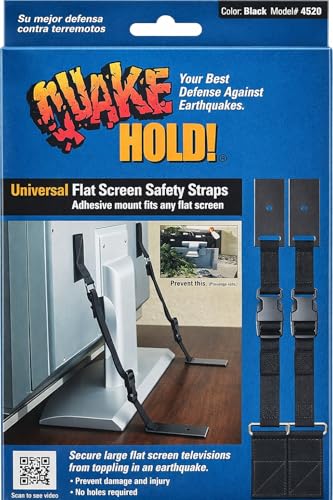
If you want a short answer, start with the Quakehold Universal Flat Screen TV Safety Straps for a well-known adhesive and screw-friendly design that suits flat screens up to 70 inches, choose the Booda Brand Furniture Anchors 10 Pack when you need to secure several pieces of furniture as well as a television, and pick the Gicyiit 2 Pack Adjustable TV Safety Straps when you rent and cannot drill. The Jolirsbox Child Proof TV Safety Straps suit households that want metal plates and no plastic parts, while the Family Care TV Safety Straps give renters a simple adhesive option for flat screens up to 100 inches. Each of these five kits takes a different route to the same goal, which is a television that stays where you put it.
A television does not have to be large to be a tip-over risk. Modern flat screens are thin, tall, and top-heavy, and many of them sit on stands that are narrower than the screen itself. A child who pulls open a drawer, climbs onto a low stand, or grabs the top edge of a screen can shift the balance in a single moment. Furniture below the television matters just as much, because a dresser or a bookcase that tips forward can carry the set with it. Anchoring the television, and anchoring the furniture beneath it, turns a fragile arrangement into a stable one.
This guide explains how to choose a strap, how to install one correctly, and which kits suit different homes. It covers screw-mounted kits, adhesive kits, steel-cable kits, and multi-pack kits, so you can match the hardware to your wall material, your tenancy, and the number of pieces you need to secure. It also explains the safety checks that matter after installation, including how to find a stud, how to test the strap, and when to replace a kit.
Table of Contents
- Quick Answer: Which TV Safety Strap Should You Buy
- Why a TV Needs a Safety Strap
- How to Choose the Best TV Safety Straps
- Screw-Mounted, Adhesive, and Steel-Cable Straps Compared
- How to Install a TV Safety Strap
- 1. Quakehold Universal Flat Screen TV Safety Straps
- 2. Booda Brand Furniture Anchors 10 Pack
- 3. Gicyiit 2 Pack Adjustable TV Safety Straps
- 4. Jolirsbox Child Proof TV Safety Straps
- 5. Family Care TV Safety Straps
- TV Safety Straps Compared Side by Side
- Safety Notes and Recall Awareness
- Frequently Asked Questions
- Conclusion
- Product and ASIN Reference
Quick Answer: Which TV Safety Strap Should You Buy
Choose the Quakehold Universal Flat Screen TV Safety Straps if you want a widely used kit for flat screens up to 70 inches and a design that has been sold for years as earthquake protection as well as childproofing. Choose the Booda Brand Furniture Anchors 10 Pack if you have several tall pieces to secure, because one box covers many items and the metal construction suits heavy furniture. Choose the Gicyiit 2 Pack Adjustable TV Safety Straps if you cannot drill, because the adhesive pads and thumb-nuts install without tools and remove without leaving holes. Choose the Jolirsbox Child Proof TV Safety Straps if you prefer metal plates and a kit with no plastic parts. Choose the Family Care TV Safety Straps if you want a straightforward adhesive kit for a large flat screen in a rented home.
The right choice depends less on brand loyalty than on your wall. A screw-mounted kit anchored into a wooden stud is the strongest common option, and it suits owners who can drill. An adhesive kit suits renters and smooth, clean surfaces, but it needs the right surface and regular checks. A steel-cable kit suits heavy furniture and households that want metal hardware throughout. A multi-pack suits a whole room, while a two-pack suits a single television and its stand. Read the sections below, measure your television, find your studs, and then pick the kit that fits the job in front of you.
Why a TV Needs a Safety Strap
A flat-screen television looks stable when it sits on a wide stand, yet its shape works against it. The screen is a tall, flat slab, the base is often a small central foot or two short feet near the edges, and the weight sits high. A forward pull at the top edge creates leverage that a small base cannot resist. Children are the most common cause of that pull, because they climb, reach, and grab without understanding the weight above them. Pets can do the same by jumping against a stand or chasing a toy behind it. Adults cause tip-overs too, by tripping over a cable, bumping a stand while cleaning, or pulling a drawer open and leaning on it.
Furniture tip-overs follow a similar pattern. A dresser with open drawers becomes a staircase, and each open drawer moves the centre of gravity forward. A bookcase loaded at the top is heavier at the top than at the base. A television placed on top of either piece adds weight exactly where it is least welcome. Anchoring the furniture to the wall and anchoring the television to the furniture or the wall breaks that chain. The strap does not need to hold the full weight of the television in the air. It needs to stop the forward rotation before it starts, and a short, tight strap does that far better than a long, loose one.
Safety agencies have tracked furniture and television tip-overs for many years, and their advice has stayed consistent: place televisions only on furniture designed to hold them, anchor top-heavy furniture to the wall, and wall-mount a television or strap it down when it sits on a stand. Keep remote controls, toys, and other tempting objects off the top of the television and off the top of tall furniture, so children have no reason to climb. Use the anti-tip device that came with a new dresser, and add a strap kit when no device was supplied. These steps cost little and take less than an hour, and they remove a risk that is easy to overlook until it happens.
A strap is not a substitute for supervision, and it is not a reason to let a child climb on furniture. It is a backup that holds the line when supervision lapses for a moment, which is exactly when most accidents happen.
How to Choose the Best TV Safety Straps
Start with the television itself. Measure the screen size from corner to corner, check the weight in the manual, and look at the back of the set for the upper mounting holes. Most flat screens have four threaded holes in a square or rectangular pattern on the back, and those holes accept the bolts that come with a strap kit or with a wall mount. If your television has no visible mounting holes, check the manual, because some sets hide them behind covers or use a different fixing point. A kit that cannot attach to the television itself is of little use, so confirm the fixing before you buy.
Next, look at the wall behind the television and the furniture beneath it. A wooden stud behind drywall gives the strongest fixing for a screw-mounted kit, and a stud finder helps you locate it. Brick, concrete, and block walls need the right plugs and screws, and metal studs need fixings designed for them. Drywall alone, without a stud or a proper anchor, is not a reliable fixing for a heavy television, so do not rely on a short screw in bare plasterboard. If you rent, check your tenancy terms before drilling, and consider an adhesive kit or a strap that ties the television to its stand, with the stand itself anchored separately where drilling is allowed.
Think about how many pieces you need to secure. A single television on a low, wide, heavy stand may need only one kit with two straps. A room with a television, a dresser, a bookcase, and a tall cabinet needs a multi-pack, or several kits, so that every top-heavy piece is anchored. Count the pieces before you shop, and buy enough straps to use two per piece. Two straps share the load, resist twisting, and keep working if one fixing loosens. A single strap on a wide television can allow the set to pivot, so pairs are the sensible standard.
Material matters, and it is worth reading the listing carefully. Nylon webbing is flexible, easy to adjust, and strong when it is triple-stitched. Steel cable resists stretching and suits heavy furniture, but it needs metal brackets and proper fixings to work as a system. Metal plates and buckles last longer than plastic ones in a kit that will be adjusted and re-tightened over time. Adhesive pads suit smooth, clean, flat surfaces and renters, but they need a clean surface, firm pressure, and time to bond, and they should be checked regularly. No single material wins in every home, so match the material to the load and the surface.
Length and adjustability matter more than they first appear. A strap that is too long leaves slack, and slack lets the television start to tip before the strap takes the load. A strap that is too short cannot reach from the television to the wall or the stand. Adjustable straps solve this by letting you pull the strap tight after both ends are fixed, and quick-release buckles let you loosen the strap for cleaning and then tighten it again. Measure the distance from the back of the television to the wall or to the fixing point on the stand, add a little working length, and choose a kit whose adjustable range covers that distance with room to spare.
Finally, check what is in the box. A complete kit should include straps, brackets or plates for the television and the wall, screws in several sizes for different television mounting holes, wall screws, and, where needed, wall plugs. Kits that include bolts in the common sizes for television mounting holes save a trip to the hardware shop and reduce the chance of using the wrong bolt. Read the instructions before you start, keep the manual with the television paperwork, and keep spare bolts in a labelled bag so a future move does not leave you searching for the right size.
Screw-Mounted, Adhesive, and Steel-Cable Straps Compared
Screw-mounted straps are the most familiar type. One end bolts to the back of the television, the other screws into a wall stud or into the stand, and the strap between them is pulled tight. They suit owners, heavy televisions, and tall furniture, and they give a firm, inspectable fixing that you can test by pulling on it. Their drawback is the hole they leave, which matters in rented homes and on furniture you plan to move. They also need the right tools, a stud finder, and care to avoid cables and pipes inside the wall. For most family homes with a heavy television, a screw-mounted kit is the first choice.
Adhesive straps use strong pads to bond to the back of the television and to the wall or the stand, with no drilling at all. They suit renters, smooth surfaces, and lighter televisions, and they install in minutes with no tools. Their strength depends entirely on the surface: clean, dry, smooth, flat surfaces bond well, while dusty, textured, painted, or flexible surfaces bond poorly. Adhesive kits need firm pressure during installation, time to cure before they are loaded, and regular checks, because heat, humidity, and age can weaken a bond. Use them for the job they suit, which is a lighter set on a smooth surface, and do not ask an adhesive pad to do the work of a stud fixing on a heavy television.
Steel-cable kits use braided steel wire instead of fabric webbing, with metal brackets at each end. They resist stretching, suit heavy furniture, and work well where a fabric strap might fray or be chewed by a pet. They are usually screw-mounted, and they need the same stud-finding care as any screw-mounted kit. Their stiffness can make them harder to route in a tight gap behind a television, and their metal ends need to sit flat against the fixing surface to work properly. For a heavy dresser, a bookcase, or a large television on a tall stand, a steel-cable kit is a strong option, and a multi-pack of steel-cable anchors covers a whole room in one purchase.
Some kits mix approaches, with a fabric strap, metal buckles, and adhesive pads as an alternative to screws. Others offer four fixing layouts in one box: television to wall, television to furniture, television to furniture and furniture to wall, or furniture to wall. That flexibility helps when the wall behind the television has no stud in the right place, or when the stand itself needs anchoring as well as the set. Whichever type you choose, the principle stays the same: short, tight, fixed at both ends, checked regularly, and never left slack.
How to Install a TV Safety Strap
Read the instructions that come with your kit before you pick up a tool, because each kit has its own brackets, bolt sizes, and fixing order. The steps below describe the common pattern for a screw-mounted kit, and the same care applies to adhesive and steel-cable kits, with the fixing method changed to suit the kit.
First, move the television and its stand away from the wall so you can work behind them, and unplug the set if you need to tilt it. Find the upper mounting holes on the back of the television and choose the bolt size that fits them without forcing it. A bolt that is too long can damage the inside of the set, and a bolt that is too short will not hold, so test the fit by hand and use the washers supplied. Attach the television brackets or plates to those holes and tighten them firmly, but do not over-tighten a bolt into a thin television back.
Next, find a stud in the wall behind the television, at the same height as the television brackets or lower. A stud finder, a small pilot hole, and a check for cables and pipes all help here, and a fixing placed below the television brackets keeps the strap pulling slightly downward, which resists forward tipping. Drill a pilot hole, fix the wall bracket with the screws supplied, and check that the bracket is solid by pulling on it. If there is no stud in the right place, move the stand slightly, use a proper heavy-duty wall anchor rated for the load, or choose a layout that ties the television to the stand and anchors the stand itself.
Then connect the straps, pull them tight, and lock the buckles. The straps should be short and taut, with no slack and no twist. A strap that hangs loose does nothing until the television has already started to move, which is too late. Check the fit by pushing the top of the television gently forward with one hand while the other hand feels the strap take the load. The set should move only a small amount before the strap stops it. If it moves freely, tighten the strap, check the fixings, and re-test.
For an adhesive kit, the steps are different but the care is the same. Clean the fixing surfaces with a dry cloth and, if the instructions allow it, a mild cleaner, then let them dry fully. Press each adhesive pad firmly into place, hold it for the time the instructions state, and leave the bond to cure before you load it. Do not stick a pad to dusty paint, textured wallpaper, or a surface that flexes, and do not reposition a pad once it has bonded, because a reused pad will not hold as well as a fresh one. Check adhesive straps more often than screw-mounted ones, especially in warm rooms and after a move.
After installation, tidy the cables so they do not pull on the television or create a trip hazard, push the stand back to the wall, and check that the television sits level and the straps are still tight. Put a reminder in your calendar to check the straps every few months, and check them again after any move, any earthquake or tremor, and any time a child has been climbing nearby. Replace a strap that is frayed, stretched, cracked, or loose, and replace any fixing that has worked loose in the wall. A strap kit is a small purchase, and a fresh kit costs far less than the damage a tip-over can cause.
1. Quakehold Universal Flat Screen TV Safety Straps
The Quakehold Universal Flat Screen TV Safety Straps are the classic choice in this roundup, and they earn that place through a simple, well-understood design. The kit uses adjustable nylon straps with a Contour Grip mount design and quick-disconnect buckles, so you can fix the straps, pull them tight, and release them later for cleaning without removing the brackets. It is sold as earthquake protection as well as childproofing, which reflects the way it was designed: to stop a flat screen from toppling forward when the floor shakes or a child pulls at it. For a family room with a flat screen up to 70 inches, it is a natural first pick.
Installation is straightforward, and the adhesive option helps households that want to avoid drilling into the television stand. The straps fix to the back of the television and to the stand or the wall, and the adjustable length lets you take up the slack until the set sits firmly. The quick-disconnect buckles are useful in real life, because a strap that is hard to remove tends to be left off after cleaning, while a strap that unclips in seconds goes back on just as quickly. Keep the buckles accessible, check that they click fully home, and re-tighten the straps after you reconnect them.
The stated fit covers flat screens up to 70 inches and up to 150 pounds, which covers most living-room televisions, including many large sets that sit on stands rather than wall mounts. That range makes the kit a good match for a main television in a family room, a bedroom set, or a playroom screen. It is less suited to very large sets above that size, and to televisions with unusual backs that lack the usual mounting holes, so measure and check the back of your set before you buy. For the televisions it does fit, the combination of nylon webbing, a shaped mount, and a releasable buckle is easy to live with.
One practical point deserves attention. Adhesive fixings work best on clean, smooth, flat surfaces, and they need firm pressure and time to bond. If your stand has a textured finish, a curved edge, or a surface that flexes, an adhesive fixing will not hold as well as a screw fixing, and you should use the screw option or choose a different layout. The same applies to a wall with textured paint or wallpaper. Read the instructions, prepare the surfaces, and test the fixing by pulling on it before you trust it with a television. A strap kit is only as strong as its weakest fixing, and the fixing is where most installations fail.
In daily use, the Quakehold kit stays out of sight behind the television, which matters in a living room where a visible strap would spoil the look of the set. The black straps blend with most television backs and stands, and the low profile of the mounts keeps the set close to the wall. That discretion helps, because a safety device that looks tidy is more likely to stay installed. Check the straps every few months, look for fraying or loosening, and replace the kit if the webbing shows wear. For households that want a proven, widely sold, easy-to-install strap for a standard flat screen, this is the premium pick in the roundup.
Specs
- Type: Adjustable nylon anti-tip straps with adhesive mounts
- Screen fit: Flat screens up to 70 inches
- Load limit: Up to 150 pounds
- Mount design: Contour Grip mount with quick-disconnect buckles
- Material: Nylon webbing with black finish
- Pack size: 1 pack
- Use: Earthquake protection and childproofing for flat-screen televisions and furniture
- Tier: Premium
- ASIN: B001132UEE
2. Booda Brand Furniture Anchors 10 Pack
The Booda Brand Furniture Anchors 10 Pack is the whole-room pick in this roundup. Instead of securing a single television, one box gives you ten metal anchors, so you can secure the television, the dresser, the bookcase, and the tall cabinet in the same afternoon. That matters, because a television is rarely the only top-heavy piece in a room, and a strap on the set alone leaves the furniture beneath it free to tip. A multi-pack turns a single purchase into a room-wide safety routine.
The construction is metal throughout, with steel wire and metal brackets, and the listing states a load limit of up to 400 pounds per anchor when properly installed. That strength suits heavy furniture, and it gives a useful margin on a large television and a loaded bookcase. The anchors are detachable, so you can release them to move furniture for cleaning and then reconnect them, which is the kind of detail that decides whether a safety device stays in use. A kit that is awkward to release tends to be removed and forgotten, while a kit that unclips cleanly goes back on without a fuss.
Independent testing has also given this design a good name. Consumer Reports tested furniture anchor kits and found that the Booda Brand anchors performed well on wooden studs and on metal studs, holding substantial force in both cases. That kind of independent result is worth more than a listing claim on its own, because it shows how the kit behaves when it is fixed to a real wall and pulled. It does not remove the need for correct installation, and a kit fixed to bare drywall will still fail, but it does suggest that the hardware itself is sound when it is fixed properly.
The white finish suits light furniture and white walls, and the metal brackets sit flat against the fixing surface. The pack includes the brackets, wires, screws, and wall fixings needed for ten anchors, with a package size of about 10.59 by 4.33 by 0.75 inches and a weight of about 11.7 ounces for the box. Count your pieces before you start, plan on two anchors per piece, and remember that ten anchors cover five pieces at two per piece. That arithmetic helps you decide whether one box is enough or whether you need a second box for a larger home.
Installation follows the standard screw-mounted pattern: fix the brackets to the furniture and to the wall, connect the wires, and pull them tight. Use a stud finder, drill pilot holes where needed, and check each fixing by pulling on it. The steel wire does not stretch the way fabric can, so a tight fixing stays tight, but that also means you need to get the length right at installation, because there is little give to take up later. Take your time, measure twice, and test each anchor before you move on to the next piece.
For households with several tall pieces, or for a new home where every room needs anchoring, this is the most economical way to cover the job in one purchase.
Specs
- Type: Metal furniture anchors with steel wire
- Pack size: 10 anchors
- Load limit: Up to 400 pounds per anchor when properly installed
- Material: Metal brackets with steel wire, white finish
- Fixing: Screw-mounted to furniture and wall
- Detachable: Yes, for moving furniture and cleaning
- Package size: About 10.59 by 4.33 by 0.75 inches
- Package weight: About 11.7 ounces
- Tier: Mid-range
- ASIN: B086ZS4D3D
3. Gicyiit 2 Pack Adjustable TV Safety Straps
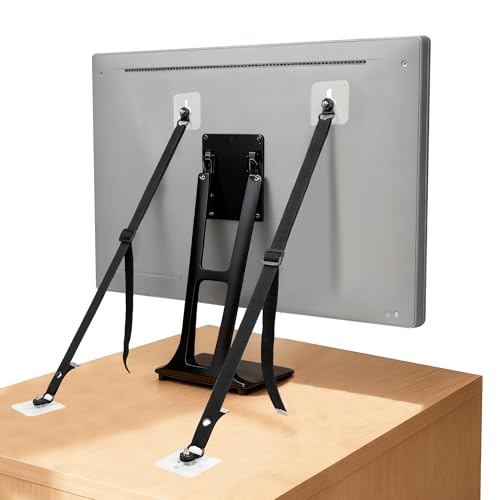
The Gicyiit 2 Pack Adjustable TV Safety Straps are the no-drill pick in this roundup, and they suit renters and anyone who wants to avoid holes in walls and furniture. The kit uses industrial-strength adhesive pads with reinforced thumb-nuts, so you can secure a flat-screen television without a drill, a stud finder, or a toolbox. Clean the surface, stick the pad, tighten the thumb-nut, and the strap is in place in minutes. That speed matters, because a safety job that takes minutes gets done this weekend, while a job that needs tools and a hardware run can wait for months.
The straps are adjustable nylon, 35 inches long and 0.78 inches wide, in black, and the pack includes two straps, four adhesive pads, and four thumb-nuts. The listing states a fit for televisions up to 100 inches, with a recommendation to use at least two straps for televisions up to 85 inches and three or four straps for extra-large sets. That guidance is worth following: a single strap on a very wide set can allow the set to pivot, while two or more straps share the load and resist twisting. If your television is at the top of the stated range, buy a second pack so you have enough straps to follow that advice.
The two-year warranty is a useful sign of confidence from the maker, and the tool-free design helps households that do not own a drill or do not want to use one. The straps suit flat screens, monitors, dressers, bookshelves, cabinets, and standing mirrors, so the same kit can secure more than the television if you have a spare strap. That flexibility is helpful in a small home, where one kit may need to cover the television in the living room and a tall mirror in the bedroom.
Adhesive fixings need care, and the instructions for this kit spell out the points that matter. Apply the pads only to smooth, clean, flat surfaces, press firmly to remove air bubbles, and let the bond form before you load it. For painted walls or delicate surfaces, attach the straps to furniture instead of drywall, because a pad bonded to paint can pull the paint away if it is removed. To reposition a pad, warm it with a hairdryer for 30 to 60 seconds and peel it gently at an angle, working slowly to avoid surface damage. Do not overstretch the straps when you tighten them, and place the television end at the upper corners or top edge of the back panel, with the other end on the back or top of the stand, the wall behind it, or heavy supporting furniture.
In daily use, the Gicyiit kit is discreet, with black nylon straps that sit behind the set and out of sight. It is a budget pick by tier, yet it covers a wide range of televisions and installs faster than any screw-mounted kit in this roundup. Its limits are the limits of any adhesive kit: it needs the right surface, it needs regular checks, and it should not be asked to hold a heavy television on a dusty or textured surface. Used on a clean, smooth surface, checked every few months, and tightened when needed, it is a practical, renter-friendly way to anchor a flat screen.
Specs
- Type: Adjustable no-drill adhesive anti-tip straps
- Pack size: 2 straps, 4 adhesive pads, 4 thumb-nuts
- Strap size: 35 inches long by 0.78 inches wide
- Screen fit: Flat screens up to 100 inches
- Material: Nylon, black finish
- Fastener type: Thumb-nut with adhesive pads
- Item weight: About 2.75 ounces
- Warranty: 2-year warranty
- Tier: Budget
- ASIN: B0FYNRDR8S
4. Jolirsbox Child Proof TV Safety Straps

The Jolirsbox Child Proof TV Safety Straps suit households that want metal hardware and no plastic parts in the load path. The kit uses heavy-duty metal plates with an adjustable strap, and the listing states plainly that it contains no plastic parts. That choice matters for a safety device that will be tightened, loosened, and re-tightened over years, because metal plates and buckles resist cracking and wear better than plastic ones, and they give a firm, inspectable fixing that you can check at a glance. For a playroom television, a nursery set, or a home with pets that chew, metal hardware is a sensible preference.
The design works for babyproofing and earthquake protection, securing a television to a stand and to a wall so that a bump, a pull, or a tremor cannot tip the set forward. The adjustable strap lets you take up slack after both ends are fixed, which is the key to a strap that actually works: a short, tight strap stops rotation before it starts, while a long, loose strap lets the television move first. Fix the plates, connect the straps, pull them tight, and test the set with a gentle forward push. The television should move only a small amount before the strap takes the load.
Metal-plate kits need the same installation care as any screw-mounted kit. Find the mounting holes on the back of the television, choose the right bolt size, and fix the plates firmly without over-tightening. Find a stud for the wall fixing, or use a proper heavy-duty anchor where no stud is available, and check each fixing by pulling on it. The metal plates should sit flat against the fixing surface, with no gap and no rocking, because a plate that rocks will work loose over time. Keep the instructions and spare bolts with the television paperwork, so a future move does not leave you guessing at the right size.
In use, the Jolirsbox kit is a premium pick by tier, and its value lies in its construction rather than in a long list of extras. It does not try to cover a whole room in one box, and it does not offer an adhesive option for renters. What it offers is a focused, metal-built strap for a single television, made to be installed once and checked regularly. That focus suits households that already have a plan for the furniture and want the strongest strap they can buy for the set itself.
Check the straps every few months, look for wear on the webbing, and check that the plates are still tight. Replace the kit if the webbing frays, the plates bend, or a fixing works loose. A metal kit lasts a long time when it is installed correctly, but no kit lasts forever, and a fresh strap is a small purchase next to the television it protects. For households that prefer metal over plastic and want a premium, no-plastic-parts strap for a flat screen, this is the pick to choose.
Specs
- Type: Childproof TV safety straps with heavy-duty metal plates
- Pack size: Adjustable strap kit for televisions and furniture
- Material: Heavy-duty metal plates with adjustable strap, no plastic parts
- Fixing: Screw-mounted to television, stand, and wall
- Use: Babyproofing and earthquake protection for flat-screen televisions
- Adjustable: Yes, pull tight after both ends are fixed
- Tier: Premium
- ASIN: B09H5YW7BV
5. Family Care TV Safety Straps

The Family Care TV Safety Straps are the second adhesive pick in this roundup, and they suit renters who want a simple, tool-free kit for a large flat screen. The kit uses adhesive pads to fix the straps to the television and to the wall or stand, with no drilling, no brackets to align, and no holes to fill when you move out. That simplicity is its main strength: a household that cannot drill can still anchor a television, and a household that can drill but prefers not to can have the job done in minutes.
The listing describes adjustable earthquake straps for flat screens, with a fit for sets up to 100 inches, and the pack includes two straps. The nylon webbing is adjustable, so you can pull the straps tight after the pads are bonded, and the compact package, about 5.12 by 3.19 by 1.65 inches with a weight of about 3.84 ounces, is easy to store and easy to carry to a new home. The adhesive design suits smooth, clean, flat surfaces, and it works best when the pads are pressed firmly into place and left to bond before the straps are loaded.
Adhesive kits need honest expectations. On a clean, dry, smooth surface, a good adhesive pad holds with surprising tenacity, and it can keep a television steady against everyday bumps and pulls. On a dusty surface, textured paint, or a surface that flexes, the same pad will not hold, and it should not be trusted with a heavy set. Check the pads regularly, especially in warm rooms and after a move, and replace the kit if a pad lifts at the edge, the webbing stretches, or the strap no longer pulls tight. For a tall dresser or a very heavy television, a screw-mounted kit into a stud is the stronger choice, and an adhesive kit should not be asked to do that job alone.
Installation follows the adhesive pattern: clean the fixing surfaces, let them dry fully, press each pad firmly into place, and leave the bond to form before you tighten the straps. Do not reposition a pad once it has bonded, because a reused pad will not hold as well as a fresh one. Place the television end high on the back of the set, fix the other end to the stand or the wall, pull the straps tight, and test the set with a gentle forward push. Tidy the cables so they do not pull on the television, and check the straps again after a week, then every few months.
As a budget pick by tier, the Family Care kit gives renters a low-cost, low-effort way to anchor a large flat screen, and it pairs well with a screw-mounted kit for the furniture beneath the set where drilling is allowed. Use it for the job it suits, check it often, and replace it at the first sign of wear. For a rented home with a large television and smooth surfaces, it is a practical, straightforward choice.
Specs
- Type: Adhesive no-drill anti-tip TV safety straps
- Pack size: 2 straps
- Screen fit: Flat screens up to 100 inches
- Material: Nylon webbing
- Fixing: Adhesive pads, no drilling required
- Package size: About 5.12 by 3.19 by 1.65 inches
- Package weight: About 3.84 ounces
- Tier: Budget
- ASIN: B0DBHVHFKL
TV Safety Straps Compared Side by Side
The five kits in this roundup cover the main ways to anchor a television. The Quakehold kit suits a standard flat screen up to 70 inches and a household that wants a proven adhesive and screw-friendly design. The Booda Brand 10 Pack suits a whole room, with ten metal anchors for several pieces of furniture. The Gicyiit kit suits renters, with a tool-free adhesive install and a fit for sets up to 100 inches. The Jolirsbox kit suits households that prefer metal plates and no plastic parts. The Family Care kit suits renters with a large flat screen who want a simple adhesive two-pack.
If you own your home and have a heavy television, start with a screw-mounted kit into a stud, and use a multi-pack for the furniture as well. If you rent, start with an adhesive kit on a clean, smooth surface, and check it often. If you have several tall pieces, buy the multi-pack first, because anchoring the furniture matters as much as anchoring the set. Whichever kit you choose, use two straps per piece, pull them tight, and test the fixing before you trust it.
Safety Notes and Recall Awareness
Check the recall list before you buy any strap kit, and check it again if you already own one. In March 2026, the Consumer Product Safety Commission recalled about 253,500 plastic tip-restraint kits sold as 4our Kiddies, because the plastic brackets and zip tie could break or degrade over time and the kits failed the industry standard for tip restraints. Similar plastic tip-restraint kits supplied with furniture were also recalled, including kits from Cranach Hardware and kits included with Childcraft furniture sold by School Specialty. Owners of a recalled kit should stop using it at once and contact the maker for the free replacement offered in the recall notice.
None of the five picks in this roundup is a recalled plastic-bracket and zip-tie kit. The Quakehold, Gicyiit, and Family Care kits use nylon webbing with adhesive or screw fixings, the Booda Brand kit uses metal brackets with steel wire, and the Jolirsbox kit uses heavy-duty metal plates with no plastic parts. Even so, a strap kit is only safe when it is installed correctly and checked regularly, so follow the instructions, fix screw-mounted kits into a stud or a proper anchor, use adhesive kits only on suitable surfaces, and replace any strap that is frayed, stretched, cracked, or loose. Keep children away from furniture secured with a damaged restraint, and do not rely on a strap that has already failed once.
Frequently Asked Questions
Do I need a TV safety strap if my television sits on a low, wide stand?
Yes, a low stand helps, but it does not remove the risk. A child can still pull the top edge of a thin, top-heavy screen forward, and a pet or a bump can shift a set that looks stable. A strap costs little, installs quickly, and removes that risk, so fit one even when the stand looks sturdy.
Can I use adhesive TV safety straps in a rented home?
Yes, adhesive straps are made for rented homes, provided the surfaces are smooth, clean, flat, and dry. Press the pads firmly into place, let the bond form before loading the straps, and check them regularly. Do not use adhesive pads on dusty, textured, or flexible surfaces, and do not ask them to hold a very heavy television on their own.
How many straps should I use on one television?
Use two straps on each television and on each tall piece of furniture. Two straps share the load, resist twisting, and keep working if one fixing loosens. For very large sets, the maker may recommend three or four straps, so follow the guidance for your kit and buy a second pack when you need more straps.
How often should I check my TV safety straps?
Check them when you install them, again after a week, and then every few months. Check them again after any move, any tremor, and any time a child has been climbing nearby. Look for fraying, stretching, cracking, and loose fixings, pull each strap to confirm it is still tight, and replace any kit that shows wear.
Conclusion
The best TV safety strap is the one that fits your television, your wall, and your home, and stays installed long after the day you fit it. For most households, the Quakehold Universal Flat Screen TV Safety Straps are the safest first choice for a standard flat screen, the Booda Brand Furniture Anchors 10 Pack are the best way to secure a whole room, and the Gicyiit 2 Pack Adjustable TV Safety Straps are the best no-drill option for renters. The Jolirsbox Child Proof TV Safety Straps suit households that want metal plates and no plastic parts, while the Family Care TV Safety Straps give renters a simple adhesive kit for a large flat screen.
Measure your television, find your studs, count the pieces you need to secure, and choose the kit that matches that job. Install it carefully, pull the straps tight, test the fixing, and check the straps every few months. A television that cannot tip forward is a television your household can live around without worry, and a strap kit is a small, simple step that makes that true.
Product and ASIN Reference
| Product | ASIN |
|---|---|
| Quakehold Universal Flat Screen TV Safety Straps | B001132UEE |
| Booda Brand Furniture Anchors 10 Pack | B086ZS4D3D |
| Gicyiit 2 Pack Adjustable TV Safety Straps | B0FYNRDR8S |
| Jolirsbox Child Proof TV Safety Straps | B09H5YW7BV |
| Family Care TV Safety Straps | B0DBHVHFKL |