Key takeaways
- Five streaming stick holders compared, from a Roku cradle to a steel VESA panel, with fit windows, mounting styles, and remote notes for every setup.
A streaming stick that dangles from an HDMI port is easy to ignore until the day it slips, the cable pulls tight, or the remote stops responding because the stick has slid behind the television. The fix is a holder that gives the stick a fixed home: a cradle on the back of the television, an adjustable wall bracket, or a clip-on shelf above the screen. The best streaming stick holder for most homes is the TotalMount for Roku Express, because it is the one pick in this guide molded to fit one specific compact player, so the player slides in snugly and the adhesive cradle keeps it exactly where the remote can reach it. Households that do not own a Roku Express should look at the ECHOGEAR Universal Streaming Device Mount instead, because its steel panel and hook-and-loop straps hold almost any stick or small box up to three pounds, and it bolts to a VESA hole instead of relying on adhesive alone.


As an Amazon Associate, we earn from qualifying purchases.
Table of Contents
- How to Choose Streaming Stick Holders
- Quick Comparison
- 1. TotalMount for Roku Express
- 2. SKLK-SEL Adjustable Wall Mount Holder, Narrow
- 3. Monzlteck Adjustable Small Device Wall Mount Holder
- 4. VIVO Adjustable Top Shelf TV Clip Mount Holder, Mount-SFTV2
- 5. ECHOGEAR Universal Streaming Device Mount, Echo-SDMU
- Before You Buy: Checks for Streaming Stick Holders
- Frequently Asked Questions
- Conclusion
- Product and ASIN Reference
How to Choose Streaming Stick Holders
Start by measuring the stick, because every holder in this guide is sized around a fit window rather than a brand name. A Fire TV Stick 4K measures 99 by 30 by 14 millimeters, which works out to about 3.9 inches long, 1.2 inches wide, and just over half an inch thick. A Roku Streaming Stick Plus measures about 3.7 by 0.80 by 0.45 inches. A Roku Express HD, the compact puck that one pick in this guide is molded for, measures about 3.0 by 1.5 by 0.75 inches, while the wider Roku Express 4K and Express 4K Plus measure about 3.4 by 1.5 by 0.8 inches. Those few fractions of an inch decide everything: a cradle molded for a 3.0-inch-wide player will not accept a 3.4-inch-wide player, and a bracket whose depth window starts at 0.8 inches will not grip a bare stick that is only about half an inch thick without room to move. Measure length, width, and thickness with a ruler before ordering, and compare all three numbers against the published fit window in each Specs block below.
Next, decide where the holder will live. A cradle that bonds to the back of the television keeps the stick inches from the HDMI port, so the short cables that ship with most sticks reach without strain. That placement suits wall-mounted televisions best, because there is no shelf below the screen for the stick to rest on. A wall bracket suits households that want the stick on the wall beside the television or on a wall behind a television that sits on a stand. A clip-on shelf suits households that want the stick visible and reachable, for example when the stick needs frequent unplugging for travel, or when the household rents and cannot put screws into the wall. A VESA panel suits households whose television already hangs on a wall mount, because the panel slides onto an existing VESA screw point and the stick travels with the screen if the mount articulates.
Then check the remote, because where the stick sits decides whether the remote works. Roku Express HD and the base Roku Express 4K ship with a simple infrared remote, and infrared light cannot pass through a television screen or a closed cabinet door. A stick or puck that uses an infrared remote must sit near the top edge, bottom edge, or outer side bezel of the television, facing outward, so the signal can reach it directly or bounce off the wall behind the set. Voice remotes that use radio frequency, including the remotes that ship with the Roku Express 4K Plus, the Roku Ultra line, Fire TV Sticks, and Chromecast with Google TV, pass through the television panel, so the holder can sit hidden in the center of the back of the set. If the household is unsure which remote it owns, look for a microphone button: a voice remote has one, and a simple infrared remote does not.
Heat matters more than most households expect. The back of a television warms up during an evening of viewing, and the warm zone sits near the center-top vents where the power board lives. Adhesive pads soften when they sit in that warm zone through repeated heat cycles, and a softened pad can let a cradle slide or drop. Place any adhesive holder on a smooth, unvented section of the rear casing, at least two inches away from exhaust slots, and clean the spot with isopropyl alcohol before pressing the pad in place. Let the bond cure for at least an hour before sliding the stick into the cradle. Screw-mounted brackets do not have this problem, which is one reason the steel picks in this guide suit households that want a permanent install.
Cable length is the last practical check. A stick that plugs directly into an HDMI port needs almost no cable at all, but a puck such as the Roku Express needs both an HDMI cable and a USB power cable. Measure from the HDMI port to the spot where the holder will sit, and confirm the cables that ship with the player reach without pulling tight. Many televisions have a powered USB service port on the back right next to the HDMI inputs, and plugging the player power cord into that port removes the long wire down to a wall outlet. The larger box players need their own wall adapters, but every stick-class device in this guide runs on standard USB power, so the television USB port is the tidy option when the set provides one.
Finally, think about how often the stick moves. A household that carries one stick between the living room, a bedroom, and a hotel room wants a cradle the stick slides in and out of freely, with the adhesive staying on the bracket rather than on the stick itself. A household that sets up one television and leaves it alone for years wants the most permanent fixing available, which is screws into drywall or a VESA bolt. The five picks below split across that whole range, from a peel-and-stick cradle to a bolted steel panel, so the right choice is the one that matches the room, the remote, and the moving habits of the household rather than the one with the longest feature list.
Quick Comparison
| Holder | Best For | Mounting Style | Fit Window | Tier |
|---|---|---|---|---|
| TotalMount for Roku Express | Roku Express HD owners who want a snug custom cradle | Adhesive cradle on the TV back | Roku Express HD, about 3.0 by 1.5 by 0.75 inches | Budget |
| SKLK-SEL Adjustable Wall Mount Holder, Narrow | Slim puck players on a wall bracket | Adjustable wall bracket with screws and anchors | Height up to 4 inches, depth 0.8 to 1.6 inches | Budget |
| Monzlteck Adjustable Small Device Wall Mount Holder | Small streaming devices, routers, and modems on a wall | Adjustable wall mount | Small media players, Apple TV, and Roku class devices | Mid-range |
| VIVO Adjustable Top Shelf TV Clip Mount Holder, Mount-SFTV2 | Renters and travelers who want the stick visible on a clip-on shelf | Clip mount on top of the TV | 12-inch platform, 4.6 inches deep | Mid-range |
| ECHOGEAR Universal Streaming Device Mount, Echo-SDMU | Any stick or small box up to 3 pounds behind the TV | VESA panel with hook-and-loop straps | Devices up to 3 pounds, Roku, Fire TV, Apple TV, and TiVo Mini | Premium |
1. TotalMount for Roku Express
The TotalMount for Roku Express is the most stick-specific holder in this guide, and that specificity is exactly what makes it the top pick for the households it fits. The cradle is custom molded to the shape of the standard Roku Express HD, so the player slides in from the side and sits held on all four sides, with no straps, no screws, and no guessing about fit. The player measures about 3.0 by 1.5 by 0.75 inches, and the cradle matches those numbers, which means the player cannot rattle, shift, or creep out of place when the television is nudged or the cables are tugged. For a household that already owns the standard Roku Express HD, there is no more direct way to get a stick-class player off the floor and onto the back of the screen.
Installation is a peel-and-stick job. The back of the cradle carries a heat-resistant adhesive pad, and the whole assembly presses onto a smooth section of the television rear casing. The maker recommends placing the cradle near the top, side, or bottom bezel, because the Roku Express HD ships with a simple infrared remote, and the player must sit where the remote signal can reach it. A cradle placed on a lower bezel works well when the viewer sits directly in front of the television, while a cradle placed on the side bezel suits a room where viewers sit at a sharp angle. Either way, the short distance between the cradle and the HDMI port means the HDMI cable and the USB power cable run only a few inches, and both stay hidden behind the screen.
The important limit is width. The cradle fits the standard Roku Express HD, models 3900, 3930, and 3960, and it does not fit the wider Roku Express 4K or Express 4K Plus, which measure about 3.4 inches wide. That distinction is easy to miss, because all three players share the Roku Express name and look alike from the front. Check the model number printed on the underside of the player before ordering: if the number ends in 3900, 3930, or 3960, the cradle fits; if the player is a 3940 or 3941, it does not. The cradle is not designed for Fire TV Sticks, Chromecast dongles, or Roku Streaming Sticks either, because those devices are thinner and longer than the puck the cradle is molded around.
The adhesive is the other detail to plan around. Heat-resistant adhesive holds well on the smooth plastic of a modern television rear casing, and it holds better on the flat center panel than on the curved lower hump where many televisions hide their speakers. Before pressing the cradle in place, wipe the chosen spot with isopropyl alcohol and let it dry completely, then press the pad firmly for at least thirty seconds. Do not slide the player in until the bond has had at least an hour to set. The cradle can be removed later without tools, and it leaves the player itself untouched, which suits households that carry the player between rooms.
The build is simple by design. There are no moving parts, no straps to tighten, and no screws to lose, so there is nothing to adjust once the cradle is on the wall of the television. That simplicity is also the reason the pick sits in the budget tier: it does one job, for one player, and does it well. Households that want a universal holder for whatever stick they buy next should look at the ECHOGEAR panel further down this guide, but households that own a Roku Express HD and want it mounted today will not find a cleaner fit.
Specs
- Brand: TotalMount
- Product: custom-molded cradle for Roku Express HD
- Fits: Roku Express HD models 3900, 3930, and 3960
- Player size it fits: about 3.0 by 1.5 by 0.75 inches
- Does not fit: Roku Express 4K and Express 4K Plus, about 3.4 inches wide
- Attachment: heat-resistant adhesive pad to the rear TV enclosure
- Placement: near the top, side, or bottom bezel for infrared remote line of sight
- Cable note: keeps the player inches from the HDMI port, so short HDMI and USB cables reach
- Tier: Budget
2. SKLK-SEL Adjustable Wall Mount Holder, Narrow
The SKLK-SEL Adjustable Wall Mount Holder in the Narrow size is the budget wall bracket for households that want a stick-class player off the television and onto the wall. The bracket is an adjustable cradle: two side walls slide in or out, and the depth window runs from 0.8 inches to 1.6 inches, so the cradle can be set to hug a slim puck player and then re-set later if the household swaps in a different device. The vertical height caps at 4 inches, and the width runs to 4.6 inches, which covers the whole stick-and-puck class, from the compact Roku Express to the wider streaming boxes that sit just above the stick class.
The fit window is the detail to read carefully. The depth window starts at 0.8 inches, and that lower bound matters. A Roku Express HD at 0.75 inches thick and a Roku Express 4K at 0.8 inches thick sit right at the bottom of the window, which is where the cradle grips best. A bare Fire TV Stick at about half an inch thick sits below the minimum depth, so it will have room to move inside the cradle unless the household pairs it with a thicker sleeve or sets the bracket to its tightest position and checks the grip by hand. The honest way to use this holder with a stick is to measure the stick first, compare the thickness against the 0.8-inch floor, and choose it when the player is a puck or when the household is happy to test the fit before finalizing the install. Households whose only device is a bare stick thinner than the window should look at the TotalMount cradle or the VIVO shelf instead.
What the bracket does well is give a permanent, screwed-in home to a small device that would otherwise dangle. The package includes drywall screws and anchors, so the install needs only a drill or a screwdriver and a level. The bracket mounts flat to the wall, and the player slides in from the front, with the front face open so the remote signal and any status light stay visible. That open front is a real advantage over closed cabinets: an infrared remote reaches the player without a repeater, and the player gets airflow on all sides instead of cooking inside a closed box.
The listing names Apple TV, Roku Box, Amazon Fire TV, optic modems, mini PCs, and modems among the compatible devices, which shows how the bracket is meant to be used: one adjustable cradle for the small black boxes that cluster around a television, rather than a molded cradle for one player. That breadth suits a household that expects to swap devices over the years. A puck player today, a mini PC tomorrow, a modem after a move: the bracket adjusts to each. The narrow size is the one to order for stick-class devices, because the wider sizes in the same line are built for larger modems and routers that would swallow a stick.
Cable management is straightforward because the bracket sits on the wall where the household chooses. Mount it directly behind the television and the HDMI cable runs a few inches. Mount it beside a television that sits on a stand and the cables run down the wall, which keeps them off the floor and away from pets and vacuum cleaners. The bracket holds the player flat against the wall, so the HDMI connector does not carry the weight of the device, which is the failure mode that kills dangling sticks over time.
Specs
- Brand: SKLK-SEL
- Product: adjustable wall mount holder, Narrow size
- Vertical height: up to 4 inches, about 102 millimeters
- Width: about 4.5 to 4.6 inches, about 118 millimeters
- Depth window: 0.8 to 1.6 inches, about 20.5 to 40 millimeters
- Compatible with: Apple TV, Roku Box, Amazon Fire TV, optic modem, mini PC, and modems
- Fit note: depth window starts at 0.8 inches, so a bare stick thinner than that should be measured against the window before install
- Hardware included: drywall screws and anchors
- Fits devices: less than 1.5 inches thick
- Tier: Budget
3. Monzlteck Adjustable Small Device Wall Mount Holder

The Monzlteck Adjustable Small Device Wall Mount Holder is the mid-range wall bracket for households that want one mount for the small devices around the television, not just the stick. The bracket is built from metal and mounts flat to the wall, and the listing names Apple TV, Roku, routers, modems, and other media players among the compatible devices. That range matters in a real living room, because the device that sits behind the television today is rarely the only device that will sit there over the next few years. A bracket that can hold a streaming player this year and a router the next is a better buy than a molded cradle that fits one player and nothing else.
The bracket measures about 11.43 by 10.16 by 3.81 centimeters and weighs about 199.58 grams, which puts it in the small-and-sturdy class: light enough to hang on a single wall fixing, solid enough that a plugged-in player will not flex it. The metal build is the reason it sits in the mid-range tier rather than the budget tier. Plastic brackets in this class can creep or crack where the screw heads bite, especially in a warm room behind a television that runs all evening. Metal does not have that failure mode, and the bracket stays flat against the wall through seasons of heat cycles.
The adjustable design is the other reason to pick it. Rather than a fixed cradle molded to one player, the bracket adjusts to the device it holds, so a household can set it for a Roku Express today and widen it for a larger media player later without buying a second mount. The adjustment also helps with cable routing: set the bracket so the HDMI and power ports face the wall or face down, whichever keeps the cables short and the plugs unstressed. A plug that hangs at an angle puts sideways force on the HDMI socket, and over months that force loosens the socket. A bracket that lets the household choose the plug orientation avoids the problem at the start.
Placement is flexible. The bracket mounts to the wall behind the television, beside a television on a stand, or inside a media cabinet with a flat back panel. Behind the television is the tidiest spot, because the HDMI cable runs a few inches and the player stays hidden. Beside the television suits a household that wants to see the status light or reach the player to unplug it often. Inside a cabinet suits a household that wants every device out of sight, though the household should check the remote first: an infrared remote cannot reach a player inside a closed cabinet, while a voice remote passes through the door.
One honest limitation is the published fit data. The listing gives the bracket dimensions and the compatible device classes, but it does not publish a numeric clamp range in the sources available for this guide. That means the household should measure the stick or puck before ordering and compare it against the 11.43 by 10.16 centimeter footprint, and should test the grip by hand right after install, before routing the cables. The bracket is built for the Apple TV and Roku class of small devices, and a standard stick or puck in that class fits the footprint, but a household with an unusually long or thick device should measure twice. The same advice applies to the SKLK-SEL bracket above, and it is the general rule for every universal holder in this guide: the fit window is the contract, and the ruler is the check.
Specs
- Brand: Monzlteck
- Product: adjustable small device wall mount holder
- Material: metal
- Mounting type: wall mount
- Product dimensions: about 11.43 by 10.16 by 3.81 centimeters
- Item weight: about 199.58 grams
- Compatible with: Apple TV, Roku, router, modem, and other media players
- Use: small streaming devices and network devices around a television
- Fit note: measure the stick or puck against the bracket footprint before ordering, because the listing does not publish a numeric clamp range
- Tier: Mid-range
4. VIVO Adjustable Top Shelf TV Clip Mount Holder, Mount-SFTV2
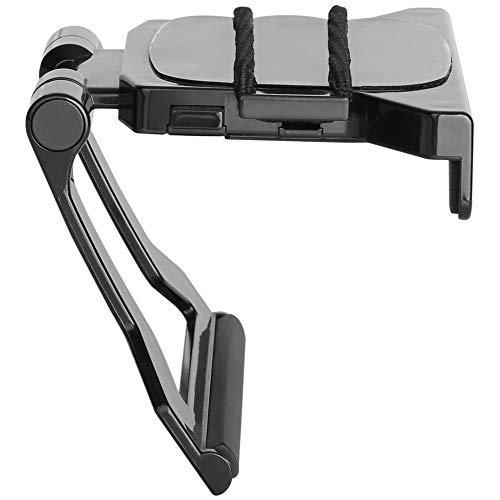
The VIVO Adjustable Top Shelf TV Clip Mount Holder, model Mount-SFTV2, is the only pick in this guide that needs no screws, no adhesive, and no wall at all. The bracket clips onto the top edge of the television and carries a 12-inch platform that sticks out behind the screen, 4.6 inches deep. A streaming stick or small player rests on that platform, where it is visible, reachable, and a few inches from the HDMI port. That visibility is the point. Households that unplug a stick to take it traveling, households that rent and cannot drill, and households that simply like to see the device and its status light all get what they want from a clip-on shelf.
The clip mechanism is the detail that decides whether this pick works in a given room. The bracket adjusts to the thickness of the television top edge and grips it from the front and the back, so the platform stays level even when a player and a cable sit on it. The platform itself weighs about 132 grams, which keeps the load on the clip light. A stick-class player adds only a few ounces more, so the total load stays well inside what a television top edge can carry. Households should still check the top edge of their set before ordering: a television with a very thin edge, a curved top, or a speaker bar built into the top will not give the clip a flat surface to grip, and a clip that cannot sit flat will tilt the platform.
The 12-inch platform is wide enough for a stick and a small player side by side, or for a stick with its power adapter and a short cable coiled beside it. The 4.6-inch depth is the number to measure against the device: a stick at about 3.9 inches long sits comfortably inside the depth, with room for the HDMI plug at the back and the cable to drop behind the television. A puck player at about 3.0 to 3.4 inches long also fits, with the extra depth left for cable slack. The platform is open on all sides, so an infrared remote reaches the player directly, and the player gets full airflow, which matters for a device that runs warm during a long movie night.
Cable routing on a top shelf is the tidiest in this guide. The HDMI cable drops a few inches from the platform to the port on the back of the set, and the USB power cable does the same to the television USB port if the set has one. Neither cable needs to run down the wall to a floor outlet, and neither cable hangs in the air where it can be snagged. The open platform also makes the setup easy to change: lift the stick off the shelf, unplug it, and pack it for a trip, then set it back down and plug it in again on return, with no tools and no adhesive to replace.
The VIVO pick is the mid-range choice for households that value access over invisibility. It costs more than the budget cradle and bracket because it carries the adjustable clip mechanism and the full shelf, but it is still a simple mechanical product with no electronics to fail. The three-year warranty on the bracket backs that simplicity. Households that want the stick completely hidden should choose the ECHOGEAR panel or the TotalMount cradle instead, but households that want the stick where they can see it and reach it will find the clip-on shelf the most convenient holder in this guide.
Specs
- Brand: VIVO
- Product: adjustable top shelf TV clip mount holder
- Model: Mount-SFTV2
- Platform length: 12 inches
- Item depth: 4.6 inches
- Designed for: Fire TV, Roku 3, Apple TV, and more
- Mounting type: top shelf clip mount on the television
- Item weight: about 132 grams
- Color: black
- Warranty: 3 years
- Tier: Mid-range
5. ECHOGEAR Universal Streaming Device Mount, Echo-SDMU

The ECHOGEAR Universal Streaming Device Mount, model Echo-SDMU, is the premium pick in this guide and the one to buy when the household wants a single holder that will outlast several generations of streaming devices. The mount is a steel panel that bolts to a VESA hole on the back of the television, and the player straps to the panel with two hook-and-loop straps. That combination, a bolted panel plus adjustable straps, is the most secure mounting in this guide, and it is the reason the pick sits in the premium tier. Nothing about it depends on adhesive, and nothing about it depends on the exact dimensions of one player.
The panel is built from alloy steel and finished in black, and the package includes the universal mount plate, two hook-and-loop straps, and a set of M4, M6, and M8 screws with washers and spacers. The screw set matters, because televisions from different makers use different VESA screw sizes, and the included set covers the common ones without a trip to a hardware store. The item weighs about 1.2 pounds, and the package measures about 9 by 6.8 by 1.5 inches. The mount is rated for devices up to 3 pounds, which is far more than any stick-class player needs, and that headroom is the point: a household can strap a stick to the panel today and a larger streaming box to the same panel tomorrow without changing the mount.
Compatibility is the broadest in this guide. The manual lists Roku models 2, 3, and 4, plus Roku Express, Express Plus, Premiere, Premiere Plus, and Ultra, alongside Apple TV from the first generation through the fourth generation and Apple TV 4K, Amazon Fire TV, TiVo Mini, Slingbox, and other small AV devices up to 3 pounds. That list covers the whole stick-and-box class, and the straps make the fit forgiving: a thin stick straps flat against the panel, a thicker puck straps just as well, and a small box straps with the same two straps. The open strap design also leaves the front of the player visible, so the status light shows and an infrared remote can reach a player mounted near the edge of the television.
Installation is the most involved in this guide, and that is the honest trade-off for the security. The panel bolts to a VESA hole, which means the household either mounts it while the television is off its wall mount, or reaches behind a wall-mounted set to thread a screw through the panel into the VESA point. The straps then wrap around the player and through the slots in the panel, and the household tightens them until the player cannot slide. The whole job takes longer than pressing an adhesive cradle onto the back of the set, but the result is a player that cannot drop, slide, or peel loose, even through years of heat cycles behind a television that runs every evening.
The VESA placement has one more advantage that the adhesive picks cannot match. When the panel bolts to the television, the player travels with the screen. A household with an articulating wall mount can swing the television to face the kitchen, and the player moves with it, keeping the HDMI cable short and unstressed. An adhesive cradle travels with the screen too, but a wall bracket does not, and a wall bracket behind a swinging television forces the HDMI cable to stretch and flex. The VESA panel avoids that entirely, which is why it is the right premium pick for households with a full-motion wall mount.
The ECHOGEAR mount is not a stick-only holder, and the guide says so plainly. It is a universal panel for streaming devices, and a bare stick is the smallest device it holds. A household that owns only one Roku Express HD and wants the snuggest possible fit should buy the TotalMount cradle instead. But a household that owns several players, expects to change them, or wants the most permanent install available should buy this panel, because it is the one pick in this guide that will still be on the back of the television when the third player replaces the first.
Specs
- Brand: ECHOGEAR
- Product: universal streaming device mount
- Model: Echo-SDMU
- Material: alloy steel
- Color: black
- Mounting type: wall mount via TV VESA holes
- Maximum weight capacity: 3 pounds, about 1.36 kilograms
- Item weight: about 1.2 pounds, about 0.54 kilograms
- Package dimensions: about 9 by 6.8 by 1.5 inches
- Included: universal mount plate, 2 hook-and-loop straps, M4, M6, and M8 screws, washers, spacers, and manual
- Compatible with: Roku 2, 3, 4, Express, Express Plus, Premiere, Premiere Plus, and Ultra, Apple TV first through fourth generation and 4K, Amazon Fire TV, TiVo Mini, Slingbox, and other small AV devices up to 3 pounds
- Tier: Premium
Before You Buy: Checks for Streaming Stick Holders
Run four checks before ordering any holder in this guide, and the install will go smoothly the first time.
First, measure the player. Length, width, and thickness, with a ruler, in inches. Compare all three numbers against the fit window in the Specs block of the holder being considered. The most common mistake in this product class is ordering a cradle molded for one model of a player family and discovering the household owns a wider model in the same family. The Roku Express family is the classic example: the standard Express HD is 3.0 inches wide and the Express 4K is 3.4 inches wide, and a cradle for one will not take the other.
Second, check the remote. A simple infrared remote needs a clear line of sight to the player, so the holder must sit near an edge of the television where the signal can reach it. A voice remote passes through the television panel, so the holder can sit anywhere behind the screen. Look for a microphone button on the remote to tell which type the household owns.
Third, check the mounting surface. Adhesive needs a smooth, flat, unvented section of the television rear casing, cleaned with isopropyl alcohol and left to cure for at least an hour. Screws need a wall or a VESA hole, and a VESA panel needs the right screw size from the included set. A clip needs a flat top edge on the television. Pick the holder whose fixing matches the surface available in the room, not the holder with the longest feature list.
Fourth, check the cables. Measure from the HDMI port to the spot where the holder will sit, and confirm the HDMI cable and the USB power cable reach without pulling tight. If the television has a powered USB port next to the HDMI inputs, plan to use it, because it removes the long wire down to a wall outlet and keeps the whole install behind the screen.
Frequently Asked Questions
Will a streaming stick holder fit any streaming stick?
No, and the fit window is the reason. Sticks and pucks differ in length, width, and thickness by fractions of an inch, and each holder in this guide publishes a fit window or a list of compatible models. Measure the player with a ruler and compare all three numbers against the Specs block before ordering, and check the model number printed on the underside of the player when the holder is molded for one specific model.
Can I mount a streaming stick behind a wall-mounted television?
Yes. An adhesive cradle or a VESA panel bolts to the back of the television itself, so the player travels with the screen, and the HDMI cable stays short. A wall bracket works too, but it mounts to the wall rather than the television, so a household with a full-motion wall mount should prefer a panel or cradle that moves with the screen.
Do I need a holder if my stick plugs directly into the HDMI port?
A stick that plugs straight into the HDMI port can hang from the port, and many households leave it that way. A holder is worth adding when the stick slips out, when the cable pulls the stick at an angle, when the stick sits behind the television where the remote cannot reach it, or when the household wants the stick secured so it cannot be knocked loose during cleaning.
Will the remote still work with the stick mounted behind the television?
It depends on the remote. A voice remote passes through the television panel, so it works with the stick hidden in the center of the back of the set. A simple infrared remote needs a clear path, so the stick must sit near the top, side, or bottom bezel, facing outward, where the signal can reach it directly or bounce off the wall behind the set.
Conclusion
The best streaming stick holder is the one that matches the player, the remote, and the room, and the five picks in this guide cover that whole range. The TotalMount for Roku Express is the top pick for Roku Express HD owners, because the custom-molded cradle fits that player exactly and the adhesive install takes minutes. The SKLK-SEL Narrow bracket is the budget wall mount for slim puck players, with a depth window that suits the Roku Express class best. The Monzlteck metal bracket is the mid-range wall mount for households that want one mount for streaming players, routers, and modems. The VIVO clip-on shelf is the mid-range pick for renters and travelers who want the stick visible and reachable without screws or adhesive. The ECHOGEAR steel VESA panel is the premium pick for households that want the most permanent install and the broadest compatibility, holding any stick or small box up to 3 pounds.
Before ordering, measure the player, check the remote type, confirm the mounting surface, and confirm the cables reach. Those four checks take five minutes and prevent the two mistakes that dominate this product class: ordering a cradle for the wrong model in a player family, and ordering a bracket whose depth window does not match the thickness of the stick. Get those right, and any of the five holders in this guide will give the stick a fixed home behind the screen, with the remote working, the cables short, and the player exactly where it belongs.
Product and ASIN Reference
| Product | ASIN |
|---|---|
| TotalMount for Roku Express | B083F7SC56 |
| SKLK-SEL Adjustable Wall Mount Holder, Narrow | B0D62ZFMVK |
| Monzlteck Adjustable Small Device Wall Mount Holder | B0C34G61FX |
| VIVO Adjustable Top Shelf TV Clip Mount Holder, Mount-SFTV2 | B07KGG7RHM |
| ECHOGEAR Universal Streaming Device Mount, Echo-SDMU | B01M4NQ0SC |