Our Short List of 3
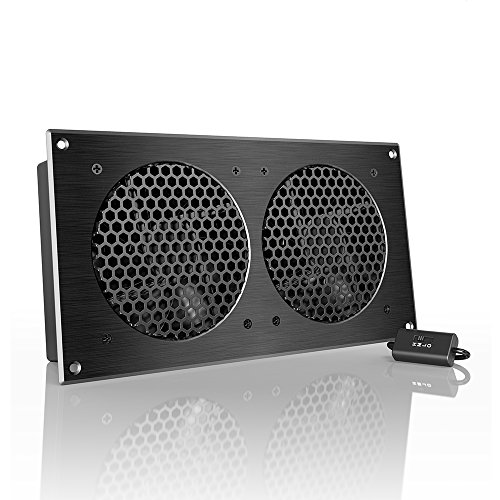
- Tier: Budget
- Type: Cabinet-mount fan system
- Fans: Two 120mm fans
- Airflow: 104 CFM

- Tier: Mid-range
- Type: Cabinet-mount fan system with thermostat
- Fans: Two 120mm fans
- Airflow: 104 CFM
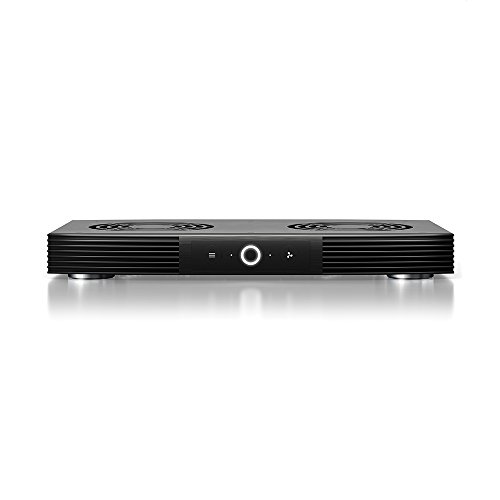
- Tier: Mid-range
- Type: Component-top cooling system, top exhaust
- Fans: Two 120mm top-exhaust fans
- Airflow: 140 CFM
All 5 Picks at a Glance
| Product | Specs | Action |
|---|---|---|
| 1. AC Infinity AIRPLATE S7 |
| Check price on Amazon |
| 2. AC Infinity AIRPLATE T7 |
| Check price on Amazon |
| 3. AC Infinity AIRCOM S7 |
| Check price on Amazon |
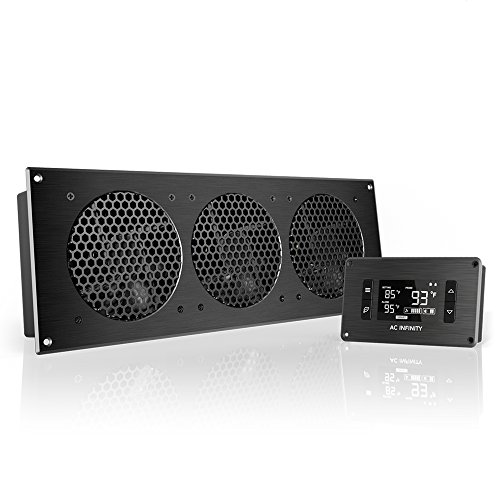 4. AC Infinity AIRPLATE T9 |
| Check price on Amazon |
 5. AC Infinity AIRCOM T9 |
| Check price on Amazon |
Key takeaways
- Compare the best home theater fans for AV cabinets and receivers, with airflow, noise, thermostat control and exhaust direction explained for cooling.
Quick answer: The best home theater fan for most AV cabinets is the AC Infinity AIRPLATE T7, a dual-fan cabinet system with thermostat control that moves 104 CFM at 19 dBA and only switches on when the cabinet warms up. If the budget is tight and manual speed control is enough, the AIRPLATE S7 uses the same dual-fan frame for less. For a receiver or amplifier that needs cooling on top of the component itself, the AIRCOM S7 sits directly on the unit and exhausts heat upward, while the AIRCOM T9 adds an LCD thermostat and 210 CFM for large receivers. The AIRPLATE T9 is the pick for wide entertainment centers, with three fans and 156 CFM behind a single thermostat controller.
As an Amazon Associate, we earn from qualifying purchases.
Table of Contents
- Why Home Theater Gear Runs Hot
- How to Choose a Home Theater Fan
- Quick Comparison
- 1. AC Infinity AIRPLATE S7
- 2. AC Infinity AIRPLATE T7
- 3. AC Infinity AIRCOM S7
- 4. AC Infinity AIRPLATE T9
- 5. AC Infinity AIRCOM T9
- Placement and Airflow Basics
- Frequently Asked Questions
- Conclusion
- Product and ASIN Reference
Why Home Theater Gear Runs Hot
A modern home theater stack is a small furnace with a remote control. An AV receiver can draw a steady load while decoding surround sound, a game console renders graphics for hours, a DVR records in the background, and a cable box never fully sleeps. Each of those boxes turns most of the electricity it consumes into heat, and when they sit together on shelves inside a closed wooden cabinet, that heat has nowhere to go. The air inside the cabinet warms up, the components draw in warmer air, and their internal fans spin faster and louder. Over a long movie night or a weekend of gaming, cabinet temperatures climb well above room temperature, and the equipment starts working against its own cooling.
Heat matters for two reasons that show up in everyday use. First, it shortens the working life of electronics. Capacitors, power supplies, and hard drives all age faster when they run hot, and a receiver that spends years in a warm cabinet is more likely to develop faults than one kept near room temperature. Second, heat makes noise. The small fans built into receivers and consoles ramp up as temperatures rise, and that whir competes with quiet dialogue and soft musical passages. A cabinet fan system fixes the root cause instead of the symptom: it moves warm air out of the cabinet and pulls cooler room air in, so the components stay closer to room temperature and their own fans stay quiet.
The fans in this roundup are built for exactly that job. They are not room fans, and they are not the small USB fans that clip onto a single streaming stick. Each one is a purpose-built cooling system for an AV cabinet or for the component sitting inside it, with published airflow and noise figures, a controller matched to the job, and a frame or housing that fits standard cabinet shelves and receiver widths. Two of the five mount into a cabinet panel and vent the whole enclosure. Two sit on top of a receiver or amplifier and cool that component directly. One does the cabinet job at a larger scale for wide entertainment centers. Together they cover the three layouts most home theaters actually have: a closed cabinet with shelves, an open rack with a hot receiver, and a wide media console with several warm boxes.
A note on what these fans cannot do is worth stating plainly. A cabinet fan cannot cool a room, and it cannot fix a cabinet that has no air path at all. If a cabinet is sealed on every side with no gap for intake air, even the strongest fan will only stir warm air around. The placement section later in this guide explains how to give these fans the intake and exhaust paths they need. A fan also cannot repair a component that already overheats because its own vents are blocked by dust or because it sits directly on top of another hot box with no gap between them. Start with spacing and clear vents, then add a fan system to move the air.
How to Choose a Home Theater Fan
Choosing a home theater fan starts with deciding what needs cooling: the cabinet or the component. That single decision narrows the field more than any other, because cabinet systems and component systems mount differently, move air differently, and solve different problems. A cabinet system mounts in a panel or on a shelf and ventilates the whole enclosure. A component system sits on top of one hot box and pulls heat off that box alone. A home theater with a closed cabinet and several warm components usually needs a cabinet system first. A home theater with an open shelf and one very hot receiver usually needs a component system first. Some setups need both, and the controller on the larger systems in this roundup can drive extra fans for exactly that reason.
Cabinet systems versus component systems
Cabinet systems, such as the AIRPLATE models in this roundup, are flat fan panels that mount into a hole cut in a cabinet wall or sit on a shelf, with a separate controller. Their job is to exchange the air in the whole enclosure: warm air leaves through the fans, cooler room air enters through gaps and vents, and every component inside benefits. They suit closed cabinets, media consoles with doors, and built-in shelving where heat collects. Component systems, such as the AIRCOM models, are low boxes that sit directly on top of a receiver, amplifier, or DVR. Their job is to pull heat off one component and push it away from that component, which suits open racks and single hot boxes. The two types are not interchangeable. A cabinet fan mounted on a shelf will not cool a receiver as directly as a component fan sitting on it, and a component fan on a receiver will not ventilate a closed cabinet.
Airflow and noise
Airflow is published in cubic feet per minute, written as CFM, and it tells how much air a fan system moves at full speed. A dual-fan cabinet system moving 104 CFM is enough for a standard cabinet with a receiver and a console. A three-fan system moving 156 CFM suits a wide console with several components. A component system moving 210 CFM suits a large receiver that runs hot under load. More airflow is not always better, because a fan system only needs to move enough air to keep the cabinet near room temperature, and extra airflow brings extra noise. Noise is published in dBA, and the models here range from 19 dBA to 21 dBA at full speed, which is quiet enough to sit unnoticed behind dialogue. The thermostat models in this roundup matter here: they run slowly or not at all when the cabinet is cool, and only ramp up when temperatures rise, so the fan is quietest during quiet scenes and loudest only when the gear is working hard.
Thermostat control versus manual speed control
Manual speed control means setting a fan speed and leaving it there. It is simple, reliable, and the right choice when the gear runs at a steady temperature, or when the cabinet fan should run at a low speed whenever the system is on. Thermostat control means the fan watches a temperature probe and adjusts itself: off or slow when cool, faster when warm. It is the better choice for gear whose heat output varies, such as a receiver that idles during dialogue and works hard during action scenes, or a console that only heats up during gaming. The thermostat models in this roundup also add an LCD display that shows the cabinet temperature and the fan speed, which makes it easy to see whether the system is keeping up. The extra cost of a thermostat model buys silence during quiet viewing and automatic response during heavy use, and for most living rooms that trade is worth it.
Exhaust direction and mounting
Exhaust direction decides where the warm air goes, and it should match the cabinet layout. Top-exhaust component systems blow heat upward, which suits open racks and shelves with clearance above the receiver. A cabinet panel fan can be mounted to push air out of the back or side of the cabinet, which suits enclosed furniture. Before buying, measure the space. Cabinet systems need a mounting hole of a published size, and the AIRPLATE models include a mounting template for cutting it. Component systems need a flat top on the receiver with enough clearance above it for the exhaust, and the 17-inch models need a receiver at least that wide. Check the depth too: a 13.5-inch deep component system overhangs a shallow receiver. Measure twice, because a fan system that does not fit the cabinet is a return, not a solution.
Power, bearings, and build
All five systems in this roundup use dual-ball bearing fans rated for 67,000 hours of operation, which is the maker’s published life expectancy for the fan family. Dual-ball bearings matter because cabinet fans often mount vertically, and sleeve bearings wear faster in that orientation. Power comes from a wall adapter on the component systems and from a wall outlet or USB port on the cabinet systems, with a cord long enough to reach a power strip behind the cabinet. The cabinet systems use an aluminum frame with a brushed finish that blends into dark furniture, and the component systems use an alloy steel housing strong enough to support another component on top, up to 30 lb on the larger model. A fan system is a permanent part of the cabinet, so build quality and a long bearing life are worth more than a small difference in airflow.
Quick Comparison
| Product | Tier | Type | Airflow | Noise |
|---|---|---|---|---|
| AC Infinity AIRPLATE S7 | Budget | Cabinet-mount fan system | 104 CFM | 19 dBA |
| AC Infinity AIRPLATE T7 | Mid-range | Cabinet-mount fan system with thermostat | 104 CFM | 19 dBA |
| AC Infinity AIRCOM S7 | Mid-range | Component-top cooling system, top exhaust | 140 CFM | 19 dBA |
| AC Infinity AIRPLATE T9 | Premium | Cabinet-mount fan system with thermostat | 156 CFM | 21 dBA |
| AC Infinity AIRCOM T9 | Premium | Component-top cooling system, top exhaust | 210 CFM | 21 dBA |
1. AC Infinity AIRPLATE S7
- Tier: Budget
- Type: Cabinet-mount fan system
- Fans: Two 120mm fans
- Airflow: 104 CFM
The AIRPLATE S7 is the straightforward pick in this roundup: a dual-fan cabinet system with a manual multi-speed controller, no thermostat, and no display. It mounts into a cabinet panel or sits on a shelf, moves 104 CFM through two 120mm fans, and holds noise to 19 dBA at full speed. For a standard cabinet with a receiver, a console, and a streaming box, that is enough airflow to keep the enclosure near room temperature, and the manual controller lets the owner set a speed that balances cooling against silence and leave it there. It is the least expensive way to ventilate a closed cabinet properly, and it is the right choice when the gear inside runs at a fairly steady temperature.
The frame is the part of the S7 that shows its quality first. It is CNC-machined aluminum with a brushed black finish, sized at 11.69 x 6.3 x 1.3 in, and it looks like part of the furniture rather than an add-on. The two 120mm fans use dual-ball bearings rated for 67,000 hours, and the system can be powered from a wall outlet or a USB port. An included Turbo adapter raises performance by one quarter for cabinets that need a little more airflow, and up to six AIRPLATE S-series units can share one power source through daisy chaining, so a large cabinet with several compartments can be ventilated from a single outlet. The mounting template included with the unit marks the hole to cut, which makes installation a matter of measuring, cutting, and securing four screws.
The S7 suits owners who want a set-and-forget cabinet fan and do not need automatic temperature response. A cabinet that holds a receiver and a console used at similar intensity most evenings will sit at a steady temperature, and a fixed low or medium fan speed keeps it there without any attention. The S7 also suits secondary cabinets, such as a bedroom media console or a home office AV shelf, where a thermostat display would be unnecessary. Its limits are the limits of manual control: it cannot speed up when a long gaming session heats the cabinet, and it cannot slow down to silence during a quiet late-night show unless the owner adjusts it. Owners who want the fan to manage itself should look at the T7 next, which uses the same dual-fan frame with a thermostat controller added.
One practical point about the S7 is placement of the controller. The multi-speed controller sits inline on the cord, so it should end up somewhere reachable, such as on a shelf edge or near the cabinet door, rather than buried behind the receiver. Once the speed is set, the controller rarely needs attention, but it is worth routing the cord with that in mind during installation. The S7 is also the easiest of the five to install, because there is no thermal probe to place and no display to mount. Cut the hole, mount the frame, set the speed, and the cabinet has steady ventilation.
2. AC Infinity AIRPLATE T7
- Tier: Mid-range
- Type: Cabinet-mount fan system with thermostat
- Fans: Two 120mm fans
- Airflow: 104 CFM
The AIRPLATE T7 takes the same dual-fan cabinet frame as the S7 and adds the feature that matters most in a living room: thermostat control. A thermal probe sits inside the cabinet, the controller watches the temperature, and the fans speed up only when the cabinet warms up. During quiet viewing the fans run slowly or not at all, and during a long action movie or gaming session they ramp up to move the full 104 CFM. The published noise figure is the same 19 dBA as the S7 at full speed, and the dimensions are nearly identical at 11.7 x 6.1 x 1.3 in, so the T7 fits the same cabinets and the same mounting hole pattern. The difference is entirely in behavior, and for a cabinet whose heat output varies through the evening, that behavior is worth the step up.
The thermostat controller is a separate unit with an LCD display that shows the cabinet temperature and the fan speed, and it mounts in its own cutout or sits on a shelf. The thermal probe runs on a cord 6 feet long, which is enough to place the probe near the hottest component, usually on top of the receiver or beside the console, while the controller sits somewhere visible. The controller can also drive additional AIRPLATE S-series fans, so a cabinet with two compartments can pair a T7 in the main compartment with an S-series unit in the second, both following the same thermostat. Power draw is 3.3 W, the fans use dual-ball bearings rated for 67,000 hours, and the frame is the same CNC-machined aluminum as the S7.
The T7 is the pick for most home theaters because it matches the way home theater gear actually behaves. A receiver idles at low heat during dialogue, works hard during action scenes, and cools down during credits. A manual fan set fast enough for the action scenes is louder than it needs to be during the dialogue, and a manual fan set quiet enough for the dialogue cannot keep up with the action scenes. The T7 resolves that by following the temperature instead of a fixed setting. It is also the best choice for cabinets that are used irregularly, such as a weekend movie room, because the fans do not run when the room is empty and the gear is off.
There are two things to get right when installing the T7. First, the probe placement decides how the system behaves. A probe placed against a cool cabinet wall will read low and the fans will start late, while a probe placed directly on a hot receiver vent will read high and the fans will run more than needed. The best spot is in free air near the hottest component, not touching it. Second, the controller needs a visible home. The LCD display is only useful if it can be seen, so mounting it near the cabinet door or on an open shelf is better than hiding it behind the receiver. With those two details handled, the T7 runs the cabinet cooling on its own for years.
3. AC Infinity AIRCOM S7
- Tier: Mid-range
- Type: Component-top cooling system, top exhaust
- Fans: Two 120mm top-exhaust fans
- Airflow: 140 CFM
The AIRCOM S7 solves a different problem from the cabinet systems above: it cools one component directly instead of ventilating the whole cabinet. It is a low box, 11.6 x 6.3 x 1.5 in, that sits on top of a receiver, amplifier, or DVR and pulls heat upward through two 120mm top-exhaust fans. It moves 140 CFM at 19 dBA, which is more airflow than the cabinet systems in a smaller footprint, because all of that air is dedicated to one hot box. For an open rack or an open shelf where a receiver runs hot and there is no closed cabinet to ventilate, the S7 is the most direct fix available.
The S7 uses a thermal trigger and speed control rather than a full thermostat display. The unit watches its temperature sensor and starts the fans when the component warms up, then adjusts speed to match. There is no LCD display to mount and no probe to place, which makes installation as simple as setting the box on top of the receiver, plugging in the mains adapter, and leaving it alone. The housing is alloy steel, the fans use dual-ball bearings rated for 67,000 hours, and the unit runs on 12V DC from the included wall adapter. The low profile, only 1.5 inches tall, means it fits on shelves with limited clearance above the receiver, and its 12-inch width matches standard receivers without overhang.
The S7 suits a single hot component in an otherwise open setup. A receiver that shuts down during long movies, a DVR that runs warm around the clock, or an amplifier that heats the shelf above it are all jobs for a component-top system rather than a cabinet fan, because the heat is concentrated in one box and the rest of the shelf is already ventilated by the open room. It also suits renters and owners who cannot cut a mounting hole in a cabinet, since it needs no installation beyond placement. Its limit is scope: it cools the component it sits on, and it does nothing for the other boxes on the shelf or for a closed cabinet. A home theater with a closed cabinet and several warm components needs a cabinet system first, and the S7 is the add-on for the one box that still runs hottest.
Placement matters for the S7 in one specific way: the top of the receiver must be clear. The S7 pulls air through the receiver vents below it and exhausts upward, so anything stacked on top of the S7 blocks the exhaust, and anything between the S7 and the receiver, such as a book or a cloth, blocks the intake. Keep the stack clear, keep the receiver vents free of dust, and leave a few inches of clearance above the S7 for the warm air to escape. With those conditions met, the S7 keeps a hard-working receiver near room temperature without adding audible noise to the room.
4. AC Infinity AIRPLATE T9
- Tier: Premium
- Type: Cabinet-mount fan system with thermostat
- Fans: Three 120mm fans
- Airflow: 156 CFM
The AIRPLATE T9 is the cabinet system for wide entertainment centers. It stretches to 17.5 x 6.1 x 1.3 in with three 120mm fans, moves 156 CFM at 21 dBA, and carries the same thermostat controller with LCD display as the T7. A standard cabinet with one receiver and one console is served well by the dual-fan T7, but a wide console with a receiver, a console, a DVR, and a streaming box generates more heat across a wider area, and the T9 covers that width with a third fan and half again as much airflow. It mounts into a single long cutout, 15.75 x 5.35 in, and the included mounting template marks the hole.
The thermostat behavior is the same as the T7, scaled up. The thermal probe, on a cord 6 feet long, sits near the hottest component, and the controller ramps all three fans together as the cabinet warms. The display measures 2.25 x 1.25 in and shows temperature and fan speed, and the controller can drive additional AIRPLATE S-series fans, so a very wide console can pair a T9 in the main compartment with an extra fan in a side compartment under the same thermostat. Power draw is 3.6 W, the fans use dual-ball bearings rated for 67,000 hours, and the operating range runs from 0 to 158 degrees Fahrenheit. The frame is aluminum with a brushed finish, and the unit mounts horizontally or vertically, which suits cabinets where the long side fits better on a side panel than on the back.
The T9 is the pick when the cabinet is wide, the component count is high, or the room runs warm. A media wall with four or five boxes, a built-in cabinet with limited ventilation, or a living room that stays warm in summer all push a dual-fan system toward its limit, and the T9 adds the headroom to keep temperatures steady without running at full speed all evening. Its limits are size and noise at full speed: at 21 dBA it is slightly louder than the dual-fan models, and at 17.5 inches wide it needs a cabinet panel wide enough for the mounting hole. Measure the panel before ordering, and check that the controller has a visible home near the cabinet door.
One detail worth planning is the intake path. A three-fan exhaust moving 156 CFM needs a matching intake, or it will pull air through every gap in the cabinet and work harder than it should. The placement section below explains how to size intake vents, and the short version is that the intake area should roughly match the exhaust area. A wide console with a T9 and no intake vent will still cool better than no fan at all, but it will cool far better with a proper intake, and the fans will run slower and quieter as a result.
5. AC Infinity AIRCOM T9
- Tier: Premium
- Type: Component-top cooling system, top exhaust
- Fans: Three 120mm top-exhaust fans
- Airflow: 210 CFM
The AIRCOM T9 is the flagship component cooler in this roundup, and it is the pick for the largest, hottest receivers. It measures 17 x 13.5 x 1.5 in, sits on top of a full-size receiver or amplifier, and moves 210 CFM through three 120mm top-exhaust fans at 21 dBA. That is the highest airflow of the five, dedicated entirely to one component, and it is enough for a flagship receiver driving a full surround setup through a long movie. The housing is alloy steel and supports up to 30 lb on top, so another component can sit on the T9 itself, which helps in racks where shelf space is tight.
The T9 carries the most capable controller of the five. An LCD thermostat shows the component temperature, the operating mode, and the fan speed in six steps, with alarm alerts, a fan-failure trigger, and backup memory that keeps the settings after a power cut. The controller also has ports to drive up to six additional AIRPLATE cabinet fans or MULTIFAN component fans, so the T9 can become the control center for a whole rack: the receiver gets direct cooling from the T9, and the cabinet fans follow the same thermostat. Power draw is 9.5 W on 12V DC from a mains adapter, the cord is 6 feet long, and the fans use dual-ball bearings rated for 67,000 hours with PWM motors that keep speed changes smooth and quiet.
The T9 suits a large receiver that runs hot under load, a rack with a flagship amplifier, or a DVR that records around the clock in a warm room. Its thermal control means it stays quiet during dialogue and only works hard during demanding passages, and the alarm alerts give warning if a fan fails or temperatures climb past the set point. The six-speed control is finer than the simpler thermal trigger on the S7, which matters when the goal is to hold a receiver at a steady temperature rather than simply switching the fans on and off. For a home theater where the receiver is the most expensive component in the rack, the T9 is the cooling that protects that investment most directly.
Fit is the main thing to check before ordering. The T9 needs a receiver at least 17 inches wide and 13.5 inches deep, with clearance above it for the top exhaust, and it adds 1.5 inches of height to the stack. A receiver in a tight shelf with no clearance above will not benefit from a top-exhaust cooler, and a shallow receiver will leave the T9 overhanging the front or back. Measure the receiver top and the shelf clearance, confirm the depth, and the T9 will sit flat, run quietly, and keep the receiver cool through the longest viewing sessions.
Placement and Airflow Basics
A fan system only works as well as the air path around it, and a little planning during installation pays off every evening the system runs. The basic rule is simple: warm air out, cool air in, with a clear path between the two. An exhaust fan without an intake pulls air through cracks and gaps, which works, but it works harder and louder than a fan with a proper intake vent. An intake vent should sit low in the cabinet, near the floor or at the bottom of a door, so cool room air enters at the bottom, rises past the warm components, and leaves through the fan at the top or back. That bottom-to-top path matches the way warm air naturally rises, and it keeps every shelf in the path of fresh air.
For cabinet systems, the exhaust should sit high. Warm air collects at the top of a cabinet, so a panel fan mounted near the top of the back or side panel removes the warmest air first. A fan mounted low in the cabinet exhausts the coolest air and leaves the warm air trapped above it. If the cabinet has two compartments, each one needs its own exhaust or a shared fan with an opening between the compartments, because a sealed divider blocks airflow as surely as a sealed door. The thermostat probe belongs near the hottest component, in free air, not touching a vent or a heat sink, so it reads the cabinet air temperature rather than one hot spot.
For component systems, the rules are simpler: clear the top of the component, clear the space above the fan, and keep the vents free of dust. A receiver with a layer of dust on its vents cannot draw in cool air, and no fan on top can fix that. A quick cleaning of the vents with a dry cloth or a soft brush before installing the fan is worth doing, and repeating it a few times a year keeps the system working at its published airflow. Cables deserve a thought too. A thick bundle of HDMI and power cables draped across a vent blocks airflow, and routing cables along the sides of the cabinet keeps the air path open.
Noise deserves a final note. All five systems in this roundup publish noise figures between 19 dBA and 21 dBA at full speed, and the thermostat models rarely run at full speed in a living room. If a fan is audible during quiet scenes, the usual causes are a probe placed too close to a hot vent, which makes the fan run fast, or an intake that is too small, which makes the fan work hard. Moving the probe a few inches and opening up the intake usually quiets the system without any loss of cooling. A fan that hums or rattles, rather than producing smooth airflow noise, usually means the frame is mounted loosely or the unit is touching a shelf edge, and tightening the mounting screws or adding a small gap solves it.
Frequently Asked Questions
Do home theater fans help if the cabinet doors stay closed?
Yes, closed doors are exactly when cabinet fans help most, because a closed cabinet traps heat that would otherwise escape into the room. A panel fan exhausts the warm air and pulls cool air in through intake gaps, so the cabinet stays near room temperature even with the doors shut. The intake path matters here: leave a gap at the bottom of the door or add a vent low in the cabinet so the fan has cool air to draw in.
Should the fan blow air into the cabinet or out of it?
Out of it, in almost every home theater setup. Exhausting warm air from the top or back of the cabinet and letting cool room air enter low down follows the natural rise of warm air and cools every shelf on the way. Blowing air into a cabinet can work in a dusty room where the intake can be filtered, but for most living rooms an exhaust setup with a low intake is simpler and more effective.
How loud are cabinet cooling fans during a quiet movie?
The systems in this roundup publish 19 dBA to 21 dBA at full speed, which is quiet enough to sit unnoticed behind dialogue, and the thermostat models run slower than full speed most of the time. During quiet scenes the cabinet is usually cool enough that a thermostat fan runs at low speed or not at all. If a fan is audible during a quiet passage, check the probe placement and the intake size before assuming the fan is too loud.
Can one fan system cool a receiver and a game console together?
Yes, if it is a cabinet system sized for the whole enclosure. A dual-fan cabinet system moving 104 CFM handles a standard cabinet with a receiver and a console, and a three-fan system moving 156 CFM handles a wide console with several components. A component-top system cools only the box it sits on, so it is the wrong tool for cooling two boxes at once. Size the fan to the cabinet, not to a single component, when several boxes share one enclosure.
Conclusion
A home theater runs hot because several warm boxes share a small space, and the fix is to move that warm air out before it builds up. For most cabinets, the AC Infinity AIRPLATE T7 is the best balance of airflow, noise, and automatic control, with its thermostat doing the work of watching the temperature so the owner does not have to. The AIRPLATE S7 covers the same cabinet at a lower tier for owners who prefer a manual speed setting, and the AIRPLATE T9 scales the same idea to wide entertainment centers with three fans and 156 CFM. For a single hot receiver on an open shelf, the AIRCOM S7 cools the component directly, and the AIRCOM T9 adds an LCD thermostat, six speeds, and 210 CFM for the largest receivers. Measure the cabinet, match the fan type to the layout, give the system a proper intake, and the gear will run cooler, quieter, and longer.
Product and ASIN Reference
| Product | ASIN |
|---|---|
| AC Infinity AIRPLATE S7 | B009CO543S |
| AC Infinity AIRPLATE T7 | B00QFWWZQO |
| AC Infinity AIRCOM S7 | B01LVW4SLP |
| AC Infinity AIRPLATE T9 | B00QFXC4MS |
| AC Infinity AIRCOM T9 | B01LW1Q4X9 |