Our Short List of 3

- Best for: High-volume shipping and warehouse labels in a 4-inch format.
- Print method: thermal transfer and direct thermal
- Resolution: 203 dpi
- Maximum print width: 4 inches
- Print speed: up to 14 inches per second

- Best for: Product and compliance labels with small text and dense barcodes.
- Print method: thermal transfer and direct thermal
- Resolution: 300 dpi
- Maximum print width: 4 inches
- Connectivity: Serial, USB, Ethernet, Bluetooth
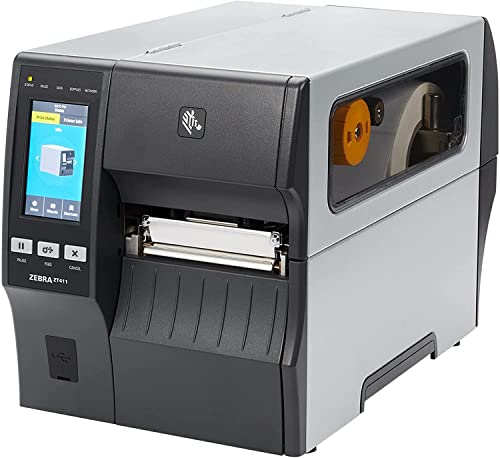
- Best for: Micro labels on electronics, circuit boards, and small pharma parts.
- Print method: thermal transfer
- Resolution: 600 dpi
- Maximum print width: 4 inches
- Print speed: 4 inches per second
All 4 Picks at a Glance
| Product | Specs | Action |
|---|---|---|
| Zebra ZT411 203 dpi |
| Check price on Amazon |
| Zebra ZT411 300 dpi |
| Check price on Amazon |
| Zebra ZT411 600 dpi |
| Check price on Amazon |
 SATO CL4NX Plus |
| Check price on Amazon |
Key takeaways
- Compare five industrial thermal-transfer printers with ribbon support, from 203 dpi workhorses to a 600 dpi model, and pick the right one for your line.
Choosing an industrial thermal-transfer printer comes down to one question: how long must the label survive? Shipping cartons that live for a few days can use almost anything, but product, asset, and freezer labels that face heat, moisture, and rubbing need ink melted from a ribbon onto the label stock. Every printer below prints with a ribbon, so the print stays readable long after a direct-thermal label would fade. The differences that matter are resolution, speed, print width, and how the machine fits into your line.
This guide is for warehouse managers, shipping supervisors, and manufacturing teams who print hundreds or thousands of labels a day and need barcodes that scan the first time at the dock. Each printer was picked from its Amazon listing by model number, resolution, print method, and connectivity, so you can match the machine to the labels you actually print.
Quick Picks
As an Amazon Associate we earn from qualifying purchases.
| Product | Best for | Key spec |
|---|---|---|
| Zebra ZT411 203 dpi | Everyday shipping and warehouse labels | 203 dpi, up to 14 ips |
| Zebra ZT411 300 dpi | Smaller barcodes and denser label text | 300 dpi, 4-inch width |
| Zebra ZT411 600 dpi | Micro labels on electronics and pharma parts | 600 dpi, 4 ips |
| Zebra ZT231 Thermal Transfer | Smaller warehouses moving up from a desktop printer | 203 dpi, tear bar, 12 ips |
| SATO CL4NX Plus | Plants where new operators load ribbon every shift | 203 dpi, 14 ips, tutorial screen |
How to Choose
Match resolution to the smallest barcode you print
Resolution decides whether a barcode scans the first time or fails at the dock. Standard 4 by 6 shipping labels with large 1D barcodes print cleanly at 203 dpi, which is also the fastest and cheapest configuration. Step up to 300 dpi when labels carry small text, dense 2D codes, or compliance information that must stay legible at arm’s length. Save 600 dpi for micro labels on electronics, circuit boards, and pharma parts, where a code a few millimetres wide has to scan every time. Buying more resolution than your labels need costs speed and money, since finer heads print slower, so match the dpi to the smallest code you actually print.
Check ribbon capacity and media size before you commit
Industrial printers earn their keep by running long stretches without a supply change, so check ribbon length and roll size before you buy. The printers here take ribbons up to 450 or 600 metres and media rolls up to 8 or 10 inches in diameter, which means fewer stops on a busy line. Just as important, industrial printers take large rolls on 3-inch cores, and desktop-size rolls with small cores will not fit. Measure the labels and ribbons you already stock, confirm the core size and the maximum roll diameter in the listing, and budget for new label stock if you are moving up from a desktop printer.
Make sure the printer speaks your software’s language
A printer that cannot understand your shipping software is a very expensive paperweight, so check printer languages before you order. Zebra printers run ZPL and ZPL II natively, and the SATO CL4NX Plus emulates ZPL, DPL, and other languages, which is what lets it drop into a line built around another brand. Ethernet is the safest connection for a fixed packing station, since it keeps the printer on your network without depending on one computer. USB suits a single desk, while Wi-Fi and Bluetooth are optional extras on most of these models, so add them to the order now if you cannot run a cable to the spot where the printer will sit.
Size the duty cycle to your daily label volume
Print speed in inches per second only matters if the printer can sustain it across a whole shift. A small warehouse printing a few hundred labels a day does fine with the ZT231, which is built for light industrial work and moderate volume. A distribution centre printing thousands of labels across two or three shifts needs the heavier ZT411 or the SATO, with metal frames, larger memories, and field-installable options such as cutters, peelers, and rewinders. Ask how many labels you print on your busiest day, not your average day, and pick the printer whose daily capacity clears that number with room to spare.
The 5 Best Options
Zebra ZT411 203 dpi
- Best for: High-volume shipping and warehouse labels in a 4-inch format.
- Print method: thermal transfer and direct thermal
- Resolution: 203 dpi
- Maximum print width: 4 inches
- Print speed: up to 14 inches per second
High-volume shipping and warehouse labels in a 4-inch format.
203 dpi can blur very small text and dense 2D barcodes; step up to 300 dpi if your labels carry fine print.
The 203 dpi ZT411 is the workhorse of this list, and it fits the widest range of warehouse jobs. It prints shipping, inventory, and product labels at up to 14 inches per second, takes full 8-inch rolls on 3-inch cores, and connects over serial, USB, Ethernet, and Bluetooth, so it drops into most packing stations without new cabling. The 4.3-inch color touch display shows status at a glance, and the metal frame with a bi-fold door stands up to dusty floors. If your labels are mostly 4 by 6 shipping labels and standard barcodes, this is the configuration to start with.
Watch out for: 203 dpi can blur very small text and dense 2D barcodes; step up to 300 dpi if your labels carry fine print.
Zebra ZT411 300 dpi
- Best for: Product and compliance labels with small text and dense barcodes.
- Print method: thermal transfer and direct thermal
- Resolution: 300 dpi
- Maximum print width: 4 inches
- Connectivity: Serial, USB, Ethernet, Bluetooth
Product and compliance labels with small text and dense barcodes.
One Amazon buyer reported receiving a non-US model from a third-party seller on this listing; confirm the part number ZT41143-T010000Z and US power cord before you buy.
The 300 dpi ZT411 uses the same chassis, touchscreen, and connectivity as the 203 dpi model, but the finer printhead draws sharper text and smaller barcodes. That makes it the pick for product labels with small print, compliance labels, and GS1 barcodes that must scan at the dock or at a customer site. It still takes 8-inch rolls on 3-inch cores and the same ribbons, so supplies stay common across both ZT411 configurations. The trade-off is speed: the finer head runs slower than the 203 dpi head, so it suits label work where clarity matters more than raw throughput.
Watch out for: One Amazon buyer reported receiving a non-US model from a third-party seller on this listing; confirm the part number ZT41143-T010000Z and US power cord before you buy.
Zebra ZT411 600 dpi
- Best for: Micro labels on electronics, circuit boards, and small pharma parts.
- Print method: thermal transfer
- Resolution: 600 dpi
- Maximum print width: 4 inches
- Print speed: 4 inches per second
Micro labels on electronics, circuit boards, and small pharma parts.
The 600 dpi head runs at 4 inches per second, so large batches of ordinary labels take much longer than on the 203 dpi model.
The 600 dpi ZT411 is the specialist of the group, built for labels where a barcode a few millimetres wide has to scan every time. Electronics trays, circuit-board labels, and small pharma parts are the classic jobs, and the 600 dpi head keeps tiny text and dense 2D codes legible at sizes where 203 dpi turns to mush. It runs at 4 inches per second, so it is slower than its siblings, and it shares the same 4-inch width, touchscreen, and connectivity. Buy it only when your labels genuinely need that level of detail; for ordinary shipping labels it is more printer than the job needs.
Watch out for: The 600 dpi head runs at 4 inches per second, so large batches of ordinary labels take much longer than on the 203 dpi model.
Zebra ZT231 Thermal Transfer
The ZT231 is the entry point into Zebra’s industrial range, and it replaces the older ZT230 with roughly double the speed at 203 dpi. It prints up to 12 inches per second, has the same 4.3-inch color touchscreen as the bigger ZT411, and takes 8-inch rolls on 3-inch cores with 450-metre ribbons, so a small warehouse gets industrial media capacity without the top-tier chassis. Connectivity covers USB, serial, Ethernet, and Bluetooth, and a tear bar is fitted as standard. It has less memory and fewer metal parts than the ZT411, but for shipping and inventory labels at moderate volume it is the sensible starting point.
Specs
- Print method: thermal transfer and direct thermal
- Resolution: 203 dpi
- Maximum print speed: up to 12 inches per second
- Connectivity: USB, Serial, Ethernet, Bluetooth
- Media handling: tear bar fitted as standard
Best for: Small warehouses moving up from a desktop printer to industrial media capacity.
Watch out for: Zebra also sells a direct-thermal-only ZT231 that cannot take a ribbon; confirm the part number ZT23142-T01000FZ before ordering.
SATO CL4NX Plus
- Best for: Plants with frequent operator turnover where ribbon loading has to be simple.
- Print method: thermal transfer and direct thermal
- Resolution: 203 dpi
- Maximum print width: 4.1 inches
- Print speed: up to 14 inches per second
Plants with frequent operator turnover where ribbon loading has to be simple.
The Amazon listing is sold through a third-party seller (Spartan POS is named as manufacturer on the mirror); confirm the exact part number WWCLP1001 and what is in the box before ordering.
The CL4NX Plus is the easiest printer on this list for new operators to load. Its printhead opens to about 60 degrees, the ribbon take-up spindle is cordless, and the color screen plays tutorial videos for loading media and ribbon, so a new hire on a night shift can change supplies without calling a supervisor. It prints at up to 14 inches per second at 203 dpi, takes 10-inch media rolls and 600-metre ribbons, and connects over LAN, USB, serial, and Bluetooth, with a real-time clock fitted. It also emulates ZPL and other printer languages, which helps it drop into a line built around another brand.
Watch out for: The Amazon listing is sold through a third-party seller (Spartan POS is named as manufacturer on the mirror); confirm the exact part number WWCLP1001 and what is in the box before ordering.
Which One Fits Your Situation
You print shipping labels all day in a small warehouse
Pick the Zebra ZT231 thermal transfer model. It prints up to 12 inches per second at 203 dpi, takes full 8-inch rolls so you are not reloading every hour, and its touchscreen and tear bar keep a small team moving. It costs less to start than the ZT411, and it is the right size when your volume is steady but not round-the-clock.
You print tiny barcodes for electronics or pharma parts
Pick the Zebra ZT411 600 dpi model. Its fine printhead keeps micro labels and dense 2D codes legible at sizes where 203 dpi fails, which is what electronics trays and circuit-board labels demand. Accept the slower 4 inches per second, since clarity is the whole point here, and keep the 203 dpi ZT411 for ordinary shipping labels.
Your operators change often and ribbon loading causes jams
Pick the SATO CL4NX Plus. Its wide-opening printhead, cordless ribbon spindle, and on-screen tutorial videos mean a new operator can change ribbon and media without a supervisor standing over them. It still prints at 14 inches per second, so the easy loading does not slow the line, and its language emulation helps it fit a mixed-brand fleet.
You want one printer family for the whole operation
Pick the Zebra ZT411 in 203 dpi for shipping and 300 dpi for product labels. Both share the same chassis, touchscreen, connectivity, and supplies, so your team learns one machine and your stockroom holds one set of spares. The 600 dpi ZT411 slots into the same family when a line needs micro labels, which keeps training and support simple as volume grows.
Common Mistakes
- Ordering a direct-thermal-only configuration by mistake: on Zebra part numbers, “T” means thermal transfer and “D” means direct thermal only, so check the letter before the dash.
- Buying desktop-size label rolls with small cores that do not fit an industrial printer’s 3-inch spindle.
- Choosing 203 dpi for tiny 2D barcodes and small compliance text that need 300 or 600 dpi to scan.
- Ordering ribbons in the wrong width or with the ink on the wrong side for the printer.
- Forgetting to add Wi-Fi, a cutter, or a peeler at order time, then finding the option is not field-installable on that configuration.
Frequently Asked Questions
Do all of these printers use ribbons?
Yes. Every printer in this guide prints by thermal transfer, which melts ink from a ribbon onto the label, and each one also prints direct thermal when you load heat-sensitive media instead. That dual method is useful: use ribbon for product, asset, and freezer labels that must last, and switch to direct thermal for short-life shipping labels when you want to skip ribbon changes.
What is the difference between 203, 300, and 600 dpi?
Resolution is the number of dots per inch the printhead lays down, and it decides how small your text and barcodes can be. Standard shipping labels with large barcodes print cleanly at 203 dpi. Smaller text, dense 2D codes, and compliance labels need 300 dpi. Micro labels on electronics and pharma parts need 600 dpi. Higher resolution prints slower, so pick the lowest dpi that keeps the smallest code readable.
Can I use the same labels and ribbons across different printers?
Mostly, but check three things. Label width and core size must match the printer: these models take rolls up to 4.1 inches wide on 3-inch cores, while desktop rolls will not fit. Ribbon width must cover the label width, and the ink side must match what the printer expects. Keep one label and ribbon specification per printer family and mark the stock so the wrong roll never reaches the machine.
What should I check before ordering labels and ribbons?
Confirm the exact part number on the listing, since one letter in a Zebra part number separates a thermal-transfer model from a direct-thermal-only one. Match the label width, core size, and roll diameter to the printer, and match the ribbon width and ink side to the label. Order a small batch of labels and one ribbon first, print your smallest barcode, and scan it at the dock.