Key takeaways
- The 5 best desktop thermal-transfer printers for high-volume use, compared by resolution, speed, connectivity, and ribbon costs to help you choose.
Choosing a desktop thermal-transfer printer for high-volume daily use comes down to matching the machine to the label load. A printer that only handles a few dozen shipping labels will stall, smudge, or overheat when a warehouse team runs hundreds of barcodes through it every shift, so resolution, speed, ribbon capacity, and connectivity all matter before the first roll is loaded. The wrong pick means reprints, unreadable barcodes, and a queue that never clears.
This guide is for warehouse staff, dispatch desks, small workshops, and online sellers who print labels from morning to closing time. The printers below were chosen from the names and specifications listed on their Amazon pages, with an eye on daily volume, print clarity, and how each unit connects to the computers around it. Use the quick picks to narrow the field, then read the buying notes before settling on one machine.
Quick Picks
As an Amazon Associate we earn from qualifying purchases
| Product | Best for | Key spec from title |
|---|---|---|
| Brother TD-4520TN | Small warehouse teams printing barcodes all day | 300 dpi, 5 ips, Ethernet and USB |
| Zebra ZD621 | Dispatch desks printing dense, small barcodes | 300 dpi, 6 ips, Bluetooth and Ethernet |
| TSC TE200 | Workshops needing a low-cost printer all day | 203 dpi, 6 ips, USB, dual print methods |
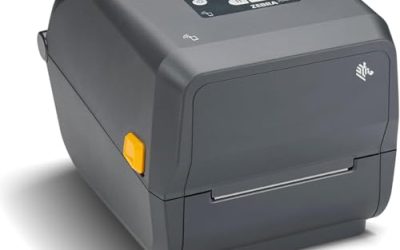
| Zebra ZD420t | Shared rooms printing from several stations | 203 dpi, 6 ips, WiFi and Bluetooth |
| Zebra GK420t | Buyers wanting a proven workhorse for less | 203 dpi, USB and Ethernet, renewed listing |
How to Choose
Print Resolution and Label Clarity
Resolution decides whether a barcode scans on the first pass. A 203 dpi head handles 4 by 6 inch shipping labels, large text, and standard barcodes without trouble, and it prints faster on most desktop models. A 300 dpi head earns its place when labels carry small text, dense two-dimensional codes, or tiny asset tags that a scanner must read at a distance. Match the resolution to the smallest element on the label, not the largest. If every label is a big shipping sticker, the extra dots add little. If the print includes fine print or compact codes, the sharper head saves reprints and failed scans.
Print Speed and Daily Volume
Speed ratings in inches per second only tell part of the story. A printer rated at 6 inches per second slows down when it feeds long labels, pauses between jobs, or waits for a computer to send the next batch. Look at the ribbon roll length as well, because a short ribbon means stopping to reload in the middle of a busy run, while a longer roll keeps the line moving. Daily volume shapes the choice: a bench that prints a few hundred labels can live with a compact unit, while a team printing thousands needs a sturdier feed path, a bigger media roll and a printhead built for constant use.
Connectivity and Placement
A desktop printer earns its keep by sitting where the work happens. USB suits a single workstation where one computer sends every label, and it is the simplest setup to keep running. Ethernet suits a shared bench, because several computers can reach the same printer without moving cables. Wireless options such as WiFi and Bluetooth free the printer from a fixed spot, which helps when the packing table moves or the stockroom has no network drop nearby. Serial ports still appear on older warehouse systems, so check what the host computer actually offers before choosing. Place the printer close to the packing area to cut walking time.
Ribbon, Media, and Running Costs
Thermal-transfer printing needs a ribbon, and the ribbon is a running cost that adds up fast at high volume. Wax ribbons suit paper labels and everyday barcodes, while resin ribbons suit synthetic labels that face heat, moisture, or rough handling. Check the maximum ribbon length the printer accepts, because a 300 meter roll lasts far longer than a short one and means fewer changeovers. Media width matters too: a 4 inch printer covers standard shipping and barcode labels, but wider tags need a different machine. Finally, look at the warranty and the printhead coverage, since the printhead is the part that wears out first under daily use.
The 5 Best Options
Brother TD-4520TN

Brother built the TD-4520TN for teams that print barcodes from the first order of the day to the last. Its 300 dpi head keeps small text and dense codes sharp, while the 5 inch per second engine moves through shipping labels without long pauses. Ethernet, USB, serial, and a USB host port cover most warehouse setups, so the printer can sit on a shared network or beside a single packing computer. The 4.16 inch print width fits standard label rolls, and the two-year warranty covers the printhead as well as the printer. It is a steady pick for a bench that never really stops.
Specs
- Print resolution: 300 dpi
- Print speed: up to 5 inches per second
- Print width: 4.16 inches
- Connectivity: USB 2.0, Ethernet, RS-232C, USB host
- Warranty: 2-year Premier Limited Warranty
Best for: Small warehouse teams printing barcodes through the whole shift.
Watch out for: No built-in wireless, so the printer needs a cable or a network drop at the bench.
ASIN: B0872HX6JF
Zebra ZD621 Thermal Transfer

Zebra positions the ZD621 as its step-up desktop for operations that print all day. The 300 dpi thermal-transfer model runs at up to 6 inches per second and handles dense barcodes, small fonts, and detailed asset tags with room to spare. USB, USB host, Ethernet, serial, and Bluetooth give the printer a place in almost any setup, from a single packing station to a shared dispatch room. The 4.27 inch maximum width covers standard label stock, and the printer accepts both thermal-transfer ribbons and direct-thermal media. It suits teams that need sharp output without slowing the line.
Specs
- Print resolution: 300 dpi
- Print speed: up to 6 inches per second
- Print width: up to 4.27 inches
- Connectivity: USB, USB host, Ethernet, serial, Bluetooth
- Print methods: thermal transfer and direct thermal
Best for: Dispatch desks printing dense, small barcodes all day.
Watch out for: The sharper head costs more than a 203 dpi model, and ribbon rolls need regular changes on long runs.
ASIN: B09HF6JGPC
TSC TE200

The TE200 is the budget entry in this set, and it earns its place by keeping the essentials strong. A 203 dpi head prints at up to 6 inches per second, which is fast enough for shipping labels, shelf tags, and standard barcodes through a full working day. The 4.25 inch print width matches common label rolls, and the printer handles both thermal-transfer ribbons and direct-thermal stock, so a team can switch methods without buying a second machine. USB keeps the setup simple beside one computer. The two-year warranty adds cover for a printer that will see constant use.
Specs
- Print resolution: 203 dpi
- Print speed: up to 6 inches per second
- Print width: 4.25 inches
- Connectivity: USB 2.0
- Print methods: thermal transfer and direct thermal
- Warranty: 2-year limited warranty
Best for: Workshops needing a low-cost printer running most of the day.
Watch out for: USB-only connectivity, so sharing it across a room needs a print server or a dedicated computer.
ASIN: B01MUHDV6B
Zebra ZD420t

The ZD420t brings wireless printing to a desktop that otherwise looks like a classic wired workhorse. With WiFi and Bluetooth alongside USB, several people can send labels from different stations without moving the printer or running new cables. The 203 dpi head prints at up to 6 inches per second, which covers shipping labels and standard barcodes at a steady pace. The 4 inch print width fits the label rolls most small operations already stock. Thermal-transfer and direct-thermal media both work, so the printer adapts when a job needs durable labels or a quick direct print.
Specs
- Print resolution: 203 dpi
- Print speed: up to 6 inches per second
- Print width: 4 inches
- Connectivity: WiFi, Bluetooth, USB
- Print methods: thermal transfer and direct thermal
Best for: Shared rooms where several people print from different stations.
Watch out for: Wireless setup takes more care than a wired connection, and 203 dpi suits shipping labels better than tiny barcodes.
ASIN: B07KMKZZNL
Zebra GK420t

The GK420t has been a warehouse staple for years, and it still shows up wherever labels need to keep moving. Its 203 dpi head and 4 inch print width cover shipping labels, barcodes, and tags at a pace that suits a busy bench, while USB and Ethernet ports connect it to one computer or a whole room. The printer works with the label software most teams already use, and parts and ribbons remain easy to find. The listing here is an Amazon Renewed refurbished unit, which keeps the entry cost down for buyers who want the proven design without paying for a brand-new machine.
Specs
- Print resolution: 203 dpi
- Print width: 4 inches
- Connectivity: USB and Ethernet
- Print type: thermal transfer, monochrome
- Print media: labels
Best for: Buyers wanting a proven workhorse at a lower entry cost.
Watch out for: This listing is sold as an Amazon Renewed refurbished unit, so check the condition grade and return terms before ordering.
ASIN: B07RBSHJZK
Which One Fits Your Situation
You run a small warehouse or dispatch bench
Pick the Brother TD-4520TN for this job. Its 300 dpi output keeps barcodes readable through long shifts, and the Ethernet port lets the whole bench share one printer. The two-year warranty covers the printhead, which matters when the machine runs from morning to closing time.
You print small, dense barcodes all day
Pick the Zebra ZD621. Its 300 dpi head and 6 inch per second speed handle tiny text and compact codes without slowing the line. Bluetooth and Ethernet mean it fits a single station or a shared room, and the wide connectivity keeps it useful as the setup grows.
You need a low-cost printer for a workshop
Pick the TSC TE200. It prints at up to 6 inches per second, covers standard label sizes, and switches between thermal-transfer ribbons and direct-thermal stock. USB keeps the setup simple beside one computer, and the two-year warranty covers a machine that will work hard every day.
You share one printer across a room
Pick the Zebra ZD420t. WiFi and Bluetooth let several people print from different stations without moving cables, while the 203 dpi head keeps shipping labels moving at up to 6 inches per second. If the budget is tighter, the refurbished GK420t covers the same label sizes over a wired connection.
Common Mistakes
- Buying a direct-thermal-only printer when the job needs durable labels that survive heat and handling.
- Choosing 203 dpi for tiny barcodes, then dealing with scans that fail at the checkout or the dock.
- Ignoring ribbon length and running out of ribbon in the middle of a busy printing run.
- Placing the printer far from the packing bench and losing time walking labels back and forth.
- Forgetting to check connectivity, then finding the printer has no port the host computer can use.
Frequently Asked Questions
Do thermal-transfer printers need ink?
No. A thermal-transfer printer uses a ribbon coated with wax or resin, and the printhead heats the ribbon so the coating bonds to the label. There is no ink cartridge to replace. The ribbon is the consumable, and its type decides how durable the finished label is. Wax suits paper labels, while resin suits synthetic labels that face heat or moisture.
What is the difference between 203 dpi and 300 dpi?
The number counts the dots the printhead lays down in one inch. A 203 dpi head prints standard shipping labels and large barcodes cleanly and runs faster on most desktop models. A 300 dpi head lays down finer dots, which suits small text, dense codes, and tiny asset tags. Choose 203 dpi for big labels and 300 dpi when the smallest element on the label must stay sharp.
Can one printer handle both thermal-transfer and direct-thermal labels?
Some desktop models can, including several in this guide. They print with a ribbon for thermal-transfer labels and without one for direct-thermal stock. Check the specifications before buying, because other models only support one method. A dual-method printer suits teams that print durable barcode labels most days and quick direct labels for short-term jobs.
Is a refurbished printer a good buy for daily use?
It can be, when the listing is clear about the condition grade and the return terms. The refurbished GK420t in this guide comes from an Amazon Renewed listing with graded condition options, and its design has a long record in warehouses. Check the grade before ordering, keep a spare ribbon and label roll on hand, and test the printer with a day of labels before putting it to work.