Key takeaways
- The best wide-format thermal-transfer printers for warehouse teams, compared for wide pallet labels, ribbon life, speed, and warehouse durability.
The best wide-format thermal-transfer printers for warehouse teams are the machines that keep pallet labels, carton labels, and compliance labels moving without constant babysitting. In a busy warehouse, a label printer is not a desk accessory. It sits beside a packing bench or at the end of a conveyor, runs for hours at a stretch, and gets used by different people on every shift. When it jams, runs out of ribbon mid-batch, or prints a barcode that a scanner cannot read, the whole line slows down.
Wide-format thermal-transfer printers solve a specific problem. Standard four-inch industrial printers handle ordinary shipping labels well, but pallet labels, wide compliance labels, and large carton labels need more width. A wide-format printer prints labels up to roughly six and a half inches wide, so a team can print a full pallet label in one pass instead of splitting information across two labels or shrinking text until it is hard to read.
Thermal transfer matters just as much as width. A thermal-transfer printer uses a heated printhead and an inked ribbon to bond the image onto the label. The result resists smudging, moisture, and abrasion far better than a direct-thermal print, which fades with heat and light. For labels that travel on pallets, sit in cold storage, or get handled repeatedly, that durability is the difference between a label that scans on arrival and one that has to be reprinted.
This guide explains what to look for in a wide-format thermal-transfer printer, profiles one model with a verified Amazon listing, and compares the leading shortlist so a warehouse team can match a printer to its actual workload.
How to Choose
Print Width and Label Size
Print width is the first specification to settle, because it decides which labels a printer can produce at all. Wide-format industrial printers in this class print up to about 6.6 inches wide and accept media up to about 7 inches wide. Measure the widest label the operation uses today, including pallet labels and any customer compliance labels, and add a small margin. A printer that tops out just below the widest label forces awkward workarounds. Also check the minimum media width, since a very wide printer can still be a poor fit for a team that mostly prints narrow bin labels and only occasionally needs a wide one.
Resolution
Resolution is measured in dots per inch, and most wide-format warehouse printers come in 203 dpi or 300 dpi versions. A 203 dpi printhead is the standard choice for shipping labels, pallet labels, and large barcodes, where the characters are big and the scan distance is generous. A 300 dpi printhead produces crisper small text, dense two-dimensional barcodes, and fine compliance print, which matters when labels carry small serial numbers, compact codes, or detailed handling instructions. Higher resolution usually means a slower top speed, so the choice is a balance between detail and throughput rather than a simple case of more being better.
Print Speed and Duty Cycle
Print speed is quoted in inches per second, and wide-format industrial models in this class typically reach 10 to 12 inches per second at 203 dpi. Raw speed is only part of the story. A warehouse printer also needs a duty cycle built for continuous running, a metal frame that survives vibration and dust, and a media path that does not jam when a roll is loaded by someone in a hurry. Ask how many labels the team prints on its busiest day and whether printing happens in long batches or in short bursts all day. Batch printing rewards raw speed and a large ribbon roll, while all-day intermittent printing rewards fast wake-up, a clear display, and simple media loading.
Ribbon and Media Capacity
Thermal-transfer printing consumes ribbon, and ribbon capacity decides how often someone has to stop and reload. Wide-format industrial printers in this class commonly accept ribbon rolls of 450 metres, and some accept 600 metres. A longer ribbon means fewer changeovers during a long batch, which matters on a packing line where every stop costs time. Media capacity matters too: an eight-inch label roll diameter holds far more labels than a small desktop roll, so the printer can run longer between reloads. Check that the printer accepts the label materials the operation already stocks, including coated paper, polyester, and any cold-storage or chemical-resistant stock, and confirm the ribbon width range matches the label widths in use.
Connectivity and Software Compatibility
A warehouse printer has to talk to the systems the team already runs. Ethernet is the baseline for a fixed packing station, USB covers a direct-attached workstation, and serial still appears in older setups. Bluetooth and Wi-Fi add flexibility for printers that move between stations or sit away from a network drop. Beyond the physical ports, check the printer languages: ZPL and EPL compatibility is what most warehouse management systems expect, and support for common label-design software avoids a painful rework of existing label templates. Remote management tools are worth having when several printers are spread across a building, since they let one person check ribbon levels, update firmware, and spot errors without walking the floor.
Durability, Display, and Ease of Use
Warehouse printers live in dusty, busy environments and get operated by many different people, including new starters. A metal frame and a sealed design hold up far better than a plastic desktop shell. A full-color touch display with plain-language status messages shortens training and makes it obvious when the printer is out of media, the ribbon is finished, or the printhead is open. Tool-free printhead and platen replacement keeps maintenance quick, and a clear media path with a side-loading design reduces loading mistakes. Finally, confirm the operating temperature range if any printer will sit near a dock door or in cold storage, and check whether a cutter, peeler, or rewinder option is available for the way labels are actually handled at the bench.
Top Picks
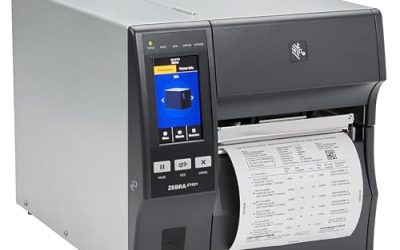
Zebra ZT421 Industrial Thermal-Transfer Printer, 6.6-Inch, 203 dpi

Zebra ZT421 Industrial Thermal-Transfer Printer, 6.6-Inch, 203 dpi
The Zebra ZT421 is the wide-format member of the ZT400 series, and it is the most straightforward pick for a warehouse team that prints pallet labels, wide carton labels, and large compliance labels every day. It prints up to 6.6 inches wide, which covers the full width of a standard pallet label in a single pass, and it handles media from 2 inches to 7 inches wide, so the same machine can also run narrower carton and bin labels when needed.
The configuration linked here is the 203 dpi model, part number ZT42162-T010000Z, which is the right resolution for large shipping and pallet barcodes. Print speed reaches up to 12 inches per second, so long batches of pallet labels clear quickly, and the printer supports both thermal-transfer and direct-thermal printing, which gives the team flexibility to run ribbon-free direct-thermal stock for short-life labels while keeping ribbon printing for durable ones. Memory is 256 MB of RAM with 512 MB of flash, enough to hold label formats and fonts on the printer itself.
Connectivity covers the usual warehouse setup: USB 2.0, serial, 10/100 Ethernet, and Bluetooth 4.1, with optional Wi-Fi on other configurations. The 4.3-inch full-color touch display shows status in plain language and makes settings changes quick, which helps when several operators share one machine across shifts. The printer runs ZPL, ZPL II, and EPL, so it slots into most warehouse management systems and label software without template rework, and it works with Zebra’s Print DNA software tools for remote setup and monitoring.
Build quality is industrial throughout: a metal frame, a side-loading media path, and a design meant for continuous operation rather than occasional desktop use. Ribbon rolls run to 450 metres, which keeps changeovers infrequent during long batches. The ZT421 also accepts field-installable options such as a peeler, cutter, and liner take-up, so a team can start with a basic tear-bar setup and add media handling later as the workflow settles.
Who it is for: warehouse and distribution teams that print wide pallet and carton labels in volume, run a warehouse management system that expects ZPL or EPL, and want a rugged, widely supported machine with a clear display for shared use.
Caveats: this is a large, heavy, stationary industrial printer that needs a dedicated bench or stand and a fixed network or USB connection, so it is not a fit for mobile cart printing or a small packing corner. The 203 dpi resolution is ideal for large labels but is not the best choice for very small text or dense two-dimensional codes; teams printing fine compliance detail should look at the 300 dpi configuration of the same model instead. Ribbon, labels, and any peeler or cutter options are separate purchases, and the exact configuration matters, so confirm the part number matches the resolution and connectivity the operation needs before ordering.
Comparison Table
| Feature | Zebra ZT421 | Zebra ZT620 | SATO CL6NX Plus | TSC MH261T |
|---|---|---|---|---|
| Max print width | 6.6 in (168 mm) | 6.6 in (168 mm) | 6.59 in (168 mm) | 6.61 in (168 mm) |
| Resolution options | 203 dpi, 300 dpi | 203 dpi, 300 dpi | 203 dpi, 305 dpi | 203 dpi |
| Max print speed | Up to 12 ips | Up to 12 ips at 203 dpi | Up to 10 ips | Up to 12 ips |
| Print methods | Thermal transfer, direct thermal | Thermal transfer, direct thermal | Thermal transfer, direct thermal | Thermal transfer, direct thermal |
| Max ribbon length | 450 m | 450 m | 600 m | 450 m |
| Display | 4.3 in color touch display | 4.3 in color touch display | 3.5 in color LCD | 4.3 in color touch display |
| Connectivity | USB, serial, Ethernet, Bluetooth 4.1 | USB, serial, Gigabit Ethernet, Bluetooth | USB, Ethernet, serial, parallel | USB, serial, Ethernet, GPIO |
| Memory | 256 MB RAM, 512 MB flash | 1 GB RAM, 2 GB flash | 2 GB flash, 256 MB RAM | 256 MB RAM, 512 MB flash |
| Media handling options | Peeler, cutter, liner take-up, rewind | Peeler, cutter, rewind | Cutter, peeler, RFID | Cutter, peeler |
| Best suited for | Wide pallet and carton labels in volume | Mission-critical high-volume wide labeling | Wide labels with long ribbon runs | Wide labels on a value-focused budget |
Which One Is Right for You?
For most warehouse teams, the Zebra ZT421 is the safest starting point. It covers the full wide-format width, prints fast enough for long pallet-label batches, and speaks the printer languages that warehouse management systems expect. Its large installed base also means labels, ribbons, and spare printheads are easy to source, and most warehouse IT staff will already know how to set it up. Choose the 203 dpi configuration for standard pallet and shipping labels, and step up to the 300 dpi configuration only if the labels carry small text or dense two-dimensional codes.
The Zebra ZT620 is the step up when uptime is mission-critical and the printer will run around the clock in a harsh environment. It shares the ZT421’s 6.6-inch width but adds a heavier-duty build, more onboard memory, Gigabit Ethernet, and a higher-duty design aimed at continuous high-volume production. It is the right call for a central print station that the whole building depends on, or for operations where a printer failure stops shipping.
The SATO CL6NX Plus suits teams that want the longest ribbon runs and strong onboard intelligence. Its 600-metre ribbon capacity means fewer changeovers than the Zebra models, and its smart printhead tracking and onboard emulations appeal to operations that run mixed printer fleets or print from PDF files directly. It is a strong fit for manufacturing and logistics sites that already use SATO equipment or need its RFID options.
The TSC MH261T is worth a look for teams that need genuine wide-format output without the top-tier outlay of the heavier-duty models. It matches the others on width and speed, includes a color touchscreen, and covers the same thermal-transfer and direct-thermal methods, making it a practical choice for a second print station, a regional warehouse, or an operation stepping up from a four-inch printer for the first time.
Whatever the choice, match the printer to the widest label, the busiest day, and the people who will load it. A printer that is slightly more capable than today needs will still be the right machine in two years, while one that is just barely wide enough becomes a bottleneck the first time a customer changes a label format.
Frequently Asked Questions
What counts as a wide-format thermal-transfer printer?
A wide-format thermal-transfer printer is an industrial label printer that prints labels wider than the standard four-inch class, usually up to about 6.6 inches wide, using a heated printhead and an inked ribbon. The width is what sets it apart: it prints full pallet labels, wide compliance labels, and large carton labels in one pass. The thermal-transfer method is what makes those labels durable, since the ribbon bonds the image onto the label stock instead of relying on heat-sensitive paper.
Is thermal transfer better than direct thermal for warehouse labels?
For most warehouse use, yes. Thermal-transfer labels resist fading, smudging, and moisture far better than direct-thermal labels, which darken with heat and fade with light and time. That durability matters for pallet labels that travel between sites, labels stored in cold or warm conditions, and any label that must still scan weeks after printing. Direct thermal is fine for short-life labels such as pick tickets that are used within days, and many printers in this class support both methods, so a team can choose per job.
What label sizes can these printers handle?
Wide-format models in this class typically accept media from about 2 inches wide up to about 7 inches wide, with a maximum print width of roughly 6.6 inches. That covers standard pallet labels, wide shipping labels, large carton labels, and most compliance formats. Always measure the widest label in current use, including any customer-specific compliance label, before choosing, and confirm the maximum label length as well, since some wide labels are also long.
How often will a warehouse team need to change ribbon and media?
It depends on batch size and ribbon length. A printer with a 450-metre ribbon roll can run a long way through standard pallet labels before a change is needed, and a model with a 600-metre ribbon stretches that further. Media changes depend on roll size: industrial printers accept large eight-inch-diameter label rolls, which hold far more labels than desktop rolls. Teams printing in long batches should favor long ribbons and large media rolls, keep spare ribbon and a spare printhead on the shelf, and train every shift on the loading path so a changeover takes minutes rather than halting the line.
Disclosure: As an Amazon Associate, we may earn from qualifying purchases.