Key takeaways
- Find the best desktop thermal-transfer printers for warehouse teams: durable 4-inch label printers built for barcodes, shipping, and inventory work.
Warehouse teams print labels all day: receiving labels, bin labels, pick tickets, shipping labels, and asset tags. A desktop thermal-transfer printer sits on a packing bench or a receiving desk and turns that steady stream of printing into crisp, scannable barcodes that survive handling, shelving, and transport. Unlike direct thermal printing, which relies on heat-sensitive paper that can fade, thermal transfer uses a ribbon to bond ink onto the label. The result is a label that stands up to sunlight, abrasion, moisture, and long storage, which is exactly what warehouse labels face. This guide covers the best desktop thermal-transfer printers for warehouse teams, with what to look for and a close look at three models that fit the job: the Zebra ZD421, the TSC TE200, and the Brother TD-4520TN.
What to Look For in a Desktop Thermal-Transfer Printer
Before choosing a printer, it helps to know which features matter most in a warehouse setting. A printer that works well in an office can fall short on a packing bench, where dust, vibration, and high daily volume are part of the job.
Print method. Make sure the printer is a thermal-transfer model, not a direct-thermal-only model. Thermal-transfer printers use a ribbon, and many models also print in direct thermal mode when a ribbon is not loaded. Direct-thermal-only printers cannot use a ribbon at all, so their labels fade faster and cannot be used for long-term inventory or asset tags. Check the model number carefully: manufacturers often sell direct thermal and thermal-transfer versions of the same printer under nearly identical names.
Print resolution. Resolution is measured in dots per inch. At 203 dpi, text and standard barcodes print clearly, and this is the most common choice for shipping and inventory labels. At 300 dpi, small text and dense two-dimensional barcodes print more sharply, which matters for small product labels, jewelry tags, and asset labels that carry a lot of information in a small space.
Print speed. Speed is measured in inches per second. A printer that runs at 6 inches per second can turn out a 4 by 6 inch shipping label in about a second, which keeps a packing line moving. A printer that runs at 4 or 5 inches per second is still fast enough for most receiving and putaway stations, where the pace is set by the worker rather than the printer.
Print width. Most warehouse labels are 4 inches wide or narrower, and a printer with a maximum print width of about 4 inches covers shipping labels, bin labels, and product labels. A wider maximum media width, up to 4.4 inches or so, gives room for liner edges and slightly oversized stock.
Connectivity. USB is standard and works well for a printer that serves one workstation. Ethernet lets a printer sit on the warehouse network so several workstations and a warehouse management system can send jobs to it. Wireless connectivity, including Wi-Fi and Bluetooth, suits mobile carts and stations that move around the floor. A printer with a modular connectivity slot can be upgraded later, which protects the investment if the network setup changes.
Ribbon capacity. Thermal-transfer printers use ribbon rolls, and longer ribbons mean fewer changeovers. A printer that accepts a 300 meter ribbon can run much longer between ribbon changes than one limited to a 74 meter ribbon. For a busy packing bench, a high-capacity ribbon is one of the most practical features a printer can have, because every ribbon change is downtime.
Media handling. Look for adjustable media sensors that handle gap, black mark, and continuous stock, plus a fan-fold feed slot for stacks of fan-fold labels. A peeler or cutter, whether built in or added as an accessory, speeds up labeling at a packing station by presenting each label ready to grab or cutting it free.
Software and language support. Warehouse printers need to work with warehouse management systems, shipping software, and label design tools. Support for common printer languages such as ZPL, EPL, and DPL makes integration straightforward, and a supplied label design application helps the team create and adjust label formats without outside help.
Durability and support. A warehouse printer should have a sturdy case, a printhead built for high duty cycles, and a warranty that covers the printhead and the mechanism. A two-year warranty is a good sign. Also consider how easy it is to load media and ribbon: a design with a wide opening and clear guides means new team members can reload the printer without mistakes.
The Best Desktop Thermal-Transfer Printers for Warehouse Teams
The three printers below are all desktop thermal-transfer models with a 4 inch print width, sold on Amazon. Each one is covered in detail: its listed specifications, the warehouse jobs it suits best, and the points a buyer should weigh before choosing it.
Zebra ZD421 Thermal Transfer Desktop Printer

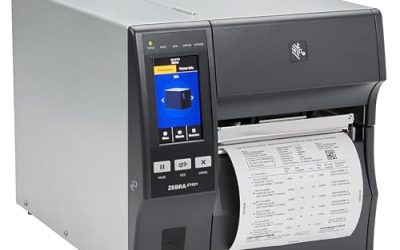
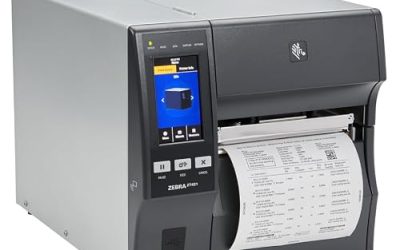
The Zebra ZD421 is a 4 inch desktop thermal-transfer printer built for retail and logistics work, and its thermal-transfer configuration, model ZD4A042-301M00EZ, is a strong fit for a warehouse bench. It prints at 203 dpi with a maximum speed of 6 inches per second, which covers shipping, receiving, and bin labels at a pace that keeps up with a packing line. The maximum print width is 4 inches, and it handles media up to 4.25 inches wide, including die-cut, continuous, and fan-fold stock.
Connectivity includes USB 2.0 and USB Host, with a modular slot that accepts Ethernet and wireless field-installable options, so the printer can begin at a single workstation and later join the warehouse network. It supports ZPL and EPL printer languages, and Zebra Print DNA software supports setup and management. The printer accepts both 74 meter and 300 meter ribbons, and the high-capacity option keeps changeovers infrequent during long shifts. A three-button interface with five LED status icons makes the printer status easy to read at a glance. The unit measures about 15.7 inches long, 9.84 inches wide, and 9.06 inches high, so it fits on a standard packing bench without crowding the work area.
Who it suits: Warehouse teams that want a fast, widely supported 4 inch thermal-transfer printer for shipping, receiving, and inventory labeling. It is a good match for packing stations that print a high volume of 4 by 6 inch labels, and for teams that already use Zebra printers or Zebra label formats.
Considerations: This is the 203 dpi configuration, so teams that print very small text or dense two-dimensional codes on small labels may prefer a 300 dpi model. Wireless and Ethernet connectivity depend on the configuration and the modular slot, so confirm the exact connectivity of the unit being ordered. Ribbons and labels are separate consumables and are not included in the box.
TSC TE200 Desktop Thermal Transfer Barcode Printer

The TSC TE200 is a compact desktop thermal-transfer barcode printer designed for warehouse, shipping, and retail labeling. It prints at 203 dpi with a maximum speed of 6 inches per second and a maximum print width of 4.25 inches, which covers standard shipping labels, product labels, and inventory tags. Its print method is thermal transfer with direct thermal capability, so the team can print durable ribbon-based labels for long-term storage and switch to direct thermal stock for short-lived shipping labels.
The TE200 connects by USB 2.0 and uses TSPL-EZD firmware, which emulates common printer languages including EPL, ZPL, ZPL II, and DPL, so it works with a wide range of warehouse and shipping software. It accepts a 5 inch outside diameter internal media supply and any desktop ribbon up to 300 meters on a 1 inch core, which means long runs between ribbon changes. The printer has a top-load design for simple media changes, a movable black mark sensor, and support for roll or fan-fold media, die-cut or continuous stock. The unit measures about 11.02 by 8.03 by 11.02 inches and weighs about 5.3 pounds. It carries a two-year warranty.
Who it suits: Warehouse teams that need a compact, economical thermal-transfer printer for a receiving desk, a small packing station, or a secondary print point away from the main line. It is a good fit for teams that print a mix of durable inventory labels and short-lived shipping labels, since it handles both print methods.
Considerations: This configuration connects by USB only, so it serves one workstation unless it is shared through a print server or a networked host computer. Teams that need built-in Ethernet or wireless sharing should look at the Ethernet version of the TE200 or a network-ready alternative. The 203 dpi resolution is standard for shipping and inventory labels but is less suited to very small, dense barcodes.
Brother TD-4520TN Thermal Transfer Desktop Label Printer

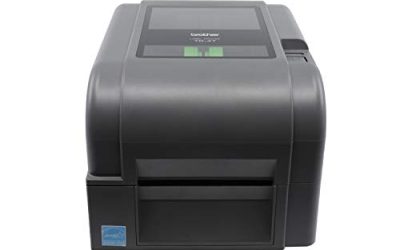
The Brother TD-4520TN is a 4 inch network-capable thermal-transfer desktop printer built for professional labeling in supply chain and warehouse operations. It prints at 300 dpi with a maximum speed of 5 inches per second, which makes it the high-resolution choice in this guide: small text, fine barcodes, and dense two-dimensional codes print sharply on small labels. The maximum media width is 4.4 inches and the maximum print width is 4.16 inches, so it handles standard shipping labels as well as narrower product and asset labels.
Connectivity is a strength here. The TD-4520TN includes USB 2.0, USB Host, serial, and Ethernet LAN as standard, so it can sit on the warehouse network and serve several workstations from the day it is installed. It supports ZPL II, EPL, and DPL printer languages, plus Brother label design software, and it ships with a ribbon spindle set, a USB cable, and BarTender UltraLite label design software in the box. Memory is 128 MB of flash and 64 MB of SDRAM. The printer accepts ribbon rolls up to 300 meters, supports roll or fan-fold media, die-cut or continuous stock, labels, receipts, tags, and wristbands, and carries a two-year Premier Limited Warranty.
Who it suits: Warehouse teams that print small, detailed labels and need 300 dpi clarity, such as product labels, asset tags, and small-item barcodes. It is also a strong choice for a shared network printer at a central labeling station, since Ethernet is built in and several workstations can send jobs to it without extra hardware.
Considerations: The maximum speed of 5 inches per second is a little slower than the 6 inches per second of the other two printers, so very high-volume packing lines may prefer a faster model. At 300 dpi, the printer uses more dots per label, so teams should confirm that their label stock and ribbon are matched to the resolution.
Comparison Table
| Feature | Zebra ZD421 | TSC TE200 | Brother TD-4520TN |
|---|---|---|---|
| Print method | Thermal transfer and direct thermal | Thermal transfer and direct thermal | Thermal transfer and direct thermal |
| Resolution | 203 dpi | 203 dpi | 300 dpi |
| Maximum speed | 6 inches per second | 6 inches per second | 5 inches per second |
| Maximum print width | 4 inches | 4.25 inches | 4.16 inches |
| Maximum media width | 4.25 inches | 4.25 inches | 4.4 inches |
| Connectivity | USB, USB Host, modular slot | USB 2.0 | USB, USB Host, serial, Ethernet LAN |
| Printer languages | ZPL, EPL | TSPL-EZD, EPL, ZPL, ZPL II, DPL | ZPL II, EPL, DPL |
| Maximum ribbon length | 300 meters | 300 meters | 300 meters |
| Internal media roll | 5 inch outside diameter | 5 inch outside diameter | 5 inch outside diameter |
| Memory | 256 MB SDRAM, 512 MB flash | 8 MB flash, 16 MB DRAM | 64 MB SDRAM, 128 MB flash |
| Warranty | 2 years | 2 years | 2 years |
| ASIN | B09BXVDHYN | B01MUHDV6B | B0872HX6JF |
Choosing the Right Printer for Your Warehouse
The right choice depends on where the printer will sit and what it will print most often.
For a high-volume packing station, speed and ribbon capacity matter most. A 203 dpi printer running at 6 inches per second with a 300 meter ribbon, such as the Zebra ZD421 or the TSC TE200, keeps the line moving and keeps changeovers rare.
For a receiving desk or a small labeling station, footprint and simplicity matter more than raw speed. A compact printer with a top-load design and clear media guides, such as the TSC TE200, is easy to reload and easy to fit on a crowded desk. USB connectivity is enough when one workstation drives the printer.
For a central labeling station that produces product labels, asset tags, or small-item barcodes, resolution and network connectivity matter most. A 300 dpi network printer, such as the Brother TD-4520TN, prints fine detail cleanly and serves several workstations over Ethernet.
Before ordering, confirm three things: the exact model number, so the thermal-transfer version is ordered rather than a direct-thermal-only twin; the connectivity included in that configuration, since USB, Ethernet, and wireless vary by model number; and the ribbon and media stock that matches the printer.
Care and Use for Warehouse Thermal-Transfer Printers
A thermal-transfer printer lasts longer and prints more reliably when it is looked after. Keep the printer on a stable, level bench away from direct dust and vibration, and leave space around it for air flow and for loading media. Clean the printhead and platen roller on a regular schedule with the cleaning supplies the manufacturer recommends, since dust and adhesive residue are the most common causes of faded or streaky labels.
Match the ribbon to the label material. Wax ribbons suit paper labels for shipping and short-term use, wax-resin ribbons suit coated paper and some synthetics, and resin ribbons suit synthetic labels that face chemicals, abrasion, or outdoor storage. Using the wrong ribbon and media combination can cause poor print quality or labels that smudge, so check the pairing before a large print run.
Store label and ribbon stock in a dry place at room temperature, away from sunlight, and keep rolls sealed until they are loaded. Calibrate the media sensor when changing label sizes or stock types so the printer finds the gap or black mark correctly and does not waste labels.
Frequently Asked Questions
What is the difference between thermal transfer and direct thermal printing?
Thermal transfer printing uses a ribbon to bond ink onto the label, which produces durable labels that resist fading, sunlight, abrasion, and moisture. Direct thermal printing uses heat-sensitive paper and no ribbon, which is simpler and works well for short-lived labels such as shipping labels that are used within days. Warehouse teams choose thermal transfer for inventory labels, asset tags, and any label that must stay readable for months or years.
Do thermal-transfer printers need ink or toner?
No. Thermal-transfer printers use a ribbon instead of ink or toner. The ribbon is a consumable that runs out and needs replacing, and the length of the ribbon determines how many labels can be printed before a changeover.
What label size do warehouse teams print most often?
The most common warehouse label is the 4 by 6 inch shipping label, followed by 4 by 2 inch and 4 by 3 inch inventory and bin labels. A desktop printer with a 4 inch print width covers all of these. Teams that print pallet labels or wide shelf labels should check the maximum print width of the printer before buying.
Can one desktop thermal-transfer printer serve a whole warehouse team?
It can serve a team that works at one station, and a network-connected printer can serve several workstations that send jobs to it over Ethernet or Wi-Fi. For a large warehouse with several distant stations, it is usually better to place one printer at each station, because walking labels across the floor wastes time and creates errors.
Conclusion
The best desktop thermal-transfer printers for warehouse teams are the ones that match the work: fast enough for the packing line, durable enough for labels that must last, and easy enough for the whole team to use. The Zebra ZD421 brings speed and a widely supported platform to a busy bench. The TSC TE200 brings a compact footprint and broad software compatibility to a receiving desk or secondary station. The Brother TD-4520TN brings 300 dpi clarity and built-in Ethernet to a shared labeling station that prints small, detailed labels. The best choice is the one whose resolution, speed, and connectivity fit the labels the team prints most.
Disclosure: As an Amazon Associate, we earn from qualifying purchases.