Key takeaways
- Compare wide-format thermal transfer printers for shipping departments: print widths past 6 inches, ribbon durability, resolution and duty cycle.
Most shipping departments live on 4-inch labels, and for parcel work that format is hard to beat. The problem arrives with everything around the parcels: pallet labels, carton content labels, rack and bin signage, drum and tote labels, and carrier or retailer compliance labels that carry long barcodes, several data fields and handling marks on a single face. Squeeze those onto a 4-inch web and something gives — the barcode shrinks, the text wraps, or the label gets rotated and slowed down. A wide-format thermal transfer printer solves the geometry problem by printing across a web of 6 inches or more, and it solves the durability problem with ribbon-based printing that survives abrasion, moisture and months on a warehouse rack.
One honest note before the picks: this is a narrow industrial category, and most wide models are sold through barcode dealers and IT resellers rather than consumer marketplaces. After checking the current Amazon US catalogue model by model, exactly one wide-format thermal transfer printer has a verifiable Amazon US listing right now, and it is the pick below. Rather than pad this guide with 4-inch machines dressed up as wide-format, the guide covers that one buyable option in depth and explains how to judge the wider class, including the dealer-channel models, so the decision holds up either way.
As an Amazon Associate, we earn from qualifying purchases.
Quick Picks
| Product | Best for | Key point |
|---|---|---|
| Zebra ZT421 (ZT42162-T010000Z) | Shipping departments adding pallet, carton and compliance labels wider than 4 inches | 6.6-inch maximum media width, 203 dpi thermal transfer, colour touch display |
How to Choose
Measure the widest label you actually print. Wide-format only earns its floor space if a real label needs the width. List the labels your department produces today and the ones carriers or retail customers have asked for: pallet labels, carton content and address combinations, drum labels, long rack labels. If the widest is a standard 4 x 6 inch shipping label, a wide printer buys you nothing. If any label runs 5, 6 or 8 inches across — or a long barcode needs to print across the web instead of along it — the wide format pays for itself in fewer rotations, fewer splits and cleaner scans.
Understand print width versus media width. Two numbers appear on every spec sheet and they are not the same. Media width is the widest stock the printer can feed; print width is the widest image the printhead can lay down, and it is always the smaller or equal figure. A printer that feeds 7-inch media but prints 6.6 inches wide leaves a margin on each edge, which is normal and useful for liner and sensor room. Judge a model by its maximum print width first, then confirm your stock width fits inside its media range with room for the gap sensor to read the label edges.
Thermal transfer versus direct thermal. Direct thermal stock darkens with heat and fades with time, sunlight, friction and contact with plastics, which is acceptable for a parcel label that lives for a week. Thermal transfer printing melts ink from a ribbon onto the label face, and the result resists scuffs, moisture, cleaning chemicals and long storage. Pallet labels that sit in a rack for a season, drum labels that travel outdoors and compliance labels that must scan at the end of a long supply chain belong on thermal transfer with the right ribbon: wax for plain paper stock, wax-resin for coated papers and light synthetics, full resin for synthetic faces that face chemicals or weather.
Match resolution to your smallest barcode and text. At 203 dpi, wide labels with standard barcodes, bold handling marks and normal address text print cleanly, and the printheads and ribbons cost less to run. At 300 dpi, small fonts, dense data fields and compact 2D codes stay crisp, which matters on compliance labels that pack a lot of data into a wide face. Resolution is fixed by the printhead fitted at purchase on most industrial models, so decide before ordering: if your widest labels are mostly big barcodes and bold text, 203 dpi is the sensible default; if they carry fine print or small codes, step up to the 300 dpi configuration of the same class.
Check speed and duty cycle against peak volume. Shipping departments do not print evenly; they print in waves before carrier pickups. Look at the rated print speed in inches per second and the build class of the machine. A metal-frame industrial printer with a high duty cycle is built to run through a full shift and absorb the pre-pickup surge without overheating or drifting out of calibration. Also check roll capacity: an 8-inch outside diameter media roll and a long ribbon reduce changeovers in the middle of a wave, which is when label errors tend to happen.
Confirm connectivity and label software fit. The printer has to speak your warehouse system’s language. Most shipping and warehouse platforms send ZPL or a similar printer language, and industrial wide models commonly emulate rival languages for drop-in replacement of older units. Ethernet is the working connection for a fixed packing or pallet station; USB and serial cover direct-attached benches. A colour touch display is worth more than it sounds in a busy department, because ribbon and media loading guidance on screen cuts the training time for new staff and reduces the misloads that waste wide stock.
Plan media handling for how labels are applied. Tear-off output is fine for low volumes. A cutter suits labels printed in batches for cartons moving down a line, and a peel-and-present option with a rewinder suits hand application at a palletising station, where the operator takes one label at a time while the liner winds away. These options are often field-installable on industrial frames, but confirm the exact configuration before ordering, because the part number encodes the resolution, the interfaces and the media handling fitted at the factory.
Best Options
Zebra ZT421 (ZT42162-T010000Z)

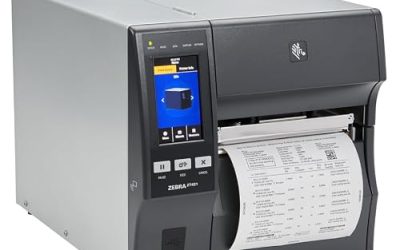
The ZT421 is the 6-inch member of Zebra’s ZT400 industrial family, and it is the wide-format thermal transfer printer a shipping department can actually order on Amazon US today. Its maximum media size is 6.6 inches, which covers the working range of wide shipping work: pallet labels, carton content labels, drum labels and wide compliance faces that a 4-inch printer has to rotate or split. The 203 dpi printhead suits the bold barcodes and handling text those labels carry, and the thermal transfer engine lets the department match ribbon to stock, from wax on paper pallet labels to resin on synthetic drum labels that live outdoors.
The machine is built around a metal industrial frame with a colour touch display that walks operators through media and ribbon loading, which matters when wide stock costs more per roll and a misload wastes more of it. Connectivity on this configuration covers the ways a shipping station actually connects: Ethernet for the network, USB and serial for direct attachment, and Bluetooth 4.1 for setup and nearby devices. Memory of 512 MB handles long label formats and stored templates without choking at peak waves, and the ZT400 platform carries the ZPL command language that warehouse and shipping systems already speak, so it drops into an existing label workflow rather than forcing a software change.
For a department adding wide labels alongside an existing 4-inch fleet, this is the natural step up: the same label design tools, the same ribbon logic, a wider web. The honest limitations are about the category, not a hidden flaw in the machine — wide stock and wide ribbons cost more per label than 4-inch consumables, the footprint is that of a full industrial printer, and departments whose fine print demands 300 dpi should order that configuration of the class through a dealer instead of forcing this 203 dpi unit into work it was not specced for.
Specs
- Print method: thermal transfer; resolution: 203 dpi; maximum media size: 6.6 inches; sheet size: 6 inches; connectivity: USB, serial, Ethernet, Bluetooth 4.1 and MFi; colour touch LCD; memory: 512 MB; dimensions: 19.5 x 13.25 x 12.75 inches; manufacturer part number: ZT42162-T010000Z
Best for: Shipping departments that need pallet, carton, drum and compliance labels wider than 4 inches, printed with ribbon durability on an industrial frame
Watch out for: This listing is the 203 dpi configuration, so very fine print and compact codes are better served by a 300 dpi build; the listing copy mixes in boilerplate figures, so confirm the configuration code ZT42162-T010000Z on the page before ordering
Which One Fits
- Choose the Zebra ZT421 listed here if your department prints pallet, carton or compliance labels in the 5 to 6.6 inch range, wants ribbon-based durability, and values ordering through Amazon US with the ZPL workflow your systems already use.
- Stay with your existing 4-inch fleet if every label you run is a standard parcel label; wide format adds consumable cost and floor space without adding capability you will use.
- Look at dealer-channel wide models — the higher-duty 6-inch class and the 8-inch class from the same industrial brands — if your volume runs around the clock, your labels exceed 6.6 inches, or you need 300 dpi, RFID encoding or barcode verification built in; those configurations are real, but they are quoted through barcode resellers rather than listed on Amazon US, so they carry no ASIN here.
- Choose the 300 dpi configuration of the wide class, wherever you buy it, if your wide labels carry dense compliance data, small fonts or compact 2D codes as a routine matter.
Common Mistakes
Buying wide for labels that are not wide. The most expensive error in this category is a wide printer feeding 4-inch stock all day. Audit your label sizes first, including the labels your biggest customer or carrier plans to require next year, and let that audit — not a hunch — set the print width.
Confusing media width with print width. A printer that feeds 7-inch media does not print a 7-inch image. Buy against the maximum print width figure, then check that your stock width sits inside the media range with room for margins and sensors.
Running direct thermal habits on a transfer printer. Thermal transfer quality depends on matching the ribbon to the stock. Wax ribbon on a synthetic drum label smears; resin ribbon on plain paper wastes money and can print poorly. Match ribbon family to label face, and keep the pairing written down at the station.
Ignoring the cost of wide consumables. Wide labels and wide ribbons cost more per unit, and a misloaded roll wastes more stock. The on-screen loading guidance and a short calibration routine after every media change protect the consumables budget more than any other habit.
Forgetting the software check. A wide printer that cannot speak your shipping platform’s label language becomes a manual workstation. Confirm ZPL or the emulation your system sends before the printer arrives, and test one real pallet label format during setup week, not on the busiest shipping day of the quarter.
FAQ
What label widths does a wide-format printer handle that a 4-inch printer cannot?
A 4-inch printer tops out at roughly 4 inches of printed width, so anything wider has to be rotated, split across two labels or shrunk. A wide-format model in the 6-inch class prints faces up to about 6.6 inches across, which covers pallet labels, carton content labels, drum labels and wide compliance labels in a single pass, with long barcodes printed across the web for reliable scanning.
Is thermal transfer worth it for shipping labels?
For standard parcel labels that are scanned within days, direct thermal is usually enough. Thermal transfer earns its place on labels that live longer or travel harder: pallet labels stored for a season, drum and tote labels exposed to moisture and abrasion, and compliance labels that must still scan at the far end of a supply chain. The ribbon is an added consumable, and the durability is the return on it.
Do I need 300 dpi for wide shipping labels?
Not for most. Bold barcodes, handling marks and normal address text print cleanly at 203 dpi, and the running costs are lower. Step up to 300 dpi when your wide labels routinely carry small fonts, dense data blocks or compact 2D codes, because resolution is set by the fitted printhead and is not a setting you can raise later.
Can a wide-format printer also run my standard 4-inch labels?
Yes. Industrial wide printers accept media down to narrow widths as well, so the same machine can run a 4-inch parcel label and a 6-inch pallet label. In practice, most departments keep a dedicated 4-inch unit for parcel volume and reserve the wide printer for wide work, which avoids constant media swaps during the pre-pickup rush.
Final Verdict
Wide-format thermal transfer is a specialist purchase, and the honest shape of the market is that one model — the Zebra ZT421 in its 203 dpi configuration — is verifiably listed on Amazon US today, while the rest of the wide class sells through dealers. For a shipping department whose pallet, carton and compliance labels have outgrown a 4-inch web, the ZT421 covers the working width, the ribbon durability and the warehouse connectivity that the job demands. Measure your widest label, match the ribbon to the stock, and the wide format stops being a workaround and becomes the simplest station in the department.