Our Short List of 3

- Best for: gamers running three or more monitors, streamers, and anyone who wants a sit-stand desk that never feels overloaded.

- Best for: corner setups, dual-monitor rigs, and gamers who want a large surface without a straight 72-inch run.

- Best for: smaller rooms, first gaming setups, and gamers who want a monitor riser included in the box.
All 4 Picks at a Glance
| Product | Specs | Action |
|---|---|---|
| EUREKA ERGONOMIC 72-Inch Wing Shaped Gaming Desk |
| Check price on Amazon |
| EUREKA ERGONOMIC L60 L-Shaped Gaming Desk |
| Check price on Amazon |
| AODK 59-Inch Gaming Desk |
| Check price on Amazon |
 SEDETA 78.8-Inch Gaming Desk |
| Check price on Amazon |
Key takeaways
- Find the best gaming desks you can attach monitors to, with grommet holes, sturdy frames and monitor shelves built for clamp and grommet monitor arms.
A monitor arm changes a gaming setup more than almost any other accessory. It lifts screens off the desktop, frees the surface for keyboard and mouse movement, and lets each display sit at exactly the right height and angle. But a monitor arm is only as good as the desk it grips. Clamp a heavy arm to a thin, hollow desktop and the mount can wobble, tilt, or slowly crush the edge. Drill a grommet mount into a glass top and the whole panel is at risk. That is why the best gaming desks you can attach monitors to are chosen for their structure first and their looks second.
This guide covers gaming desks built with monitor mounting in mind: solid desktops that accept C-clamp arms, grommet holes for through-desk mounts, raised monitor shelves for multi-screen rigs, and frames rated to carry the combined weight of monitors, a PC tower, and everything else a battle station holds. Every desk below is listed on Amazon US with a verified ASIN, and every pick supports at least one recognised way of attaching monitors, whether that is a clamp arm, a grommet mount, or a built-in monitor shelf.
At a Glance
| Product | Best For | Key Spec |
|---|---|---|
| EUREKA ERGONOMIC 72-Inch Wing Shaped Gaming Desk | Heavy multi-monitor rigs and standing setups | 72 x 23.6 in surface, 400 lb capacity, 2 grommets, monitor shelves |
| EUREKA ERGONOMIC L60 L-Shaped Gaming Desk | Corner setups with two or three monitors | 60 x 43 in L-shape, 170 lb capacity, 2 cable grommets |
| AODK 59-Inch Gaming Desk | Compact rooms and first monitor-arm setups | 59 in surface, built-in monitor stand, USB charging ports |
| SEDETA 78.8-Inch Gaming Desk | Wide triple-monitor layouts with storage | 78.8 in surface, monitor stand, hutch, storage shelves |
How to Choose a Gaming Desk for Monitor Mounting
1. Check how the monitor arm attaches
Most monitor arms attach in one of two ways. A C-clamp arm grips the back edge of the desktop, so the edge must be solid, flat, and thick enough for the clamp to bite — typically somewhere between a fraction of an inch and around three inches, depending on the arm. A grommet mount passes a bolt through a hole in the desktop, so the desk needs a grommet hole in a useful position, usually near the rear centre. Desks with built-in grommet holes remove all guesswork: the hole is already there, reinforced, and placed where a monitor arm naturally sits. Before buying, check which mounting style your arm uses and confirm the desk supports it.
2. Desktop material matters more than looks
A laminated wood or engineered-wood desktop with a steel frame is the safest base for a clamp arm, because the material resists compression and spreads the load. Glass desktops look striking and suit monitor shelves, but most clamp arms are not designed to grip glass, and tightening a clamp on a glass edge risks cracking the panel. Thin hollow-core tops can also deform under a loaded arm over time. If your heart is set on a glass desk, plan to rest monitors on a shelf or stand rather than clamping an arm to the edge.
3. Weight capacity and frame stability
A single 27-inch monitor weighs roughly ten to fifteen pounds, and an ultrawide can weigh far more. Add a second or third screen, a tower, speakers, and a stack of peripherals, and the total climbs fast. A desk rated for 170 pounds or more handles a typical dual-monitor gaming rig with room to spare, while a 400-pound rating covers triple-monitor setups and heavy towers without flex. Look for steel legs, cross-bracing, and adjustable feet: a frame that sways when you lean on it will also sway when you adjust a monitor arm.
4. Surface size and monitor layout
A 59-inch desk fits a single ultrawide or two standard monitors side by side with space left for a keyboard. A 60-inch L-shaped desk adds a return wing that holds a second screen, a laptop, or streaming gear without crowding the main play area. A 72-inch or 78-inch desk gives a triple-monitor array room to breathe and keeps the tower off the floor. Measure your monitors and your room before ordering, and leave at least a few inches of clearance behind the desk for the arm mechanism and cables.
5. Cable routing and monitor shelves
Monitor arms tidy the desktop, but the cables still need somewhere to go. Grommet holes double as cable pass-throughs, letting display and power cables drop straight to a tray or power strip below. A raised monitor shelf lifts screens to eye level, which helps posture during long sessions, and it creates storage space underneath for a console, a dock, or a soundbar. Built-in power socket holders and USB ports are a bonus, since they keep chargers within reach without adding clutter.
6. Standing adjustment and future upgrades
Height-adjustable desks let you switch between sitting and standing, which is useful when a long session stretches into hours. If you choose a standing desk, confirm that the monitor arm still works through the full height range and that the cables have enough slack.
EUREKA ERGONOMIC 72-Inch Wing Shaped Gaming Desk
- Best for: gamers running three or more monitors, streamers, and anyone who wants a sit-stand desk that never feels overloaded.
gamers running three or more monitors, streamers, and anyone who wants a sit-stand desk that never feels overloaded.
The EUREKA ERGONOMIC 72-inch wing-shaped desk is the heavyweight of this roundup, built for gamers who run several monitors and want the desk to disappear as a concern. Its desktop measures 72 by 23.6 inches and carries a carbon-fibre textured finish that resists water, heat, and scratches. The frame is rated to hold up to 400 pounds, which is more than enough for three monitors, a full tower, speakers, and a shelf of accessories. That capacity matters for monitor mounting, because a loaded arm transfers its force into a small patch of desktop, and a frame this strong does not flex or creep under the load.
Monitor attachment is covered three ways. Two cable grommets in the desktop serve as pass-throughs for grommet-mount arms and keep display cables routed cleanly. Convertible monitor shelves can be installed in the middle as a raised desktop mount for one or two monitors, on the left and right as display shelves, or at the side to support three or four widescreen monitors. The wing-shaped desktop curves around the user, so screens sit closer and the viewing angle feels natural even with a wide array.
This is also a height-adjustable standing desk, driven by a dual-motor system with a height range that moves smoothly and quietly between sitting and standing positions, and it includes a smart anti-collision system that stops the desk if it meets an obstacle. A pull-out keyboard tray rotates horizontally and tilts vertically, with its own mouse pad, and a full-desk mouse pad is included. Dual power socket holders sit under the desk, two headphone hooks and a cup holder are mounted on the sides, and slots hold a tablet or phone within reach.
Pros:
– Exceptional 400-pound weight capacity for heavy multi-monitor rigs
– Two grommets plus convertible monitor shelves for flexible mounting
– Dual-motor height adjustment with anti-collision protection
– Keyboard tray, full-desk mouse pad, and under-desk power holders included
Cons:
– Large 72-inch footprint needs a roomy space
– Arrives in two packages, so delivery and assembly take longer
– Wing shape suits wide rooms better than narrow corners
EUREKA ERGONOMIC L60 L-Shaped Gaming Desk
- Best for: corner setups, dual-monitor rigs, and gamers who want a large surface without a straight 72-inch run.
corner setups, dual-monitor rigs, and gamers who want a large surface without a straight 72-inch run.
The EUREKA ERGONOMIC L60 turns an unused corner into a proper gaming station. Its L-shaped desktop measures 60 inches wide by 43 inches deep, with a carbon-fibre textured laminated surface and a steel frame rated to hold up to 170 pounds. The corner layout gives two distinct zones: the main run holds the primary monitor and keyboard, while the return wing takes a second monitor, a laptop, or streaming equipment. That separation is exactly what a dual-monitor gamer needs, because each screen gets its own space instead of competing for the same stretch of desktop.
For monitor mounting, the L60 includes two cable grommets with protective armour, positioned to route monitor cables and to accept grommet-mount arms. The laminated wood desktop is solid enough for C-clamp arms along the rear edge, which covers the most common mounting style. A power strip holder clips under the desktop, so the strip and its cables stay out of sight, and the desk ships with a large gaming mouse pad that covers the main play area.
The steel frame uses T-shaped legs for stability and includes adjustable feet that level the desk on uneven floors, which keeps a clamped monitor arm steady. Assembly uses a two-piece desktop with included tools, and the black carbon-fibre finish matches most gaming peripherals without drawing attention away from the screens.
Pros:
– L-shape fits corners and gives each monitor its own zone
– Two armoured cable grommets for grommet mounts and clean cable routing
– Solid laminated desktop accepts C-clamp monitor arms
– 170-pound capacity with stable T-shaped steel legs
Cons:
– No built-in monitor shelf, so screens sit on the desktop or on arms
– Corner footprint can dominate a small room
– Return wing orientation is fixed once assembled
AODK 59-Inch Gaming Desk
- Best for: smaller rooms, first gaming setups, and gamers who want a monitor riser included in the box.
smaller rooms, first gaming setups, and gamers who want a monitor riser included in the box.
The AODK 59-inch gaming desk is the compact pick in this guide, aimed at bedrooms and smaller rooms where a 72-inch desk simply will not fit. Its 59-inch engineered-wood desktop still holds a dual-monitor setup comfortably, and it comes with a built-in monitor stand that raises the screens to a more comfortable viewing height. That riser is the simplest form of monitor attachment: screens sit on a stable shelf instead of their own stands, freeing the surface below for a keyboard, a console, or a notebook.
The desk is reversible, so the storage shelves and drawers can sit on either side to suit the room layout. Built-in USB charging ports and a power outlet in the desktop keep phones and controllers charged without trailing cables across the floor. LED lighting runs along the desk for a gaming atmosphere, and fabric drawers plus open shelves store games, headsets, and accessories. A side hook holds a headset within reach.
For monitor arms, the AODK works best with C-clamp mounts on the rear edge, where the engineered-wood top gives the clamp a solid grip. The built-in monitor stand also means gamers who do not own an arm yet still get the ergonomic benefit of raised screens from day one, and can add an arm later without replacing the desk.
Pros:
– Built-in monitor stand raises screens to eye level
– Reversible layout with drawers, shelves, and a side hook
– Built-in USB ports and power outlet in the desktop
– Compact 59-inch size fits bedrooms and apartments
Cons:
– No grommet holes, so grommet-mount arms need a drilled hole or a clamp instead
– Lower weight capacity than the larger steel-frame desks here
– Fabric drawers hold light items better than heavy gear
SEDETA 78.8-Inch Gaming Desk
- Best for: triple-monitor setups, large rooms, and gamers who want maximum surface and storage in one desk.
triple-monitor setups, large rooms, and gamers who want maximum surface and storage in one desk.
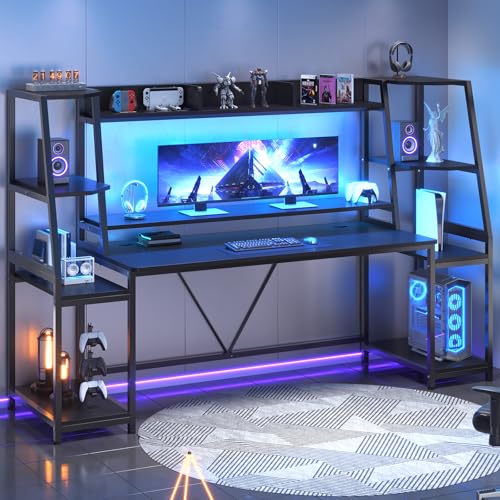
The SEDETA 78.8-inch gaming desk is the widest option in this guide, built for gamers who want three monitors in a row with room left over. Its near-79-inch desktop stretches far enough for a triple-monitor array plus a tower, and the included monitor stand raises the screens to a comfortable height while opening storage space underneath. A hutch and two large storage shelves sit above and beside the work surface, holding games, books, and display items without crowding the monitors.
LED light strips run along the desk and are controlled through an app, with a wide range of colours and flashing modes for a gaming atmosphere. A CPU holder keeps the tower off the floor and within reach, two headphone hooks and a cup holder handle accessories, and the desk ships with a detailed instruction manual for assembly. The model designation for this configuration is SD-1, and the 78.8-inch size is the largest of the available options.
For monitor mounting, the wide desktop gives C-clamp arms plenty of edge to grip, and the raised monitor stand provides a stable platform for two or three screens without an arm at all. The combination suits gamers who are building a triple-screen rig and want the desk itself to do most of the work, with arms as an optional upgrade rather than a necessity.
Pros:
– Very wide 78.8-inch surface fits three monitors comfortably
– Integrated monitor stand lifts screens to eye level
– Hutch, shelves, and CPU holder keep gear organised
– App-controlled LED lighting with many colours and modes
Cons:
– Needs a large wall and a wide room
– Hutch adds height that may not suit low ceilings or shelves above
– Assembly takes longer than a simple flat desk
Which Desk Fits Your Monitor Setup
A single ultrawide or a dual-monitor rig fits happily on the AODK 59-inch desk, especially with its built-in monitor stand doing the lifting. Gamers planning a dual-monitor corner station should look at the EUREKA L60, where the return wing and two grommets keep each screen in its own zone. Triple-monitor builders have two strong options: the SEDETA 78.8-inch desk, with its wide surface and integrated stand, or the EUREKA 72-inch wing desk, whose 400-pound capacity and convertible monitor shelves handle the heaviest arrays. If standing while gaming matters, only the EUREKA 72-inch model adjusts height, and it does so while carrying the full load.
C-clamp arms suit all four desks, and grommet-mount arms fit the two EUREKA models directly through their built-in grommet holes.
Frequently Asked Questions
Can I clamp a monitor arm to any gaming desk?
No. A clamp arm needs a solid, flat desktop edge, usually wood, engineered wood, or metal. Glass tops and thin hollow-core tops can crack or deform under the clamp, so check the material and the thickness range your arm supports before buying.
What size grommet hole does a monitor arm need?
Most grommet mounts fit holes between about two and three and a half inches in diameter, though the exact size depends on the arm. Desks with factory grommets, such as the EUREKA models above, already have holes sized for this purpose.
How much weight can a gaming desk hold with monitors attached?
It depends on the desk. The desks in this guide range from a compact 59-inch model suited to one or two screens, up to a 72-inch frame rated for 400 pounds. Add up the weight of every monitor, the tower, and the peripherals, then leave a comfortable margin.
Is a monitor shelf as good as a monitor arm?
A shelf raises screens to eye level and frees space underneath, which covers the main ergonomic benefit. An arm adds tilt, swivel, rotation, and easy repositioning, so arms suit gamers who adjust screen angles often or switch between sitting and standing.
Do I need a special desk for an ultrawide monitor?
An ultrawide needs a deep, stable desktop and a strong mounting point, because its weight sits far from the clamp or grommet. A desk rated for 170 pounds or more, with a steel frame, handles most ultrawides, and the EUREKA 72-inch model is the safest choice for the largest curved screens.
Will a monitor arm work on a standing desk?
Yes, as long as the arm is mounted to the moving desktop and the cables have enough slack for the full height range. The EUREKA 72-inch standing desk in this guide is designed for that use, with a dual-motor lift and cable routing built in.
Conclusion
The best gaming desk for monitor mounting is the one whose structure matches your screens. Grommet holes, a solid desktop edge, a strong steel frame, and enough surface for your monitor layout matter far more than lighting or styling. The EUREKA 72-inch wing desk leads for heavy multi-monitor and standing setups, the EUREKA L60 owns the corner, the AODK 59-inch desk fits compact rooms with a monitor stand included, and the SEDETA 78.8-inch desk gives triple-monitor rigs the widest stage. Pick the desk that fits your room and your screen count, confirm your arm’s mounting style against the desk’s features, and your monitors will sit exactly where you want them.
Disclosure: As an Amazon Associate, we earn from qualifying purchases.