Key takeaways
- Compare the best DVD cleaning kits for skipping discs and dusty lenses. Find lens cleaner discs, fluid kits, and wipes that fit your player.
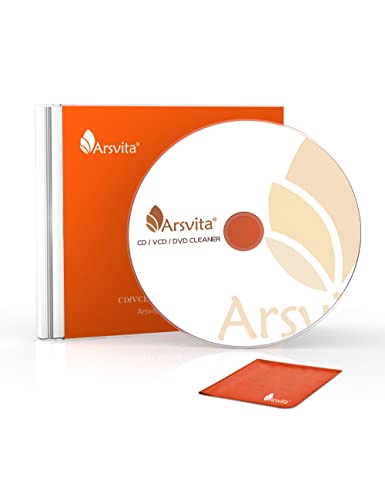
A dusty laser lens is one of the most common reasons a DVD player starts skipping, freezing, or refusing to load a disc that looks clean. The best DVD cleaning kits solve that problem without opening the player or touching the lens by hand. For most households, the Arsvita CD Laser Lens Cleaner Disc Cleaning Set is the simplest place to start, because it pairs a two-brush cleaning disc with a microfiber cloth and works with standard CD, VCD, and DVD players. Households with Blu-ray players or game consoles should look at the Allsop Digital Innovations CleanDr for Blu-ray instead, since it is built for those drives and adds image and sound calibration tools. Readers who only need to clean the discs themselves, rather than the player lens, will get more from the Maxell CD and DVD Quick Wipes.

As an Amazon Associate, we earn from qualifying purchases.
Table of Contents
- Why a DVD Player Starts Skipping
- How DVD Cleaning Kits Work
- How to Choose a DVD Cleaning Kit
- Quick Comparison
- 1. Arsvita CD Laser Lens Cleaner Disc Cleaning Set
- 2. Arsvita Laser Lens Cleaner Disc ARCD-04
- 3. Allsop Digital Innovations CleanDr for Blu-Ray Laser Lens Cleaner
- 4. Memorex CD and DVD Lens Cleaning Kit
- 5. Maxell CD and DVD Quick Wipes, 20 Pack
- Lens Cleaning or Disc Cleaning: Which Do You Need
- How to Use a DVD Lens Cleaner Disc
- How to Clean a DVD Disc by Hand
- Mistakes to Avoid
- Frequently Asked Questions
- Conclusion
- Product and ASIN Reference
Why a DVD Player Starts Skipping
A DVD player reads a disc by shining a laser through the clear layer and measuring the light that bounces back from the data layer. Anything that interrupts that beam can turn a smooth film night into a stuttering mess. Dust is the usual culprit. A thin film of household dust settles on the lens over months of sitting in a media console, and every disc that slides in and out carries a little more with it. Smoke, cooking grease, pet hair, and pollen add to the layer. The lens itself is small and recessed, so the buildup is easy to miss and hard to reach.
Skipping is the most familiar symptom. The picture freezes for a second, the sound drops out, and playback resumes a few seconds later. Slow loading is another. A player that used to start a disc in a few seconds may spin, pause, and spin again before the menu appears. Some players show a disc error or report that no disc is present even though the tray holds a clean, unscratched DVD. Freezing during layer changes or near the end of a long film also points toward a dirty lens, because the laser works hardest when it reads the outer edge of the disc.
Before buying a cleaning kit, rule out the simple causes. Try a second disc that is known to play well. If the second disc plays cleanly, the first disc may be scratched or dirty rather than the player. Try the problem disc in a different player when one is available. If it plays there, the original player is the likely source of trouble. Check that the player sits level and has room to breathe, since heat buildup can also cause odd behavior. A cleaning kit is the right next step when several discs misbehave in the same player, or when one player struggles with discs that play fine elsewhere.
It is worth knowing what a cleaning kit cannot fix. A scratched disc with deep damage, a worn-out laser, a failing drive motor, or a cracked disc will not improve after cleaning. A lens cleaner also cannot repair a player that has stopped spinning discs altogether. If the tray does not open, the disc does not spin, or the player shows the same error with every disc even after a careful cleaning cycle, the fault is likely mechanical or electronic, and a repair shop or replacement is the honest answer. Cleaning kits are maintenance tools for a common, fixable cause, not a cure for every failure.
How DVD Cleaning Kits Work
Most DVD cleaning kits fall into two groups, and the distinction matters more than brand. Lens cleaner discs clean the player. Disc surface cleaners clean the discs. Some kits combine both jobs, but each product in this guide leans clearly toward one side or the other.
A lens cleaner disc looks like an ordinary disc, but it carries one or more small brushes on its underside. When the player reads the disc, the brushes sweep gently across the laser lens as the disc spins. Many cleaner discs also carry an audio track that guides the process, with spoken instructions and tones that move the laser assembly across the lens surface. The whole cycle usually takes a few minutes. The brushes are soft by design, because the lens coating is delicate and a stiff brush would do more harm than good.
Wet and dry designs differ in how the brush meets the lens. Dry cleaner discs rely on the brush alone. They are simple, they cannot spill, and they suit light dust and routine maintenance. Wet kits add a small amount of cleaning fluid to the brushes before the disc goes in. The fluid loosens grime that a dry brush might slide over, which helps when the buildup is heavier or sticky. The trade-off is that fluid must be used sparingly and only as directed. Too much fluid can leave residue, and fluid meant for one kit should not be swapped into another without checking the instructions.
Disc surface cleaners work differently. Wipes, sprays, and cloths remove fingerprints, dust, and smudges from the clear side of the disc, the side the laser reads through. A fingerprint on that surface scatters the laser beam just as surely as dust on the lens. Wipes are the most convenient form, since each wipe is fresh and there is no bottle to store. Sprays paired with a microfiber cloth give more control over how much fluid touches the disc, and the cloth can be washed and reused. Neither form repairs scratches, despite what hopeful packaging sometimes implies. A wipe can clear the grime around a light scuff and make a disc readable again, but it cannot fill in missing data or polish away a deep gouge.
Compatibility is the detail that causes the most confusion. Many lens cleaner discs are made for standard tray-loading CD, VCD, and DVD players, and they say so plainly on the listing. Game consoles are a separate case. Some cleaner discs list specific consoles as compatible, while others warn against use with consoles entirely. Slot-loading players, car stereos, and portable players also need checking, because the brush and the disc mechanism interact differently in those designs. Blu-ray players need a Blu-ray compatible cleaner, since the lens assembly and the disc format differ from standard DVD. The product sections below spell out the compatibility limits of each pick, and the buying guide explains how to match a kit to the equipment in the room.
How to Choose a DVD Cleaning Kit
Start with the device, not the kit. Write down every player that needs attention: the living room DVD player, the bedroom Blu-ray player, a game console, a computer drive, a car stereo. Then check each kit against that list. A cleaner that is perfect for a tray-loading DVD player may be the wrong choice for a Blu-ray deck or a slot-loading car unit. The compatibility line in the listing is the authority, and the player manual is the second check when the listing is vague.
Next, decide whether the lens or the discs need the work. When several discs skip in one player, the lens is the prime suspect and a cleaner disc is the answer. When one disc skips in every player, the disc surface is the problem and wipes or a spray kit will do more good. Many households end up needing both over time, which is why this guide includes a strong wipe option alongside the lens cleaner discs. Buying the wrong type first is the most common wasted purchase in this category.
Brush design deserves a close look. Lens cleaner discs use anywhere from one brush to ten, and more brushes are not automatically better. A two-brush system is the standard layout and suits routine maintenance. Six-brush designs spread the contact across the lens and can clear a wider area in one pass. Ten-brush systems, such as the one in the Allsop CleanDr for Blu-ray, are built for thorough cleaning of Blu-ray and console lenses. What matters most is that the brushes are soft and designed for optical lenses. Carbon fiber brushes add an anti-static effect, which helps keep dust from settling straight back onto the freshly cleaned lens.
Fluid is the next fork in the road. Dry kits are the lowest fuss option, and they are enough for dust. Wet kits clean more aggressively, and they suit players that have gone years without maintenance or sit in dusty rooms. When choosing a wet kit, check what comes in the box. A kit that includes its own fluid and cloth is ready to use on arrival. A kit that needs a separate fluid purchase adds a step and a cost. Never use household glass cleaner, rubbing alcohol from an unknown source, or tap water on a lens. The fluids in these kits are formulated to evaporate cleanly, and substitutes can leave a film that is harder to remove than the dust.
Included accessories change the value of a kit more than most buyers expect. A microfiber cloth is useful for wiping discs and the outside of the player, and it is easy to lose track of how handy it is until it is missing. A storage case keeps the cleaner disc clean between uses, which matters because a dusty cleaner disc defeats its own purpose. Voice guidance or on-screen instructions make the process easier for anyone who has never used a cleaner disc before. Calibration tools, such as the image and sound checks included with the Allsop CleanDr, are a bonus for home theater setups.
Usage limits are a real part of the cost. Some cleaner discs carry a recommended replacement schedule, such as replacing the disc after a set number of uses or when the brushes show wear. That is not a flaw; it is honest guidance about a consumable tool. A kit that lasts for many uses suits a household with several players. A single-purpose wipe pack suits a household that only needs to clean discs before movie night. Think about how often the kit will be used before choosing between a durable disc and a consumable pack.
Storage and handling matter after the purchase. Keep the cleaner disc in its case, away from direct sunlight and heat. Keep fluid bottles upright and capped. Keep wipes sealed so they do not dry out. A kit that is stored well is ready when a disc starts skipping during a film, and a kit that is left loose in a drawer may be dusty or dry when it is needed most.
Quick Comparison
| Product | Cleaning Type | Best For | Tier |
|---|---|---|---|
| Arsvita CD Laser Lens Cleaner Disc Cleaning Set | Lens cleaner disc, dry brush | Everyday DVD players | Budget |
| Arsvita Laser Lens Cleaner Disc ARCD-04 | Lens cleaner disc with fluid | Heavier lens buildup | Mid-range |
| Allsop Digital Innovations CleanDr for Blu-Ray Laser Lens Cleaner | Lens cleaner disc, multi-brush | Blu-ray players and consoles | Premium |
| Memorex CD and DVD Lens Cleaning Kit | Lens cleaner disc, multi-brush | Older players and audio setups | Mid-range |
| Maxell CD and DVD Quick Wipes, 20 Pack | Disc surface wipes | Fingerprints and smudges on discs | Budget |
1. Arsvita CD Laser Lens Cleaner Disc Cleaning Set
The Arsvita CD Laser Lens Cleaner Disc Cleaning Set is the straightforward pick for a standard DVD player that has started skipping. It uses a two-brush cleaning process to remove dirt and dust from the laser lens, and it ships with a soft microfiber cloth and a user manual. The design is deliberately simple: insert the disc, follow the guidance, and let the brushes do the work. For a household with one or two tray-loading players, that simplicity is the point.
The two-brush layout is the classic approach in this category. As the disc spins, the brushes sweep the lens and lift the dust that scatters the laser beam. The set is aimed at the everyday problems that bring people to this guide: slow loading, skipping, and freezing during playback. Those symptoms are exactly what a dirty lens produces, and they are exactly what a brush disc is built to address. The included microfiber cloth handles the other half of the job, wiping fingerprints and dust from the disc surface before it goes into the player.
Compatibility is where buyers should pause and read carefully. This set is made for CD, VCD, and DVD players. The listing states that it is not compatible with PlayStation 1, 2, 3, or 4, Xbox consoles, Wii, Wii U, or Bose players. That exclusion list is important. A cleaner disc that is forced into an incompatible drive can fail to run its cycle, and the brushes may not reach the lens in the way the design expects. Households with a game console as their main disc player should skip this pick and look at the Allsop CleanDr instead, which is built with consoles in mind.
The kit suits routine maintenance as well as rescue work. A player that skips occasionally will often improve after a single cycle. A player that has not been cleaned in years may need a second cycle, with the disc removed and inspected between runs. The manual explains the steps, and the process takes only a few minutes. Because the set includes a cloth, it also encourages the habit that prevents repeat problems: wiping each disc before it goes in, so the player lens stays cleaner for longer.
Build and handling are practical rather than fancy. The package measures 5.39 x 4.96 x 0.47 inches and weighs 1.76 ounces, so it stores easily in a media console drawer or on a shelf beside the disc collection. The disc itself is a standard size, which means it loads like any other disc in a tray-loading player. The cloth is soft enough for disc surfaces and for the outside of the player, and it can be kept with the disc so the whole kit stays together.
This is the Budget tier pick in this guide, and its value comes from covering the most common case at the simplest level. It does not include cleaning fluid, so households with heavy or sticky buildup may want the wet kit in the next section. It does not work with Blu-ray players or consoles, so home theater setups with those devices need a different tool. For a standard DVD player in a living room or bedroom, though, it is the easiest first step, and the one most likely to be used regularly because it asks so little of the owner.
Specs
- Brand: Arsvita
- Model: Arsvita CD Laser Lens Cleaner Disc Cleaning Set
- Cleaning method: Two-brush dry lens cleaner disc
- Compatibility: CD, VCD, and DVD players
- Not compatible with: PlayStation 1, 2, 3, and 4, Xbox consoles, Wii, Wii U, and Bose players
- Included items: Cleaner disc, microfiber cloth, user manual
- Package dimensions: 5.39 x 4.96 x 0.47 inches
- Item weight: 1.76 ounces
- Tier: Budget
2. Arsvita Laser Lens Cleaner Disc ARCD-04
The Arsvita Laser Lens Cleaner Disc ARCD-04 takes the same two-brush idea as the set above and adds cleaning fluid to the process. That single change makes it the better choice when a dry brush has not been enough, or when a player has gone a long time without any maintenance. The fluid loosens grime that dust alone does not explain, and the double brush system carries it across the lens in a controlled way. For a player that skips on nearly every disc, the wet approach is worth trying before assuming the drive is worn out.
The kit includes the cleaner disc, cleaning fluid, a glasses cloth, and a user manual. Having the fluid in the box matters, because it removes the guesswork about which liquid is safe for a lens. The instructions explain how much fluid to apply and where it goes, and following that guidance is the whole skill the kit requires. The glasses cloth is a soft microfiber cloth by another name, and it is useful for wiping discs and for handling the cleaner disc itself without leaving fingerprints on it.
Like the base Arsvita set, the ARCD-04 is built for CD, VCD, and DVD players, and it carries the same compatibility limits. It is not the pick for PlayStation consoles, Xbox consoles, Wii, Wii U, or Bose players. It is also not a Blu-ray cleaner. Buyers with those devices should choose the Allsop CleanDr. The overlap between the two Arsvita picks is real, and it is worth stating plainly: the ARCD-04 is the stronger version of the same tool, aimed at the same players, for dirtier lenses. A household that owns one standard DVD player and wants one kit should weigh the dry set against this wet kit and pick based on how bad the skipping is.
The double brush cleaning system is the heart of the design. Two brushes spaced across the disc sweep the lens from different angles as the disc rotates, which helps clear dust that has settled unevenly. The fluid softens the deposits first, so the brushes lift rather than drag the grime. That sequence is gentler on the lens than a dry brush pressed against a sticky film, and it is the reason wet kits exist. After the cycle, the disc should be returned to its case so the brushes stay clean for the next use.
This is the Mid-range tier pick, and the step up from the Budget set is the fluid and the stronger cleaning action. It suits a household that has already tried a dry cleaner without full success, a player that lives in a dusty room, or a collection of older discs that leave residue in the tray. It also suits anyone who wants a single kit that covers both light and heavier cleaning, since the fluid can be used sparingly and the disc works without it for routine passes. The trade-off is a little more care in use and storage, since fluid bottles need to stay capped and upright.
Handling is simple. The disc is a standard 4.72 inch disc, so it loads in a tray-loading player like any other disc. The fluid bottle is small, and the cloth folds flat beside the disc in a drawer or case. The manual is short and direct, and the cycle takes a few minutes. For a player that has been skipping for weeks, that small effort is a reasonable test before spending on a repair or a replacement player.
Specs
- Brand: Arsvita
- Model: ARCD-04
- Cleaning method: Double brush lens cleaner disc with cleaning fluid
- Compatibility: CD, VCD, and DVD players
- Not compatible with: PlayStation consoles, Xbox consoles, Wii, Wii U, and Bose players
- Included items: Cleaner disc, cleaning fluid, glasses cloth, user manual
- Disc diameter: 4.72 inches
- Tier: Mid-range
3. Allsop Digital Innovations CleanDr for Blu-Ray Laser Lens Cleaner
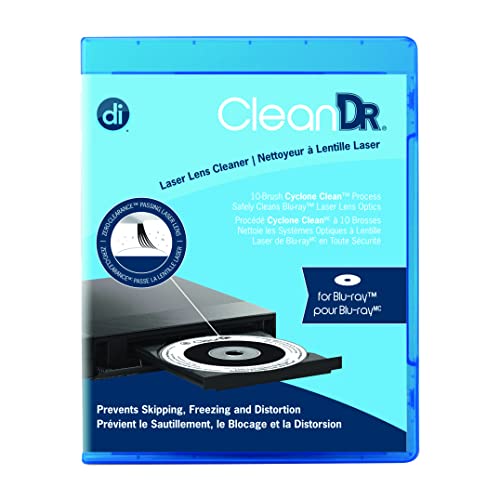
The Allsop Digital Innovations CleanDr for Blu-ray Laser Lens Cleaner is the Premium pick in this guide, and it earns that place by covering the devices the other lens discs exclude. It is built for Blu-ray players, DVD players, and a long list of game consoles, including PlayStation 3 and PlayStation 4, Xbox, Xbox 360, and Xbox One. For a home theater where the Blu-ray player and the console share the same shelf, one cleaner that fits both is more useful than two separate kits.
The cleaning system is the most elaborate in this guide. It uses a ten-brush Cyclone Clean process, with brushes arranged to sweep the lens from multiple angles as the disc spins. The design also uses Zero-Clearance technology, which is the maker language for a brush layout that reaches the lens without pressing hard against surrounding parts. The result is a thorough cleaning pass aimed at the finer lens assemblies in Blu-ray drives, which read data more densely than standard DVD drives and are less forgiving of dust.
The kit includes more than the disc. Image and sound calibration tools are part of the package, so the same disc that cleans the lens can help check that the picture and sound are set up well. A storage case is included, which keeps the disc and its brushes clean between uses. That case is a practical detail, because a cleaner disc left loose in a drawer collects the very dust it is meant to remove. The model number is 4190300, which is worth matching on the packaging when ordering, since the CleanDr line includes versions for different formats.
Compatibility is broad but still worth checking against the player manual. The listing names Blu-ray and DVD players alongside PlayStation 3, PlayStation 4, Xbox, Xbox 360, and Xbox One. That coverage makes it the natural pick for a household whose main disc device is a console rather than a standalone player. It also suits a household that has upgraded from DVD to Blu-ray and wants a single maintenance tool for the new player. The disc is a standard size, and the cleaning cycle runs like any other cleaner disc, with on-disc guidance for the steps.
The case for this pick is strongest when the other picks cannot do the job. A standard DVD cleaner disc will not serve a Blu-ray player, and a cleaner that excludes consoles will not serve a PlayStation. Buying the wrong disc first and then buying the right one costs more than choosing the Blu-ray compatible kit at the start. The Premium tier reflects the wider compatibility, the ten-brush system, and the calibration tools, not a claim that it cleans a standard DVD player better than a simpler disc. For a standard DVD player alone, the Arsvita set is the simpler match. For a Blu-ray player or a console, this is the pick that fits.
Storage and care follow the same rules as the other discs, with the included case making the job easier. Keep the case closed, keep the disc out of direct sunlight, and keep the brushes free of dust. The disc measures 7.5 x 5.5 x 0.625 inches in its packaging and weighs 1 pound, so it is a little bulkier than a bare disc, largely because of the case and the calibration materials. That bulk is the price of a kit that is meant to be kept and reused rather than used once and forgotten.
Specs
- Brand: Allsop
- Model: 4190300
- Cleaning method: Ten-brush Cyclone Clean lens cleaner disc with Zero-Clearance design
- Compatibility: Blu-ray players, DVD players, PlayStation 3, PlayStation 4, Xbox, Xbox 360, and Xbox One
- Included items: Cleaner disc, image and sound calibration tools, storage case
- Package dimensions: 7.5 x 5.5 x 0.625 inches
- Item weight: 1 pound
- Tier: Premium
4. Memorex CD and DVD Lens Cleaning Kit

The Memorex CD and DVD Lens Cleaning Kit is the veteran of this guide. It has been available since February 1, 2003, and its design has stayed close to the original idea: a cleaner disc with six ultra soft brushes, plus sound optimization tools on the disc for use with audio setups. Longevity in this category is a useful signal. A cleaner disc that has been sold for years in the same form has been used in a wide range of players, and its limits are well understood.
The six-brush system sits between the two-brush Arsvita discs and the ten-brush Allsop CleanDr. Six brushes spread the cleaning contact across the lens, which helps when dust has settled unevenly or when the player has gone a long time between cleanings. The brushes are described as ultra soft, which is the right quality for a lens coating. The disc also carries seven sound optimization tools, which are audio tracks meant to help set up and check a stereo system. Those tools are a bonus for a household that still runs a CD player through a hi-fi system, and they are harmless for a household that ignores them.
This kit is aimed at CD and DVD players, and it is a natural fit for older equipment. A player bought years ago, a stereo system with a CD changer, or a DVD player that has served a bedroom for a decade will all fall inside its compatibility. The package measures 6.31 x 0.38 x 8.69 inches and weighs 0.353 ounces, which makes it light and easy to store beside a disc collection. The thin profile is typical of a cleaner disc in a slim case, and it slips onto a shelf without taking the space a boxed kit needs.
The Memorex kit is the Mid-range tier pick, and its value is the combination of a six-brush disc and the audio tools at a middle level of complexity. It does not include cleaning fluid, so it is a dry cleaner, and it is best for dust rather than sticky buildup. Households with a heavily soiled lens should consider the Arsvita ARCD-04 with fluid first, or use the Memorex disc for regular maintenance after a wet clean. It is not presented as a Blu-ray cleaner, so Blu-ray owners should choose the Allsop CleanDr instead.
One honest note belongs here. A product that has been on sale since 2003 will have older listings and older packaging in circulation, and buyers should check that the listing matches the CD and DVD lens cleaning kit described here, with six brushes and seven sound optimization tools. The model number in the listing is a long numeric code, so matching by product name and brush count is the more practical check. When the right listing is confirmed, the kit is a simple, proven tool for the players it was made for, and its age is a reason to trust the design rather than a reason to doubt it.
Specs
- Brand: Memorex
- Model: CD and DVD Lens Cleaning Kit
- Cleaning method: Six ultra soft brush lens cleaner disc, dry
- Compatibility: CD and DVD players
- Included items: Cleaner disc with seven sound optimization tools
- Package dimensions: 6.31 x 0.38 x 8.69 inches
- Item weight: 0.353 ounces
- Date first available: February 1, 2003
- Tier: Mid-range
5. Maxell CD and DVD Quick Wipes, 20 Pack

The Maxell CD and DVD Quick Wipes take a different approach from the other four picks. They do not clean the player lens at all. They clean the discs, and for many households that is the job that actually needs doing. A fingerprint, a smudge, or a layer of dust on the clear side of a disc scatters the laser beam, and a quick wipe before playback can be the difference between a smooth film and a skipping one. The wipes are the simplest tool in this guide, and the one most likely to be used often because the effort is so small.
Each pack holds 20 wipes, and each wipe is a single-use sheet for removing dirt, dust, and smudges from DVDs, CDs, PlayStation discs, and Xbox discs. The single-use design is a strength. A reusable cloth that has picked up grit can scratch the next disc it touches, while a fresh wipe starts clean every time. The wipes are soft and non-abrasive by design, which matters because the clear layer of a disc is easy to mark with a rough cloth or a paper towel. The model number is 190511, which helps match the exact pack when ordering.
The wipes suit a household with a large disc collection, children who handle discs, or a player that is used for rentals and borrowed discs. They also suit a household that has already cleaned the player lens and still sees occasional skipping on individual discs. In that situation the disc surface is the remaining suspect, and a wipe is the fastest test. They are equally useful for game discs, music CDs, and DVDs, since the cleaning job is the same across formats: remove the film from the clear side so the laser can read through it cleanly.
This is the Budget tier pick, and its value is measured in convenience rather than in features. There is no disc to load, no cycle to run, and no fluid to apply. The wipe is used, the disc is played, and the wipe is discarded. The pack is small enough to keep beside the player, and 20 wipes last a household with a modest collection for many film nights. Heavy users will go through packs faster, but the low effort per use is what makes the wipes a habit rather than a chore.
The limits are clear and worth stating. Wipes cannot clean a player lens, so they will not fix a player that skips on every disc. They cannot repair scratches, and they cannot restore a disc with deep damage. They are a surface cleaner, and they should be judged as one. Used correctly, with a gentle wipe from the center outward, they keep discs readable and reduce the dust that reaches the player in the first place. Paired with one of the lens cleaner discs in this guide, they cover both sides of the problem: the lens inside the player and the discs that go into it.
Specs
- Brand: Maxell
- Model: 190511
- Cleaning method: Pre-moistened single-use wipes for disc surfaces
- Compatibility: DVDs, CDs, PlayStation discs, and Xbox discs
- Included items: 20 wipes per pack
- Use: Removes dirt, dust, and smudges from disc surfaces
- Tier: Budget
Lens Cleaning or Disc Cleaning: Which Do You Need
The fastest way to choose is to test the pattern. If several discs skip in one player, clean the lens. If one disc skips in several players, clean the disc. That single test separates the two problems, and it saves the cost of buying the wrong kit first. A household that is unsure can start with the cheaper test: wipe the problem disc with a Maxell wipe and play it again. If it still skips in the same player while other discs play fine, the lens is the next suspect.
There is also a middle case. A dusty house will dirty both lenses and discs at the same time, and a player that has never been cleaned may need both jobs done in the same evening. In that case, clean the lens first with a cleaner disc, then wipe each disc before it goes in. The order matters, because a dirty disc will carry dust straight back onto a freshly cleaned lens. Building the wipe habit after a lens clean is what keeps the player working well for months rather than days.
How to Use a DVD Lens Cleaner Disc
Using a lens cleaner disc is simple, but the steps deserve care. Start by wiping the cleaner disc itself with the included cloth, so no dust rides into the player on the tool meant to clean it. Check the manual for any fluid step. For a dry kit, there is none. For a wet kit such as the Arsvita ARCD-04, apply the fluid exactly as directed, in the amount stated, and nowhere else. More fluid is not better, and fluid on the wrong part of the disc can leave residue.
Place the disc in the tray with the correct side up, following the arrow or label on the disc. Close the tray and let the player read the disc. Many cleaner discs play an audio guide that explains each step, and some include tones that move the laser assembly. Turn the volume up enough to hear the guidance, and do not open the tray or press buttons while the cycle runs. The process usually takes a few minutes. When the guide ends, remove the disc and return it to its case.
Test the player with a disc that skipped before. If playback is smooth, the job is done. If skipping remains, a second cycle is reasonable, especially for a player that has not been cleaned in years. If two careful cycles make no difference, the problem is likely not dust on the lens. Check the disc surface, try a different disc, and consider whether the player needs a repair. Running the cleaner disc many times in a row will not help and may wear the brushes sooner than needed.
Store the cleaner disc in its case after use. Keep fluid bottles capped and upright. Keep cloths clean and dry. A kit that is stored well will be ready the next time a disc skips, and its brushes will still be soft and effective.
How to Clean a DVD Disc by Hand
Hand cleaning a disc is a small skill, and the direction of the wipe matters more than the force. Hold the disc by its edges, with a finger through the center hole for support. Never touch the clear playing surface with bare fingers, since skin oils leave a film that scatters the laser. Use a fresh Maxell wipe, or a clean microfiber cloth lightly dampened with a fluid made for discs.
Wipe in straight lines from the center of the disc outward to the edge, like spokes on a wheel. Do not wipe in circles around the disc. A circular wipe can create scratches that follow the data track, and a scratch along the track is harder for the player to read past than a short scratch across it. Use light pressure and let the wipe or cloth do the work. Repeat with a fresh section of the cloth or a fresh wipe until the surface looks clear.
Let the disc dry fully before it goes back in the player. A damp disc can leave moisture inside the tray, and moisture attracts dust. Check the surface in good light before loading it. If fingerprints remain, repeat the wipe. If a scratch is visible, note its depth. A light surface mark may play fine after cleaning, while a deep gouge that catches a fingernail is likely to cause skipping no matter how clean the disc is.
Store discs in their cases, upright, away from heat and sunlight. A disc left out on a table collects dust and risks scratches with every move. A disc returned to its case after each use stays cleaner, plays better, and lasts longer. That habit, more than any single product, is what keeps a collection in good shape.
Mistakes to Avoid
The most common mistake is using the wrong cleaner for the device. A standard DVD cleaner disc in a Blu-ray player, or a cleaner that excludes consoles in a PlayStation, will not do the job and may waste a purchase. Check compatibility before ordering, and check the player manual when the listing is unclear. The second mistake is using household cleaners on a lens or a disc. Glass cleaner, all-purpose spray, and tap water can leave films or minerals that are harder to remove than the dust they were meant to clear. Use only the fluid that comes with the kit or a fluid made for optical discs.
A third mistake is pressing too hard. A lens brush is designed to sweep gently, and a disc wipe is designed to lift grime with light pressure. Pressing hard can scratch a disc or stress a lens assembly. Let the tool work. A fourth mistake is wiping a disc in circles, which can turn a small mark into a track-following scratch. Straight wipes from center to edge are the safe pattern, every time.
A fifth mistake is expecting a cleaner to repair damage. A cleaner removes dust, fingerprints, and smudges. It does not fill scratches, replace a worn laser, or fix a failing motor. When cleaning makes no difference after two careful cycles, the honest next step is a repair assessment or a replacement, not a third cleaner. Finally, do not store the cleaner disc loose in a drawer. A dusty cleaner disc carries dust into the player, which is the opposite of its purpose. Keep it in its case, keep fluid capped, and keep wipes sealed.
Frequently Asked Questions
Can a DVD cleaning kit fix a disc that skips on every player?
A cleaning kit can help when the cause is dirt, dust, or fingerprints on the disc surface, and a wipe will often clear that kind of skipping. When a disc skips on every player even after careful cleaning, the cause is more likely a deep scratch or damage to the data layer, and no cleaning kit can repair that. In that case, replacing the disc is the practical answer.
How often should a DVD player lens be cleaned?
There is no fixed schedule that fits every home, because dust levels and use vary widely. A player that is used daily in a dusty room may benefit from a cleaning every few months, while a rarely used player in a closed cabinet may need it once a year. The player itself gives the signal: skipping, freezing, or slow loading across several discs means the lens needs attention.
Are lens cleaner discs safe for Blu-ray players?
Only a cleaner disc that is made for Blu-ray players should be used in one. Blu-ray drives read data more densely and use a different lens assembly than standard DVD drives. The Allsop Digital Innovations CleanDr for Blu-ray in this guide is built for Blu-ray players and for several game consoles, while the standard DVD cleaner discs are not.
Do DVD cleaning kits work on game consoles?
Some do, and some do not, so the compatibility list is the deciding factor. The Allsop CleanDr names PlayStation 3, PlayStation 4, Xbox, Xbox 360, and Xbox One as compatible. The Arsvita discs in this guide state that they are not compatible with PlayStation consoles, Xbox consoles, Wii, Wii U, or Bose players. Always match the kit to the exact console before buying.
Conclusion
A skipping DVD player is usually a dusty lens or a dirty disc, and both problems have simple, inexpensive fixes. The Arsvita CD Laser Lens Cleaner Disc Cleaning Set is the best starting point for a standard DVD player, because it is simple, complete, and easy to use. The Arsvita ARCD-04 adds cleaning fluid for heavier buildup in the same type of player. The Allsop Digital Innovations CleanDr for Blu-ray covers Blu-ray players and game consoles that the standard discs exclude. The Memorex CD and DVD Lens Cleaning Kit brings a six-brush disc and audio tools to older players and stereo setups. The Maxell CD and DVD Quick Wipes handle the disc surface, which is the other half of the problem and the part that needs attention most often.
Choose by device first, then by whether the lens or the discs need the work. A household with a single DVD player needs only the Arsvita set and a pack of wipes. A home theater with a Blu-ray player and a console needs the Allsop CleanDr. A collection of older discs and players benefits from the Memorex kit and a regular wipe habit. Whichever kit fits, use it gently, store it well, and wipe discs before they go in. Those small habits will keep the player reading smoothly and the collection playing the way it should.
Product and ASIN Reference
| Product | ASIN |
|---|---|
| Arsvita CD Laser Lens Cleaner Disc Cleaning Set | B08PBPZB5Z |
| Arsvita Laser Lens Cleaner Disc ARCD-04 | B08PTZV382 |
| Allsop Digital Innovations CleanDr for Blu-Ray Laser Lens Cleaner | B00419ZT3E |
| Memorex CD and DVD Lens Cleaning Kit | B00008EM7U |
| Maxell CD and DVD Quick Wipes, 20 Pack | B0BC2DX4VQ |