Key takeaways
- Discover the best TVs with minimal game input lag for responsive console and PC gaming, with fast panels, HDMI 2.1, VRR and low-latency game modes.
Input lag is the delay between pressing a button and seeing the result on screen, and in gaming it is the one number that separates a responsive TV from a frustrating one. A TV with high input lag makes aiming feel sluggish, turns fighting-game combos into guesswork, and adds a beat of hesitation to every dodge and parry. A TV with minimal game input lag feels connected: the character moves the instant your thumb does, and the screen never feels like it is holding you back. The best TVs with minimal game input lag pair a fast panel with a dedicated game mode, HDMI 2.1 ports, and variable refresh rate support, so the picture stays smooth without adding delay.

This guide focuses on TVs whose measured input lag sits among the lowest available, from premium OLED sets that respond in a handful of milliseconds to a Mini-LED option that brings fast gaming to a more modest budget. Every TV below is listed on Amazon US with a verified ASIN. Input-lag figures cited here come from independent measurements published by review outlets, and they refer to the TV’s game mode at high refresh rates, which is how these sets should be used for gaming.
At a Glance
| Product | Best For | Key Spec |
|---|---|---|
| LG C4 55-Inch OLED evo | Best overall gaming TV | 4K 144Hz OLED, about 5.1ms input lag at 4K 120Hz, 4x HDMI 2.1 |
| Samsung S90D 65-Inch QD-OLED | Fastest response for competitive play | 4K 144Hz QD-OLED, about 3.8ms input lag at 4K 120Hz, 4x HDMI 2.1 |
| Sony BRAVIA 8 65-Inch OLED | Movies and PlayStation gaming | 4K 120Hz OLED, about 5.2ms input lag, PS5 features, Google TV |
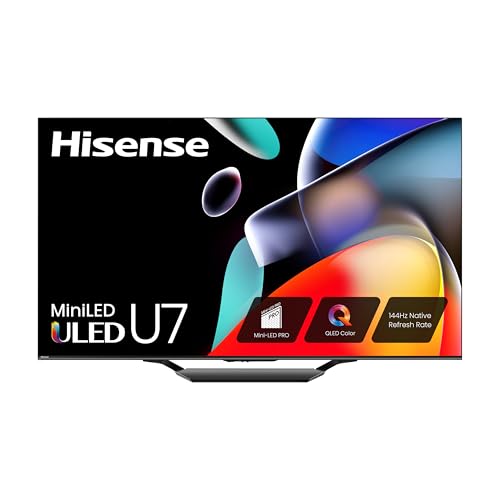
| Hisense U7N 55-Inch Mini-LED | Low-lag gaming on a modest budget | 4K 144Hz Mini-LED, Game Mode Pro, VRR, full-array local dimming |
How to Choose a TV With Minimal Game Input Lag
1. Understand what input lag really means
Input lag is measured in milliseconds, and it counts the time from signal input to the picture appearing on screen. Independent measurements of the TVs in this guide fall roughly between four and six milliseconds at 4K 120Hz in game mode, which is effectively imperceptible. By contrast, a TV outside game mode can add tens of milliseconds of processing delay, which is why the game mode setting matters as much as the panel itself. Always switch the TV to its game mode or enable auto low latency mode before playing.
2. Refresh rate and HDMI 2.1
A 120Hz or 144Hz panel refreshes the picture far more often than a standard 60Hz screen, which shortens the time each frame waits to appear and makes motion look smoother. To use those refresh rates with a PlayStation 5, Xbox Series X, or gaming PC, the TV needs full-bandwidth HDMI 2.1 ports. Four HDMI 2.1 ports is the ideal count, since it covers two consoles, a PC, and a soundbar without swapping cables. Check the number of full-bandwidth ports, not just the total port count.
3. Variable refresh rate and auto low latency mode
Variable refresh rate, known as VRR, lets the TV match its refresh rate to the console or PC frame rate, which removes screen tearing and stutter without adding lag. Auto low latency mode, or ALLM, switches the TV into game mode automatically when a console starts, so the lowest-lag path is always active. Support for NVIDIA G-Sync and AMD FreeSync extends the same benefit to PC gaming. A TV with VRR, ALLM, and both sync standards covers every platform.
4. Panel type: OLED versus Mini-LED
OLED panels switch each pixel individually, which gives near-instant response times and perfect blacks, and that is why OLED TVs dominate the lowest input-lag measurements. Mini-LED TVs use a backlight with many dimming zones behind an LCD panel, which gives higher brightness and no burn-in risk, at the cost of slightly slower pixel response. Both types can deliver minimal input lag in game mode; the choice comes down to room brightness, viewing habits, and whether static game interfaces stay on screen for hours.
5. Game mode picture quality
Some TVs dim the picture or wash out colours when game mode is switched on, because processing features are turned off to cut lag. The best gaming TVs keep HDR highlights bright inside game mode, so the picture still has punch while the lag stays low. Look for a TV whose game mode preserves HDR brightness and colour, and check whether it offers a game optimiser menu for quick adjustments to dark-scene detail and crosshair overlays.
6. Size, viewing distance, and sound
A 55-inch TV suits a bedroom or a desk setup, while a 65-inch set fills a living room and makes HUD text easy to read from the sofa. Sit far enough back that the whole screen fits comfortably in view, since a screen that is too close forces constant head movement during fast games. Built-in sound matters too: TVs with stronger speaker systems reduce the need for a soundbar, though a dedicated soundbar still improves the experience for cinematic games.
LG C4 55-Inch OLED evo 4K Smart TV
ASIN: B0CVS1XHWC
The LG C4 is the default recommendation for gamers for good reason, and its input lag is a large part of that reputation. Independent measurements put its input lag at about 5.1 milliseconds at 4K 120Hz, dropping to around 4.3 milliseconds in its input-delay boost mode at 144Hz. Those figures sit far below the threshold any player can perceive, which means the TV simply gets out of the way and lets the game speak for itself.
The panel is a 55-inch 4K OLED evo display with a 144Hz refresh rate, driven by the Alpha 9 AI Gen7 processor. It supports 4K at 120Hz from consoles and 144Hz from a PC, with four full-bandwidth 48Gbps HDMI 2.1 ports, so a PlayStation 5, an Xbox Series X, and a PC can all stay connected at full speed. NVIDIA G-Sync, AMD FreeSync Premium, and HDMI Forum VRR are all supported, and the Game Optimizer menu gives quick access to dark-room settings and frame-rate displays. Dolby Vision gaming works at 120Hz on Xbox, which is a combination few rivals match.
Picture quality in game mode stays strong: unlike some earlier OLED generations, the C4 keeps HDR highlights bright when Game Optimizer is active, so dark scenes stay detailed without washing out. The OLED panel delivers perfect blacks and a 0.1-millisecond pixel response, which removes motion blur and ghosting in fast shooters and racers. Sizes range from 42 to 83 inches, so the same low-lag performance is available for a desk setup or a large living room.
Best for: gamers who want the lowest-lag all-rounder for PlayStation, Xbox, and PC in one TV.
Pros:
– About 5.1ms input lag at 4K 120Hz, among the lowest measured
– Four full-bandwidth HDMI 2.1 ports with 144Hz, VRR, G-Sync, and FreeSync
– OLED evo panel with perfect blacks and 0.1ms pixel response
– HDR brightness holds up inside Game Optimizer mode
Cons:
– OLED panels carry a burn-in risk with static HUD elements over long periods
– Peak brightness trails brighter QD-OLED rivals in very bright rooms
– Premium positioning compared with Mini-LED alternatives
Samsung S90D 65-Inch QD-OLED 4K Smart TV
ASIN: B0CV9VGMPT
The Samsung S90D is the speed champion of this guide. Independent measurements put its input lag at about 3.8 milliseconds at 4K 120Hz, the fastest figure recorded for a consumer TV, which makes it the natural choice for competitive play where every millisecond counts. Fighting games, first-person shooters, and fast-paced racing titles all benefit from a screen that responds this quickly, and the difference is noticeable to players who compete online.
The panel is a 65-inch 4K QD-OLED display, model QN65S90DAFXZA, which combines OLED’s self-lit pixels with a quantum-dot colour layer. The result is richer, more saturated colour in bright HDR scenes than a standard OLED, with peak brightness reaching roughly 1,240 nits in HDR. Motion Xcelerator drives the panel at up to 144Hz, and four HDMI 2.1 ports support 4K 120Hz gaming with VRR and FreeSync Premium Pro. The NQ4 AI Gen2 processor handles 4K AI upscaling, and the Gaming Hub puts cloud gaming services on the home screen without a console.
Sound is handled by Object Tracking Sound Lite with Dolby Atmos support and a 70-watt speaker system, which gives games a wider soundstage than the slim chassis suggests. The TV runs Samsung’s smart platform with Alexa built in, and its ultra-wide viewing angle keeps colours accurate for players sitting off to the side. For a living-room console setup where competitive responsiveness matters most, the S90D is hard to beat.
Best for: competitive gamers and anyone who wants the fastest measured input lag available.
Pros:
– About 3.8ms input lag at 4K 120Hz, the fastest in this guide
– QD-OLED panel with vivid colour and strong HDR brightness
– 144Hz refresh rate with four HDMI 2.1 ports and FreeSync Premium Pro
– Gaming Hub for cloud gaming without a console
Cons:
– No Dolby Vision support, which matters for some Xbox titles
– QD-OLED shares OLED’s burn-in considerations with static images
– 65-inch size needs a roomy living-room setup
Sony BRAVIA 8 65-Inch OLED 4K Smart TV
ASIN: B0CY4S6P6B
The Sony BRAVIA 8, model K-65XR80, is the cinematic pick in this guide, and it still keeps input lag low enough for serious gaming. Independent measurements put its input lag at about 5.2 milliseconds, which sits in the same imperceptible band as the LG and Samsung sets above. That combination of low lag and Sony’s image processing makes it the best choice for gamers who spend as much time watching films as playing.
The 65-inch 4K OLED panel runs at 120Hz and is driven by Sony’s XR Processor, which is known for accurate motion handling and strong upscaling of lower-resolution content. Two HDMI 2.1 ports support 4K 120Hz gaming with VRR and ALLM, and PlayStation-specific features include Auto HDR Tone Mapping and Auto Genre Picture Mode, which adjust the picture automatically when a PS5 is connected. Dolby Vision and Dolby Atmos are both supported, and Acoustic Surface Audio+ turns the screen itself into a speaker, producing dialogue that seems to come from the characters on screen.
Google TV is the smart platform, with a wide app selection and voice control, and the slim design fits living rooms where the TV is as much furniture as technology. The OLED panel delivers the deep blacks and infinite contrast that make dark horror games and moody adventures look their best, while the 120Hz refresh rate keeps fast action smooth.
Best for: PlayStation owners and film lovers who want low input lag without giving up cinematic picture quality.
Pros:
– About 5.2ms input lag, effectively imperceptible in play
– Excellent motion handling and upscaling from the XR Processor
– PlayStation features including Auto HDR Tone Mapping
– Acoustic Surface Audio+ with Dolby Vision and Dolby Atmos
Cons:
– Only two HDMI 2.1 ports, so multi-console setups may need a switch
– 120Hz maximum refresh rate rather than 144Hz
– Premium positioning for a 120Hz set
Hisense U7N 55-Inch Mini-LED ULED 4K Smart TV
ASIN: B0CY56XCJ9
The Hisense U7N proves that minimal game input lag does not require a flagship budget. This 55-inch Mini-LED TV, model 55U7N, pairs a native 144Hz panel with Game Mode Pro, a dedicated low-latency gaming mode that keeps delay down while VRR and ALLM handle smooth, tear-free motion. It is the value pick in this guide, aimed at gamers who want genuine 4K 120Hz and 144Hz gaming without paying OLED prices.
The Mini-LED backlight uses full-array local dimming to control brightness across the panel, pushing HDR highlights past 1,400 nits for bright, punchy game worlds. Quantum-dot colour, Dolby Vision IQ, and Dolby Atmos are all supported, and the built-in 2.1-channel subwoofer gives the sound more weight than most TVs in this class. The panel measures 54.6 inches diagonally, the set weighs 34 pounds, and it runs Google TV with Alexa compatibility.
Unlike the OLED sets above, the U7N has no burn-in risk, which suits gamers who leave static HUDs, health bars, and minimaps on screen for hours. Its native 144Hz refresh rate also makes it a strong match for PC gaming, and AMD FreeSync Premium support keeps frame pacing smooth across a wide refresh range. For a bedroom, dorm room, or second gaming setup, it delivers the core low-lag experience at a far more modest outlay than the premium OLED options.
Best for: budget-conscious gamers, dorm rooms, and long sessions with static on-screen interfaces.
Pros:
– Native 144Hz panel with Game Mode Pro, VRR, and ALLM
– Bright Mini-LED HDR with full-array local dimming
– No burn-in risk from static HUD elements
– Built-in 2.1 subwoofer and Dolby Vision IQ support
Cons:
– Slower pixel response than OLED, with some motion blur in fast scenes
– Narrower viewing angles than the OLED sets in this guide
– No measured input-lag figure as low as the premium OLED rivals
Which TV Fits Your Games
Competitive players should start with the Samsung S90D: its measured 3.8-millisecond input lag is the fastest here, and its 144Hz QD-OLED panel stays vivid in bright rooms. Gamers who play across PlayStation, Xbox, and PC will get the most from the LG C4, whose four HDMI 2.1 ports, Dolby Vision gaming at 120Hz, and 5.1-millisecond lag cover every platform without compromise. PlayStation owners who also watch films should choose the Sony BRAVIA 8, which pairs 5.2-millisecond lag with the best motion processing and PlayStation-specific features in this guide. The Hisense U7N is the right call for a second room, a dorm, or a first gaming TV, where its 144Hz Mini-LED panel and Game Mode Pro deliver the low-lag essentials with no burn-in worries.
Enable game mode or ALLM before playing: the lowest lag figures quoted here all assume game mode is active.
Frequently Asked Questions
What input lag is good for gaming?
Measurements in the region of five milliseconds or below at 4K 120Hz in game mode are effectively imperceptible, and all the premium TVs in this guide fall in that band. Anything under about ten milliseconds feels responsive for most players, while figures above twenty milliseconds start to feel sluggish in fast games.
Does game mode reduce picture quality?
Game mode turns off extra picture processing to cut delay, which can slightly change the image. The best gaming TVs, including the LG C4 and Samsung S90D, keep HDR brightness and colour accuracy high inside game mode, so the trade-off is minimal.
Is a 144Hz TV better than a 120Hz TV for console gaming?
Consoles cap output at 120Hz, so a 144Hz panel offers no extra benefit for console play alone. A 144Hz panel does help PC gaming, where frame rates can exceed 120, and it future-proofs the TV for later hardware.
Do I need HDMI 2.1 for low input lag?
HDMI 2.1 is needed for 4K 120Hz and 144Hz gaming with VRR, which is where the lowest lag figures are measured. A TV can still have low lag at 4K 60Hz over older HDMI, but it cannot reach the fastest modes without HDMI 2.1 ports.
Does OLED burn-in matter for gaming?
OLED panels can retain faint images if the same static elements, such as health bars or minimaps, stay on screen for very long periods at high brightness. Modern OLED TVs include pixel shifting and screen-dimming protection, and varied content reduces the risk. Gamers who play one title for many hours daily may prefer the Mini-LED Hisense U7N instead.
Can I use a low input lag TV as a PC monitor?
Yes. A 42-inch or 48-inch OLED TV works well as a large PC monitor, and the LG C4 is available in those sizes with the same low-lag performance. Use the TV’s PC or game mode, sit at a suitable distance, and enable the burn-in protection features.
Conclusion
Minimal game input lag turns a good TV into a great gaming display, and the sets in this guide prove it is available at several levels. The Samsung S90D leads on raw speed, the LG C4 is the most versatile all-rounder, the Sony BRAVIA 8 is the cinematic choice for PlayStation players, and the Hisense U7N brings genuine low-lag 144Hz gaming to a more modest budget. Pick the panel type and size that suit your room, confirm the HDMI 2.1 port count against your consoles and PC, and always switch on game mode before you play.
Disclosure: As an Amazon Associate, we earn from qualifying purchases.