Key takeaways
- Find the best projector lens cleaning kits for dust-free, streak-free projector lenses. Compare five kits, tools, fluids, and cloths before you buy.
A dusty projector lens softens the picture, washes out dark scenes, and turns bright highlights into a faint haze. The best projector lens cleaning kits solve that problem with the same tools used for camera and telescope optics: a blower to lift loose dust, a soft brush or lens pen for fingerprints, a coating-safe fluid, and clean microfiber cloths or tissues. The short answer is that the Altura Photo Camera Lens Cleaning Kit is the strongest all-round choice for most home theater owners because it covers every step in one hard case, while the Camkix Camera Lens Cleaning Kit is the best low-cost way to keep a projector lens clean, the Celestron Lens Cleaning Kit is the best optics-first choice for telescope and projector glass, the LensPen New DSLR Pro Camera Cleaning Kit is the best pocket kit for quick touch-ups, and the ZEISS Lens Care Pack is the best fluid-and-cloth choice for owners who already own a blower and a brush.

As an Amazon Associate, we earn from qualifying purchases.
Table of Contents
- Best Projector Lens Cleaning Kits for Clear Images
- Why a Projector Lens Needs Its Own Cleaning Kit
- How to Choose a Projector Lens Cleaning Kit
- The 5 Best Projector Lens Cleaning Kits
- Altura Photo Camera Lens Cleaning Kit
- Camkix Camera Lens Cleaning Kit
- Celestron Lens Cleaning Kit
- LensPen New DSLR Pro Camera Cleaning Kit
- ZEISS Lens Care Pack
- Projector Lens Cleaning Kits Compared
- How to Clean a Projector Lens Safely
- Mistakes That Damage Projector Lenses
- Frequently Asked Questions
- Conclusion
- Product and ASIN Reference
Why a Projector Lens Needs Its Own Cleaning Kit
A projector lens is a coated optical surface, and it behaves like a camera lens rather than a television screen. Dust settles on the front element every time the projector sits unused, and a home theater room adds its own share of lint, pet hair, cooking film, and airborne particles. When the lamp shines through that layer, the image loses contrast first. Blacks turn gray, fine detail in dark scenes disappears, and a bright scene can show a soft glow around objects that should have crisp edges. A fingerprint is worse, because skin oil bonds to the coating and smears across the glass when it is wiped with a dry shirt or a paper towel.
A dedicated cleaning kit matters because the order of the clean is as important as the tools. Loose dust must come off before anything touches the glass. If a cloth drags a grain of sand across a coated lens, the result is a fine scratch that no amount of fluid will remove. A good kit gives you a blower for that first step, a brush for what the blower leaves behind, a pen or fluid for fingerprints, and fresh cloths or tissues for the final wipe. Each tool has one job, and using them in the right order keeps the coating intact.
Projector makers generally give the same advice: let the projector cool and switch it off before cleaning, blow dust away first, and never spray liquid directly onto the lens. Fluid belongs on a cloth or a tissue, never on the glass itself, because liquid can seep around the edge of the lens and into the housing. A kit built for optics follows that logic. A television screen cleaner kit, by contrast, is built for a large flat panel and often includes a big spray bottle and a large cloth that are awkward on a small, curved projector lens. Lens caps protect a lens between uses, but they do nothing about dust that is already on the glass. The kits in this guide are different: every one of them is built around optical glass, and every one of them can be used on a projector lens, a camera lens, a pair of binoculars, or a telescope eyepiece.
The other reason to buy a kit rather than a single cloth is storage. A brush rolling loose in a drawer gathers the same dust you are trying to remove, and a cloth left on a shelf picks up grit. The better kits in this guide store the tools in a hard case or a pouch so they come out as clean as they went in. That detail sounds small until you realize that a dirty cleaning tool is the fastest way to scratch a lens.
How to Choose a Projector Lens Cleaning Kit
Start with the blower. A kit without a blower forces you to wipe dust off the lens, which is the one step that causes most scratches. A rubber bulb blower needs no batteries and no refills, and it delivers a targeted stream of air that moves loose dust without touching the glass. If a kit has no blower, plan to buy one separately, or choose a different kit.
Next, look at how the kit handles fingerprints. A lens pen uses a carbon cleaning tip that lifts oil without fluid, which makes it ideal for a quick touch-up before a movie night. A fluid and cloth combination handles heavier smudges and a lens that has not been cleaned in months. The strongest kits offer both: a pen for fast work and a fluid for deep cleaning. If you only ever deal with dust, a blower and a brush may be enough, but most home theater owners eventually face a fingerprint, especially on a portable projector that gets handled often.
Check the fluid formula. Makers of optics cleaning fluid usually describe their spray as alcohol free and ammonia free, and formulated for anti-reflective and multi-coated glass. That wording matters because a projector lens carries coatings that control reflections and color. A harsh household cleaner can damage those coatings, and a glass cleaner made for windows is not a substitute. If a kit does not state that its fluid is safe for coated optics, treat that as a gap and use the fluid only on a cloth, sparingly, or skip the kit.
Count the cloths and tissues. A single cloth is not enough for a household with more than one projector or a projector that is cleaned often. A cloth that has already wiped a greasy fingerprint, or picked up a speck of grit, is the wrong tool for the next lens. Kits that include three or five cloths, plus a pad of disposable lens tissues, let you rotate to a fresh surface every time. Disposable tissues have a second advantage: they are used once and thrown away, so there is no chance of reusing a contaminated cloth.
Consider storage and size. A hard case keeps a brush, a pen, and cloths clean between uses, and it makes the kit easy to keep beside the projector or in a media cabinet. A pouch is lighter and better for a portable projector that travels. A kit with no case at all can still work well, but you will need to store it in a clean, sealed container of your own. Think about where the kit will live, because a kit stored in a dusty drawer slowly becomes part of the problem.
Finally, match the kit to the projector. A ceiling-mounted home theater projector needs a kit that can be used at arm’s length on a ladder, which favors a pen and a cloth over a large blower and a spray bottle. A portable projector that moves between rooms benefits from a compact kit that fits in the carry case. A short-throw projector sits close to the screen and gathers dust quickly, so a blower-first kit earns its place. None of the kits in this guide is made only for projectors, because projector makers do not sell many lens cleaning kits under their own names. The right approach is to choose an optics kit whose tools, fluid, and cloths suit coated projector glass, and to use it with the care a projector lens deserves.
The 5 Best Projector Lens Cleaning Kits
Altura Photo Camera Lens Cleaning Kit
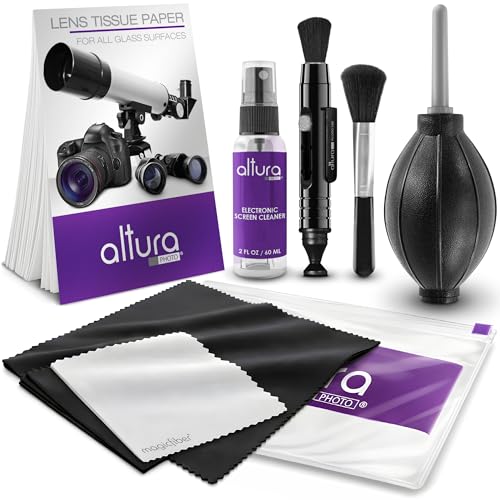
The Altura Photo Camera Lens Cleaning Kit is the most complete everyday kit in this guide, and it is the one to buy first if you want a single purchase that covers every step of a lens clean. Altura lists a lens cleaner spray, a cleaning brush, a lens pen, an air blower, three microfiber cloths, and 50 lens tissue sheets, all stored in a hard case. That combination follows the safe cleaning order exactly: blow dust away, brush what remains, lift fingerprints with the pen, and finish with fluid on a cloth or a fresh tissue.
The spray is described by the maker as alcohol free, ammonia free, and odor free, and formulated for anti-reflective and multi-coated glass. That is the right profile for a projector lens, whose coatings are the reason the image stays sharp and color-accurate. The three cloths are supplied by MagicFiber, a brand known for soft microfiber made for optical glass, and the 50 tissues give you a disposable option for a lens that is dusty or greasy. When a tissue is used once and discarded, there is no risk of wiping the next lens with a cloth that picked up grit on the last one.
The hard case is what separates this kit from cheaper bundles. A brush stored loose in a bag gathers dust, and cloths left in a drawer pick up lint and sand. The case keeps every tool clean and together, so the kit is ready beside the projector instead of scattered across a shelf. It also makes the kit easy to carry to a ceiling-mounted projector or to a portable projector in another room. Altura lists compatibility with lenses from the major camera brands, including Canon, Nikon, Sony, Fujifilm, Olympus, Pentax, Sigma, and Tamron, and the same tools work on filters, binoculars, and projector lenses.
The one gap is the absence of sensor swabs. That does not matter for a projector, because a projector has no camera sensor to clean, but it is worth knowing if you also shoot with an interchangeable lens camera and want one kit for both jobs. For projector use alone, the Altura kit has everything that matters and nothing that does not. It is a mid-range kit in this guide, and it earns that place by covering the full cleaning routine without asking you to buy anything else.
Use this kit when you want one complete purchase, when the projector has not been cleaned in a while, or when several people in the household will use the kit and need clear tools for each step. Keep the tissues stocked, wash the cloths regularly, and replace the spray when it runs out rather than substituting a household cleaner.
Specs
- Tier: Mid-range
- Kit contents: Lens cleaner spray, air blower, cleaning brush, lens pen, 3 microfiber cloths, 50 lens tissues
- Fluid: Listed as alcohol free, ammonia free, and odor free
- Cloths: 3 microfiber cloths plus 50 disposable lens tissue sheets
- Storage: Hard case
- Best for: Complete everyday cleaning of projector lenses and camera lenses
- ASIN: B0098QH2BC
Camkix Camera Lens Cleaning Kit
The Camkix Camera Lens Cleaning Kit is the budget pick in this guide, and it is the best value for a home theater owner who wants a complete set of tools without paying for a hard case. Camkix lists an air blower, a 2-in-1 lens cleaning pen, a cleaning brush, a spray bottle with cleaning solution, 50 sheets of lens cleaning paper, and five microfiber cloths. That is more cloths than any other kit here, which matters more than it sounds: a fresh cloth for every clean is the simplest way to avoid scratching a lens with a contaminated wipe.
The blower needs no batteries or refills, and Camkix describes it as delivering a precisely targeted stream of air for a lens or a camera sensor area. That first step, blowing loose dust away before anything touches the glass, is the habit that protects a coating. The 2-in-1 pen carries an adjustable brush on one end and a non-liquid cleaning element on the other, which Camkix says is designed never to dry out. The brush sweeps away what the blower leaves, and the cleaning element lifts fingerprints and grease without fluid.
The five microfiber cloths are described as non-abrasive and extra soft, intended for glass after the spray or the tissue. With five cloths, you can keep one for the projector lens only, one for filters, one for a portable projector, and still have spares in rotation while others are being washed. The 50 sheets of lens paper are listed as safe for coated lenses and suitable for telescopes, magnifying glasses, microscopes, and other precision optics, which is exactly the class a projector lens belongs to.
The trade-off is storage. Camkix does not list a hard case, so plan to keep the kit in a clean pouch or a sealed box of your own. A loose brush in a drawer will gather dust, and cloths left out will do the same. The other detail to check when ordering is the spray bottle: Camkix also sells a version of this kit with an empty spray bottle, so make sure the listing you choose is the version with cleaning solution included. With those two cautions handled, this is a straightforward, complete kit that covers every step of a lens clean at the lowest tier in this guide.
Choose the Camkix kit when the projector is cleaned often, when you want plenty of spare cloths, or when you are buying a first kit and want to learn the routine before spending more. It is also a good second kit to keep beside a portable projector while the main kit stays in the home theater room.
Specs
- Tier: Budget
- Kit contents: Air blower, 2-in-1 lens cleaning pen, cleaning brush, spray bottle with cleaning solution, 50 lens tissue sheets, 5 microfiber cloths
- Fluid: Spray bottle with cleaning solution included in this version
- Cloths: 5 microfiber cloths plus 50 sheets of lens cleaning paper
- Storage: No hard case listed; store in a clean pouch or sealed box
- Best for: Frequent cleaning and households that want plenty of spare cloths
- ASIN: B00MHGOGUK
Celestron Lens Cleaning Kit
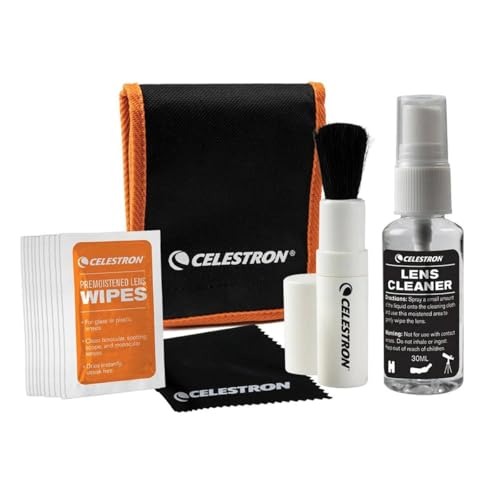
The Celestron Lens Cleaning Kit comes from a maker known for telescopes and optical instruments, and it is the most optics-first kit in this guide. Celestron describes it as a complete solution for cleaning the lenses of optical instruments, including binoculars and spotting scopes, as well as the external surfaces of telescope eyepieces and correctors, camera lenses, eyeglasses, and other similar items. A projector lens is the same kind of coated glass, and the kit treats it that way.
The manual for this kit lists a lens cleaning solution in a spray bottle, individually wrapped pre-moistened single-use lens wipes, a non-abrasive microfiber cleaning cloth, a retractable cleaning brush, and a carrying case with a belt loop. The manual sets out a two-step method: blow and brush loose dirt and dust off the lens first, then use the fluid and wipes only when a thorough wet cleaning is required. That is the correct order for a projector lens, and it is spelled out in the instructions rather than left to guesswork.
The single-use wipes are a real advantage for a projector that sits unused for weeks. Each wipe is individually wrapped and pre-moistened, so it comes out clean and is discarded after one use. There is no reused cloth carrying grit from a previous clean, and no question about whether the cloth was washed properly. The kit contains ten of these wipes, which is enough for a long run of routine cleans when most of the work is done by the blower and the brush. The microfiber cloth handles the final polish, and the carrying case keeps everything together with a belt loop for carrying the kit to a ceiling-mounted projector.
Celestron is careful about what the kit should not be used for. The manual states that the contents should not be used to clean the mirrors of any telescope or contact lenses, and the same caution applies in spirit to the inside of a projector: this kit is for the external front lens only, never for internal optics. That boundary is a sign of a maker that understands optical surfaces, and it is worth respecting. For the front element of a home theater projector, a portable projector, or a short-throw projector, this kit is a precise, well-documented choice.
Pick the Celestron kit when you value a maker with a long history in optics, when you like the discipline of single-use wipes, or when the projector shares a shelf with binoculars and a telescope and one kit should serve all of them. It is a mid-range kit, and its strength is the quality of its method rather than the size of its piece count.
Specs
- Tier: Mid-range
- Kit contents: Lens cleaning solution spray, 10 pre-moistened single-use lens wipes, non-abrasive microfiber cloth, retractable cleaning brush, carrying case with belt loop
- Fluid: Lens cleaning solution in a spray bottle
- Cloths: 1 microfiber cloth plus 10 individually wrapped wipes
- Storage: Carrying case with belt loop
- Best for: Optics-first cleaning of projector lenses, binoculars, and telescope eyepieces
- ASIN: B08N5D9LXH
LensPen New DSLR Pro Camera Cleaning Kit

The LensPen New DSLR Pro Camera Cleaning Kit is the pocket kit in this guide, and it is the best choice for quick touch-ups when a full cleaning routine is more than the moment needs. Instead of a spray bottle and a set of cloths, this kit contains three lens pens and a microfiber carrying pouch that doubles as a cleaning cloth. The original LensPen is made for DSLR lenses, the FilterKlear pen is made for lens filters, and the MicroPro pen is made for viewfinders. Together they cover the small glass surfaces that gather fingerprints fastest, including the front element of a projector lens.
Each pen works without fluid. One end carries a retractable natural brush that sweeps dust away, and the other end carries a carbon cleaning tip that lifts oil and fingerprints from coated glass. The carbon compound absorbs oil rather than pushing it around, which is why a lens pen can clear a fingerprint in a few light circular passes. The tip is round and compact, and the pen body is short enough to fit in a pocket, a projector carry case, or a media cabinet drawer. For a ceiling-mounted projector, that matters: you can carry the pen up a ladder without juggling a spray bottle and a stack of cloths.
The pouch is a thoughtful part of the design. It stores the pens so their tips stay clean, and it doubles as a cleaning cloth for larger surfaces. That dual role keeps the kit to a single small item, which is the reason to choose it over a larger bundle. The trade-off is that there is no blower and no fluid in the box. A projector lens covered in dust still needs a blower first, and a lens with a heavy smudge may still need fluid on a cloth. The LensPen kit is best as a fast tool for fingerprints and light dust, paired with a blower or a fuller kit for deeper cleans.
This is the premium pick in this guide by tier, because it is a specialized tool from a maker focused entirely on lens pens rather than a general bundle. It earns that place for owners who clean a projector lens often and want the fastest safe method between full cleans. Keep it beside the projector, use the brush end first, and let the carbon tip do the work with light pressure and no added liquid.
Specs
- Tier: Premium
- Kit contents: Original LensPen for DSLR lenses, FilterKlear pen for lens filters, MicroPro pen for viewfinders, microfiber carrying pouch that doubles as a cleaning cloth
- Fluid: None included; carbon cleaning tips work without liquid
- Cloths: Microfiber carrying pouch doubles as a cleaning cloth
- Storage: Microfiber carrying pouch
- Best for: Quick fingerprint removal and pocket-size touch-ups
- ASIN: B0081ER9KG
ZEISS Lens Care Pack

The ZEISS Lens Care Pack is the fluid-and-cloth choice in this guide, and it is the best option for owners who already have a blower, a brush, and a lens pen and simply need a reliable cleaning fluid and fresh cloths. ZEISS is a maker with a long history in optics, and this pack contains two 8-ounce bottles of streak-free lens spray and microfiber cloths. The formula is described as ammonia free and low in volatile compounds, and safe for lenses with anti-reflective coatings, blue-light-blocking coatings, and other coated optics. That profile suits a projector lens, whose coatings are the part of the glass most at risk from a harsh cleaner.
The pack is built for repetition. Two large bottles last through many cleans, and the cloths are made to be washed and reused. The spray is applied to the cloth, never directly to the lens, and a small amount goes a long way on a projector front element. For a home theater projector that is cleaned on a regular schedule, this is the most economical way to keep the fluid supply topped up without buying a whole new kit every time. It also suits a household with several optical items, because the same spray and cloths can be used on eyeglasses, binoculars, camera lenses, and a projector lens.
The limit of this pack is that it is not a complete kit on its own. There is no blower, no brush, and no lens pen in the box, so a dusty lens still needs dust removed before the spray and cloth touch the glass. Buy this pack as a refill and companion to a blower-first kit, or as the main supply for an owner who already owns those tools. One caution for the user checking stock: the listing for this pack has shown a notice that no featured offers were available in one recent crawl, so confirm the live offer before posting or ordering. The product itself is a straightforward, trusted optics cleaner, and its value is in the size of the bottles and the quality of the formula rather than in the number of tools.
Choose the ZEISS pack when the cleaning routine is already in place and the fluid keeps running out, when several lenses in the household need the same cleaner, or when you prefer a large bottle that does not need replacing often. It is a premium pick in this guide, and it pairs well with any of the blower-first kits above.
Specs
- Tier: Premium
- Kit contents: 2 bottles of lens spray, 8 fluid ounces each, plus microfiber cloths
- Fluid: Streak-free lens spray, listed as ammonia free and low in volatile compounds
- Cloths: Microfiber cleaning cloths included with the spray bottles
- Storage: Bottles and cloths; no hard case listed
- Best for: Owners who already own a blower and a brush and need fluid and cloths
- ASIN: B00GPVQVCO
Projector Lens Cleaning Kits Compared
The five kits in this guide cover the same job in different ways, and the right choice depends on which step of the clean you need most. The Altura Photo kit is the only one that covers every step in a single hard case: blower, brush, pen, fluid, cloths, and tissues. If you buy one kit and want the routine handled, start there. The Camkix kit covers the same steps at a lower tier and with more cloths, but it asks you to provide your own storage. For a household that cleans often and goes through cloths quickly, that trade is worth making.
The Celestron kit is the most disciplined of the five. Its manual spells out the blower-first method, its wipes are single-use, and its maker is explicit about what the kit should not be used on. It has fewer cloths and no lens pen, but it has the clearest instructions and the strongest optics background. The LensPen DSLR Pro kit is the opposite in shape: it is the smallest kit here, with no fluid and no blower, but it is the fastest tool for a fingerprint and the easiest to carry to a ceiling-mounted projector. The ZEISS pack is not a complete kit at all, and it should not be bought as one. It is a fluid and cloth supply for owners who already own the tools, and it is the best value in that role because of the size of its bottles.
A useful way to think about the choice is to ask what is already beside your projector. If nothing is there, buy the Altura Photo kit. If a blower and a brush are already there, buy the ZEISS pack. If the projector travels, add the LensPen kit to the carry case. If the projector shares a room with binoculars and a telescope, buy the Celestron kit. If the projector is cleaned every week and cloths run out fast, buy the Camkix kit. Most home theater owners will be happy with the first answer, and the other kits are best understood as companions to it rather than rivals.
How to Clean a Projector Lens Safely
Switch the projector off and let it cool completely before you start. A hot lens can be damaged by a cool cloth or fluid, and a projector that is still running will keep drawing dust onto the glass while you work. Move the lens cap aside if the projector has one, and work in a room with still air so dust does not drift back onto the lens while you clean it.
Start with the blower. Hold the projector steady, aim the blower at the lens from a short distance, and use several short puffs rather than one long blast. The goal is to lift loose dust and lint off the glass without touching it. Follow with the brush, using light strokes from the center outward, and let the brush carry away what the blower left behind. If you use a lens pen, use the brush end first for the same reason: the carbon tip should only meet glass that is already free of grit.
Only then should you deal with fingerprints or smudges. If you are using a lens pen, twist the cap to expose the carbon tip and use light circular passes, starting at the center and working outward. If you are using fluid, spray a small amount onto a clean microfiber cloth or a fresh lens tissue, never directly onto the lens. Wipe in gentle circles or straight lines with almost no pressure, and turn the cloth to a fresh area as it picks up oil. A single-use wipe is used once and discarded; a cloth is folded to a clean face before it touches the glass again.
Finish by inspecting the lens in reflected light. Hold a light at an angle and look for streaks, smudges, or remaining dust. A second pass with a fresh tissue is better than pressing harder with a used one. When the lens is clean, replace the lens cap if the projector has one, and store the cleaning tools in their case or pouch so they stay clean for the next use. Clean the lens only when it needs it: a weekly blower pass is fine, but a full wet clean every time the projector is used will wear the coating faster than necessary.
Mistakes That Damage Projector Lenses
The most common mistake is wiping a dusty lens with a dry cloth. Dust is abrasive, and a cloth drags it across the coating like fine sandpaper. Always blow dust away first, even when the lens looks only lightly dusty. The second mistake is spraying fluid directly onto the lens. Fluid can run to the edge of the glass and seep into the housing, and it can leave streaks as it dries unevenly. Spray the cloth, not the lens, and use less fluid than you think you need.
Household cleaners are the third mistake. Glass cleaner made for windows, all-purpose sprays, and paper towels are all too harsh for coated optics. Paper towels are made of wood fiber and can scratch a lens, and a shirt hem carries grit from the day. Use only cloths and tissues made for optical glass, and only fluid described as safe for coated lenses. The fourth mistake is pressing hard. A projector lens does not need force; light passes with a clean tool do the work, and pressure only grinds any remaining grit into the coating.
The fifth mistake is cleaning too often or too aggressively. A lens that is blown clean once a week and wet-cleaned only when it shows fingerprints will last longer than a lens that is scrubbed after every use. The sixth mistake is storing cleaning tools badly. A brush left loose in a drawer, a cloth left on a shelf, and a pen left uncapped all gather the dust they are meant to remove. Keep the kit in its case, wash microfiber cloths regularly, and replace tissues and wipes when they run out. A clean tool is the whole point of a cleaning kit.
Frequently Asked Questions
Can I use a camera lens cleaning kit on a projector lens?
Yes. A projector lens is coated optical glass, the same class of surface as a camera lens, a telescope eyepiece, or a pair of binoculars. A camera lens cleaning kit with a blower, a soft brush, a lens pen, a coating-safe fluid, and clean microfiber cloths is the right set of tools. Use the blower first, apply fluid to a cloth rather than to the lens, and never use a household glass cleaner or a paper towel on the glass.
How often should I clean my projector lens?
Blow dust off the lens when you notice it, which for most home theater rooms means about once a week or before an important viewing session. A full wet clean with fluid and a cloth is only needed when fingerprints, smudges, or a haze remain after blowing and brushing. Cleaning too often with fluid and pressure wears a coating faster than a light blower pass, so let the condition of the lens decide rather than a fixed schedule.
Should I spray cleaning fluid directly on the projector lens?
No. Spray a small amount of fluid onto a clean microfiber cloth or a fresh lens tissue, then wipe the lens with light, circular passes. Spraying directly onto the lens can let fluid seep around the edge of the glass and into the projector housing, and it can dry unevenly and leave streaks. The same rule applies to every kit in this guide, including the ZEISS spray and the Celestron solution.
What is the safest first step when a projector lens looks dusty?
Use a blower before anything touches the glass. Several short puffs of air lift loose dust and lint without contact, and a soft brush follows for what the blower leaves behind. Only after the lens is free of loose dust should a lens pen, a cloth, or a tissue touch it. Wiping a dusty lens with a dry cloth is the fastest way to scratch a coating, so the blower-first order is the most important habit in this guide.
Conclusion
A clear projector picture starts with a clean lens, and a clean lens starts with the right order: blow dust away, brush what remains, lift fingerprints with a pen or a little fluid on a cloth, and store the tools so they stay clean. The Altura Photo Camera Lens Cleaning Kit is the best all-round choice for most home theater owners because it covers every step in one hard case. The Camkix Camera Lens Cleaning Kit is the best budget choice for frequent cleaning, the Celestron Lens Cleaning Kit is the best optics-first choice for a room shared with binoculars and telescopes, the LensPen New DSLR Pro Camera Cleaning Kit is the best pocket tool for quick touch-ups, and the ZEISS Lens Care Pack is the best fluid and cloth supply for owners who already own a blower and a brush. Pick the kit that matches what is already beside your projector, follow the blower-first routine, and the lens will stay clear enough for the picture to speak for itself.
Product and ASIN Reference
| Product | ASIN |
|---|---|
| Altura Photo Camera Lens Cleaning Kit | B0098QH2BC |
| Camkix Camera Lens Cleaning Kit | B00MHGOGUK |
| Celestron Lens Cleaning Kit | B08N5D9LXH |
| LensPen New DSLR Pro Camera Cleaning Kit | B0081ER9KG |
| ZEISS Lens Care Pack | B00GPVQVCO |