Key takeaways
- Compare five desktop thermal label printers for online stores, from thermal-transfer Zebras to fast direct-thermal shipping models, with specs and ASINs.
A growing store actually prints two different jobs, and confusing them is where money gets wasted. Shipping labels only need to stay scannable for a few days in transit, while product, barcode and inventory labels may sit on a shelf or in a stockroom for months. Direct thermal printing is fast and needs no ribbon, but its prints fade with heat and light. Thermal transfer printing melts ink from a ribbon onto the label, so the result survives storage, handling and sunlight far longer.


This roundup is written for store owners whose order volume has outgrown a basic office printer and a hand-applied label sheet. Every pick below is a desktop thermal label printer sold on Amazon US, chosen from the names and specifications published on its listing. Two are true thermal transfer machines, three are direct thermal shipping printers, and each one is labelled clearly by print method so you can match the technology to the job.
Quick Picks
As an Amazon Associate we earn from qualifying purchases
| Product | Best for | Key spec from title |
|---|---|---|
| Zebra ZD421 Thermal Transfer Printer | Durable product and inventory labels | Thermal transfer and direct thermal, 203 dpi |
| Zebra ZD230 Thermal Transfer Printer | A first ribbon printer on a budget bench | Thermal transfer, 203 dpi, USB, Wi-Fi and Bluetooth |
| Rollo Wireless Label Printer X1040 | High-speed shipping labels, any label brand | Direct thermal, 150 mm/s, Wi-Fi with AirPrint |
| Brother QL-1110NWB | Crisp small barcodes and networked desks | Direct thermal, 300 dpi, labels up to 4 inches wide |
| DYMO LabelWriter 5XL | One-click 4×6 labels from marketplaces | Direct thermal, 300 dpi, automatic label recognition |
How to Choose
Start With the Print Method, Not the Brand
Direct thermal printers darken heat-sensitive label stock, so there is no ink, toner or ribbon to buy, and the mechanism stays simple. The trade-off is lifespan: the image reacts to heat, friction and sunlight, which is fine for a parcel label but risky for a product barcode that must scan a year later. Thermal transfer printers press pigment from a ribbon into the label surface, producing prints that tolerate storage rooms, freezers and shop windows. If your store prints both kinds of work, a thermal transfer model that also runs direct thermal covers everything with one machine.
Check Label Width and How Locked-In the Media Is
Carrier shipping labels are almost always 4×6 inches, so any serious store printer must handle stock at least 4 inches wide. Beyond width, look at whose labels the machine accepts. Some printers take any direct thermal roll or fanfold stack, which lets you shop around for media. Others only work with their own branded rolls, recognised by a sensor or chip, and that lock-in decides your running costs for years. Product labels add another wrinkle: small barcode and price labels need narrower stock and clean edges, so confirm the printer supports the full range of widths your store actually prints.
Match Speed and Resolution to Your Daily Volume
Print speed is quoted in inches or labels per second, and it matters once a packing bench handles dozens of orders in a batch. A printer rated around 150 mm/s clears a 4×6 label in about a second, which keeps a queue of marketplace orders moving. Resolution is the other half of the decision. Standard 203 dpi is plenty for carrier labels and large barcodes, but small product barcodes, tiny fonts and logos print cleaner at 300 dpi. Stores that mostly ship parcels can stay at 203 dpi; stores labelling small items should pay attention to the higher figure.
Confirm Connectivity and Marketplace Compatibility
A printer only earns its desk space if it connects the way your team works. USB suits a single packing computer, while Wi-Fi or Ethernet lets several staff print from wherever orders are picked, and AirPrint support helps stores that run on iPads or Macs. Just as important is software fit: the listings for seller-focused models name the platforms they print from, such as Amazon, eBay, Etsy and shipping tools like ShipStation. Check that your exact selling channels and operating systems appear in the listing before ordering, because driver support varies more between these machines than the hardware does.
The 5 Best Options
Zebra ZD421 Thermal Transfer Printer
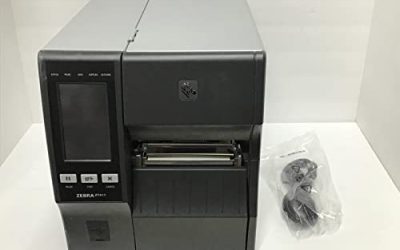
The Zebra ZD421 in its thermal transfer configuration is the pick for stores whose labels have to last. Because it prints both ways, it can run ribbon-based thermal transfer for product and inventory labels that sit in storage, then switch to direct thermal for everyday shipping labels. At 203 dpi and up to 6 inches per second it is quick enough for a busy bench, and Zebra’s desktop line is built for commercial duty cycles rather than occasional home use. It suits a growing store that labels its own products, not just its parcels.
Specs
- Print method: Thermal transfer and direct thermal
- Resolution: 203 x 203 dpi
- Maximum print speed: 6 in/sec
- Maximum media size: 4 inches
- Connectivity: USB and Ethernet
- Model number: ZD4A042-301M00EZ
Best for: Stores printing durable product, barcode and inventory labels alongside shipping labels.
Watch out for: The ZD421 is sold in many near-identical configurations; check the model code before ordering, because 301M00EZ is the thermal transfer version and the direct thermal versions look the same.
ASIN: B09BXKLHK4
Zebra ZD230 Thermal Transfer Printer
The Zebra ZD230 thermal transfer model brings ribbon printing to a smaller bench and a tighter equipment budget. It keeps the essentials a store needs: 203 dpi output, print speeds up to 6 inches per second and a 4.09-inch maximum print width that covers standard 4×6 shipping labels as well as narrower product labels. This listing’s configuration adds Wi-Fi and Bluetooth alongside USB, so the printer does not have to sit next to one specific computer. It is a sensible first step into thermal transfer for a store that has outgrown fading direct thermal product labels.
Specs
- Print method: Thermal transfer
- Resolution: 203 dpi
- Maximum print speed: 6 in/sec (152 mm/sec)
- Maximum print width: 4.09 in (104 mm)
- Connectivity: USB, Wi-Fi and Bluetooth
- Programming language: EZPL
Best for: Smaller stores moving up to ribbon printing for longer-lasting labels.
Watch out for: Other ZD230 listings are USB-only or direct thermal only, so confirm the connectivity and print method on the exact listing before buying.
ASIN: B0CJRX59J1
Rollo Wireless Label Printer X1040
The Rollo Wireless X1040 is built purely for shipping volume. Its direct thermal engine prints at 150 mm/s, roughly one 4×6 label per second, and it accepts any brand of direct thermal label in roll or fanfold form, in widths from 1.57 to 4.1 inches. Wi-Fi with AirPrint covers iPhone, iPad and Mac printing, with USB as a wired fallback, and the listing names compatibility with major shipping platforms and marketplaces including Amazon, Shopify, Etsy and eBay. For a store whose labels are almost all carrier labels, this is the straightforward workhorse.
Specs
- Print method: Direct thermal, no ink, toner or ribbon
- Print speed: 150 mm/s, about one 4×6 label per second
- Resolution: 203 dpi
- Label widths: 1.57 to 4.1 inches, roll or fanfold, any direct thermal brand
- Connectivity: Wi-Fi with AirPrint, and USB
- Model: X1040
Best for: Shipping-focused stores that want fast wireless printing without proprietary labels.
Watch out for: It is direct thermal only, so its labels can fade with heat and sunlight over time; it is the wrong tool for product labels that must stay readable for months.
ASIN: B09VF4Z2WQ
Brother QL-1110NWB

The Brother QL-1110NWB is the direct thermal option for stores that care about fine detail. Its 300 dpi print head renders small barcodes and small text more cleanly than 203 dpi rivals, it prints up to 69 labels per minute, and a built-in automatic cutter trims continuous rolls to length. Brother’s barcode crop function, listed for online sellers, pulls individual barcode labels out of full-page templates, which helps with product labelling. Bluetooth, Wi-Fi, Ethernet and USB are all on board, so it can serve a whole packing area from one spot on the network.
Specs
- Print method: Direct thermal
- Resolution: 300 dpi
- Print speed: Up to 69 labels per minute
- Label width: Up to 4 inches, Brother DK labels and tapes
- Connectivity: Bluetooth, Wi-Fi (802.11b/g/n), Ethernet and USB
- Features: Automatic cutter, barcode crop function for online sellers
- Dimensions: 6.7″D x 8.7″W x 5.9″H
Best for: Stores printing small, detailed product barcodes from a shared networked printer.
Watch out for: It only accepts Brother DK labels and tapes, so your media costs are tied to Brother’s rolls rather than generic stock.
ASIN: B079G51QT9
DYMO LabelWriter 5XL

The DYMO LabelWriter 5XL is aimed squarely at marketplace sellers who print one thing all day: 4×6 shipping labels. It prints them at 300 dpi and uses automatic label recognition, so the software knows which label size and type is loaded without manual setup. DYMO’s listing highlights printing shipping labels directly from Amazon, eBay, Etsy, Poshmark and other selling platforms, which keeps the workflow short for a small team. USB and Ethernet connections cover a single desk or a shared bench. It is a focused machine rather than a flexible one, and that focus is its appeal.
Specs
- Print method: Direct thermal
- Resolution: 300 dpi
- Label size: 4 x 6 inch shipping labels
- Feature: Automatic label recognition
- Connectivity: USB and Ethernet (LAN)
- Model number: 2112554
Best for: Marketplace sellers who print 4×6 carrier labels all day and want minimal setup.
Watch out for: The 5XL only recognises genuine DYMO labels, so third-party rolls will not work; factor DYMO media into your running costs.
ASIN: B08TM6WWDC
Which One Fits Your Situation
You Ship Parcels Every Day but Rarely Label Products
Choose the Rollo Wireless X1040. Almost everything you print is a carrier label that only needs to survive the journey, so direct thermal’s speed and zero ribbon costs work in your favour. It takes any brand of 4×6 label stock, prints about one label per second, and connects over Wi-Fi, which keeps a busy packing bench moving without tying the printer to one computer.
Your Product Labels Sit in Storage for Months
Choose one of the Zebras. A direct thermal product label can fade in a warm stockroom until its barcode will not scan, which creates real problems at picking time. The ZD421 thermal transfer printer is the stronger long-term machine, while the ZD230 covers the same ribbon-based printing in a simpler wireless configuration. Both also handle daily shipping labels, so one printer covers the whole store.
You Sell the Same Items on Several Marketplaces
Look at the DYMO LabelWriter 5XL or the Brother QL-1110NWB. The DYMO prints 4×6 shipping labels directly from platforms such as Amazon, eBay and Etsy with automatic label recognition, which removes setup friction. The Brother adds a barcode crop function aimed at online sellers and 300 dpi detail for product barcodes, plus full network connectivity for a shared workspace.
Your Packing Bench Is Short on Space and Staff
Pick a networked model and place it where the parcels are. The Brother QL-1110NWB has a compact footprint and Bluetooth, Wi-Fi and Ethernet, so several people can print to it without moving seats. The ZD230’s wireless configuration does the same job for ribbon printing. Either way, a shared printer near the packing area beats a faster printer tethered to one person’s desk.
Common Mistakes
- Buying a direct thermal printer for product labels that must stay readable for a year or more, then discovering faded barcodes in storage.
- Ordering the wrong configuration of a printer family; models like the ZD421 and ZD230 come in direct thermal and thermal transfer versions that look identical in photos.
- Ignoring media lock-in, then finding the printer only accepts the manufacturer’s own label rolls at higher ongoing cost.
- Choosing 203 dpi for tiny product barcodes and small print, when 300 dpi would have kept them scannable.
- Forgetting to check that the listing names your selling platforms and operating system, leaving you with a printer your software cannot drive properly.
Frequently Asked Questions
Is thermal transfer worth it for shipping labels?
Usually not on its own. A shipping label only needs to survive a few days of transit, and direct thermal handles that without ribbon costs. Thermal transfer earns its place when the same printer also produces product, barcode or inventory labels that must remain scannable after months in storage, which is why dual-method machines like the ZD421 suit growing stores.
Can one printer handle both shipping labels and product labels?
Yes, if it is a thermal transfer model that also runs direct thermal, like the Zebra ZD421 listed here. You can load a ribbon for durable product labels and switch to plain direct thermal stock for carrier labels. Dedicated direct thermal printers such as the Rollo and DYMO can print both shapes of label, but their product labels will fade sooner.
Do these printers need ink or toner?
No. Direct thermal printers use heat on coated label stock, and thermal transfer printers melt ink from a ribbon onto the label. Neither uses ink cartridges or toner. Your consumables are the labels themselves, plus ribbons if you choose a thermal transfer model, so check media compatibility and ribbon size before ordering supplies.
What label size do online stores print most?
The 4×6 inch label is the standard for major carriers, and every printer in this roundup handles stock at least 4 inches wide. Stores also print smaller barcode, price and product labels, which is where width range and resolution start to matter. If small labels are a big part of your work, favour a 300 dpi model and confirm it accepts the narrower stock you use.