Key takeaways
- Learn how to choose a projector for home theater: throw distance, brightness, resolution, and sound, with five example projectors for different rooms.
A projector turns a plain wall into a screen far larger than any television, but the wrong choice shows up fast: a dim picture in a bright room, a screen that does not fit the wall, or furniture that must move every time you watch. The fix is to measure first and buy second. Throw distance, brightness, and resolution decide almost everything, and each one is easy to check before you order.
This guide walks through those three decisions in plain terms, then shows five example projectors that fit different rooms: a bright living room, a dark theater room, a gaming setup, a first budget buy, and a portable pick for movie nights anywhere.
As an Amazon Associate, we earn from qualifying purchases.
Quick Answer
Measure the wall first, then match the projector to the room. A dark room suits a lower-brightness model with strong contrast, while a bright living room needs more lumens. Short-throw models sit close to the wall; standard models need several feet of space. The five examples below cover a bright living room, a dark theater room, a gaming setup, a first budget buy, and a portable pick.
Epson Home Cinema 2350 4K PRO-UHD Smart Projector

The Epson Home Cinema 2350 is the example for a bright living room. Its listing claims 2,800 lumens of color and white brightness, the highest brightness figure among the five examples here, and it carries HDR10 and HLG support for a wider range of color and detail in bright and dark scenes. The 3-chip 3LCD design gives color brightness equal to white brightness, instead of letting color fall behind.
Android TV is built in, so streaming apps run on the projector itself, and a 10-watt speaker covers casual viewing without extra boxes. The listing calls the picture 4K PRO-UHD, which Epson builds with pixel shifting rather than a native 4K panel, so buyers who want a native 4K panel should look at a true 4K model instead. Low-latency gaming support keeps console play responsive. At 9 pounds, it is a fixed-room projector, not a travel pick.
Specs
| Feature | Detail |
|---|---|
| Resolution | 4K PRO-UHD (pixel-shifted) |
| Brightness | 2,800 lumens (color and white) |
| Display technology | 3-chip 3LCD |
| HDR support | HDR10, HLG |
| Model number | V11HA73020 |
| Value group | Premium |
BenQ HT2060 1080p HDR LED Home Theater Projector

The BenQ HT2060 is the example for a dark theater room, where contrast and color matter more than raw brightness. Its listing claims a 500,000 to 1 contrast ratio with DCI-P3 color coverage and 98 percent Rec.709 coverage, which is the combination that makes dark scenes hold their detail instead of washing out to gray. The LED light source is rated for 20,000 hours in normal use and 30,000 hours in ECO mode, so there is no lamp to swap on a schedule.
One figure needs a careful read. The listing title states 2,200 lumens, while the maker lists 2,300 ANSI lumens for the same model, so treat the brightness as roughly 2,200 lumens and plan the room around that number. The native picture is 1080p, though it accepts a 4K input, and input lag is listed at 16.7 milliseconds at 1080p 60Hz. There is no built-in streaming platform, so a streaming stick is part of the setup. Vertical lens shift, 2D keystone, and 1.3x zoom make placement forgiving.
Specs
| Feature | Detail |
|---|---|
| Resolution | 1920 x 1080 (accepts 4K input) |
| Brightness | 2,200 lumens (listing) |
| Display technology | DLP, 4LED light source |
| Contrast ratio | 500,000 to 1 |
| Color coverage | DCI-P3, 98 percent Rec.709 |
| Input lag | 16.7 ms at 1080p 60Hz |
| Light source life | 20,000 hours (30,000 ECO) |
| Speakers | 5-watt x 2 built-in speakers |
| Connectivity | Dual HDMI 2.0, S/PDIF |
| Value group | Mid-range |
ViewSonic PX701-4K UHD 4K Projector
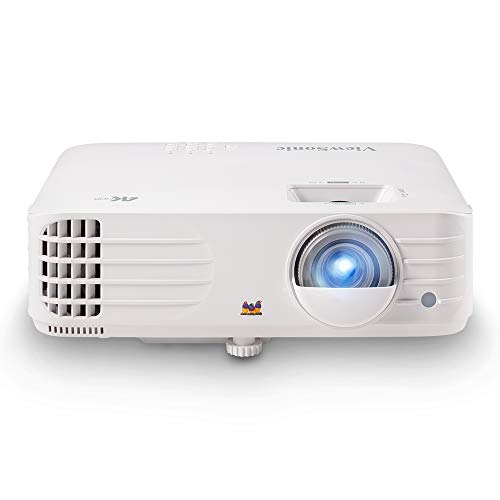
The ViewSonic PX701-4K is the example for buyers who want a true 4K picture and also play games. The listing states a 3840 x 2160 picture with 3,200 ANSI lumens, a 240Hz refresh rate, and 4.2 milliseconds of input lag, the fastest response figure among the five examples here. HDR support is included, auto keystone straightens the image when the projector sits off-center, and the screen can stretch to 300 inches in a large room.
The light source is a DLP lamp rated for 6,000 hours in normal mode and 20,000 hours in economy mode, so the lamp is a consumable to plan for, unlike the LED and laser models in this guide. Dual HDMI ports cover a console and a streaming device at once. The listing shows two UPC values across sources, 766907012408 and 766907007893, so confirm the listing matches model PX701-4K at checkout. A renewed listing circulates under a different code, B08TTQ5Z6G, which is not the new listing recommended here.
Specs
| Feature | Detail |
|---|---|
| Resolution | 3840 x 2160 (4K UHD) |
| Brightness | 3,200 ANSI lumens |
| Display technology | DLP lamp |
| Contrast ratio | 12,000 to 1 |
| Input lag | 4.2 ms |
| Lamp life | 6,000 hours (20,000 economy) |
| Max screen size | 300 inches |
| Weight | 6.2 pounds |
| Value group | Mid-range |
Optoma HD146X Full HD 1080p Home Theater Projector

The Optoma HD146X is the example for a first budget buy. Its listing claims 3,600 lumens, the brightest figure among the budget-friendly examples here, with a 1080p picture and an enhanced gaming mode rated at 16 milliseconds of response time. That combination suits a living room where the lights stay on during the day and a console shares the screen at night.
The weight figure varies across listing excerpts, reading 6.2 pounds in some and 8.2 pounds in others, so plan the shelf or mount for the heavier figure. A price-history record shows a current Amazon listing as of April 2026, the freshest stock signal among the five examples. There is no built-in smart platform in the listing, so a streaming stick or a console supplies the content. The single-chip DLP design keeps the body compact at about 12 inches wide.
Specs
| Feature | Detail |
|---|---|
| Resolution | 1920 x 1080 |
| Brightness | 3,600 lumens |
| Display technology | DLP, single chip |
| Weight | 6.2 pounds (some excerpts read 8.2 pounds) |
| Value group | Budget |
Samsung The Freestyle 2nd Gen Smart Portable Projector
The Samsung Freestyle 2nd Gen is the portable example. It is a small cylinder that throws a 30 to 100 inch picture, with 1080p resolution, a 550-lumen LED light source, and a 100,000 to 1 contrast ratio. Auto focus, auto keystone, and auto leveling straighten the picture on a table or shelf, and the Gaming Hub puts console streaming and apps on one home screen. A 360-degree speaker fills a small room without extra audio gear.
Two limits matter. The Freestyle has no built-in battery, so it needs USB-C power from an outlet or a power bank. The ASIN was confirmed through an ExpertBeacon ASIN page and a retailer mirror showing it in stock and fulfilled by Amazon, not through an explicit amazon.com Product information excerpt, so confirm the listing at checkout. The older first-generation Freestyle, model SP-LSP3BLAXZA, is a different listing and is not the model recommended here.
Specs
| Feature | Detail |
|---|---|
| Resolution | 1920 x 1080 |
| Brightness | 550 lumens |
| Display technology | DLP, LED light source |
| Contrast ratio | 100,000 to 1 |
| Battery | None — needs USB-C power |
| Weight | 1.8 pounds |
| Model number | SP-LFF3CLAXXZA |
| Value group | Mid-range |
How to choose
Start with the wall. Measure the distance to the wall and the picture width you want, then check the throw ratio in the listing. A standard-throw projector needs several feet for a 100-inch picture, a short-throw model needs far less, and an ultra-short-throw model sits almost against the wall. If the room is small, throw distance is the first filter, not brightness.
Next, judge the light. A dark room suits a lower-brightness projector with strong contrast, because deep blacks carry the picture. A living room with windows needs more lumens, and the examples above show the trade: the Epson and Optoma models claim 2,800 and 3,600 lumens for bright rooms, while the BenQ model claims about 2,200 lumens for a dark room. Treat maker brightness figures as rough guides, since measurements often read lower than the headline number.
Then pick the resolution and the light source. A 1080p picture is enough up to about 100 inches at a normal viewing distance, while 4K shows its advantage on larger screens and closer seats. Lamp models cost less up front but need a lamp swap after thousands of hours; LED and laser models run far longer. Finally, check the sound and the smart platform. Built-in speakers suit casual viewing, a soundbar suits a theater room, and a projector without built-in streaming needs a stick or a console.
Who should skip
Skip a projector if the room cannot go dark and the wall faces direct sun, because even a bright projector loses to daylight on a white wall. Skip a standard-throw model if the room is too short for the screen size you want. Skip a lamp projector if you plan to leave it running all day, since lamp hours add up fast. Skip a portable projector if you want a fixed theater setup, because portability trades away brightness and speaker size. Skip any projector whose listing you cannot confirm at checkout, and skip a renewed listing when you want a new unit.
Frequently Asked Questions
How far should a projector sit from the wall?
It depends on the throw ratio and the picture size you want. A standard-throw projector needs several feet for a 100-inch picture, a short-throw model needs far less, and an ultra-short-throw model sits almost against the wall. Measure the room first, then check the throw figures in the listing.
How many lumens do I need for a bright living room?
A bright living room with windows needs more lumens than a dark theater room. The examples here claim 2,800 to 3,600 lumens for bright rooms, while the dark-room example claims about 2,200 lumens. Treat those figures as rough guides, since measurements often read lower.
Is 4K worth it on a projector?
A 4K picture shows its advantage on larger screens and closer seats, where 1080p starts to look soft. On a 100-inch screen at a normal viewing distance, 1080p is enough. If the screen is larger than 120 inches or the seats are close, a 4K model is the safer choice.
Do I need a screen, or can I use a plain wall?
A plain white wall works for a first setup, and it is the cheapest way to start. A screen improves the picture with a smoother surface and better light control, and it is worth adding once the projector choice is settled. A colored or textured wall dulls the picture, so a screen matters more there.
Final verdict
Measure the wall, judge the light, then pick the resolution and light source for the room. The Epson Home Cinema 2350 suits a bright living room, the BenQ HT2060 suits a dark theater room, the ViewSonic PX701-4K suits a 4K gaming setup, the Optoma HD146X is the sensible first budget buy, and the Samsung Freestyle 2nd Gen covers portable movie nights. Whichever fits your room, confirm the model number and the listing at checkout.